We make one of these two products, so read this the way you would read any comparison written by an interested party. What we can do is put the concessions first and source every claim about the other side to a page you can open yourself.
respond.io is aimed at a company. Its pricing page — checked on 21 October 2026 — describes a product with a reach ours does not attempt, and for a lot of businesses that reach is the whole decision.
Start with the part where we lose
On their pricing page, not on ours
What we do instead
That is not a preamble before the real argument. For a company with a support team it is the argument, and if you are that company you can stop reading and go set up respond.io with a clear conscience.
The meter is the actual difference
Everything else here follows from what each pricing page says it counts.
respond.io's, checked on 21 October 2026, counts users first and contacts second. It puts the idea as paying only for the contacts you talk to, and defines an active contact as anyone you interacted with through calls or messages during the billing month. Read the billing toggle before you read the price. The page opens on yearly billing, where Starter is $79 a month with five users, Growth $159 with ten and Advanced $279 with ten; billed month to month the same three are $99, $199 and $349. Enterprise is priced on application. Extra users are listed at $12, $20 and $24 a month. Their compare table lists Growth and Advanced as starting with 1,000 Monthly Active Contacts, with overage at $12 per 100 on Growth and $15 per 100 on Advanced, and AI credits at 5,000 on Starter rising to 10,000, 20,000 and 40,000. Broadcasts, workflows and AI Agents start at Growth. There is a seven-day trial with Growth features for five users and 1,000 contacts, broadcasts excepted, and no card.
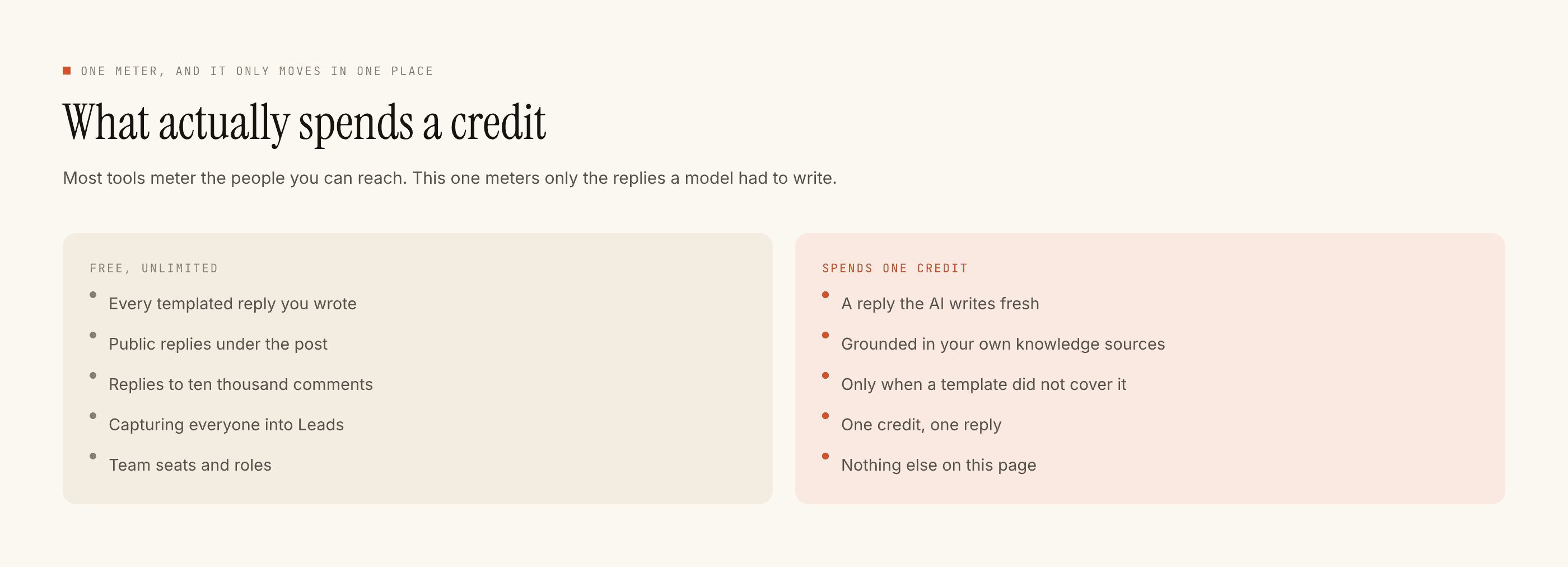
Ours counts one thing, mostly. One credit is one AI-written reply. A comment reply sent from a template you wrote costs nothing, however many people it goes to, on every plan. A templated DM costs nothing too, up to Free's 1,000-every-30-days cap, which Lite removes for $4 a month. Creator at $12 a month adds 3,000 AI replies, the Inbox and the Leads list; Studio at $29 adds 8,000, five accounts and three seats. The free tier is 100 credits with no card, and packs are $3.99 for 1,000 credits, $14.99 for 4,500 and $39.99 for 12,000. Every figure is on our pricing page.
One meter counts the people on your team and the people they spoke to. The other counts the sentences a model had to write.
Where each shape hurts
Neither is a trick. They break in different places, and which one breaks for you is knowable without a spreadsheet.
A seats-and-contacts meter is comfortable when several people answer messages all day across several channels, because the alternative is several tools and no shared history. It is uncomfortable when one person answers one channel, because the floor is a five-user price and the team is you.
A per-reply meter is comfortable when your inbox repeats itself, because repetition is exactly what a free template absorbs. It is uncomfortable when every reply genuinely needs composing from scratch, and it is useless the moment revenue arrives somewhere we cannot see.
Neither of us can change the platform
Both products reach Instagram through Meta's official API, so both live in the same box. You can reply to a DM within 24 hours of that person's last message and to a comment within 7 days. Nobody sells an exemption from that, and a tool implying otherwise is not describing the official API. The whole shape of it is in is Instagram DM automation safe.
What differs inside the box is what a tool refuses to do. Ours runs sixteen checks in a fixed order before anything sends — kill switch, connection, takeover, auto-reply switch, complaint pause, window, dedupe, burst, bot loop, cooldown, quiet hours, account limits, rate budget, free DM cap, credits, content safety — and the first failure stops the send with its reason recorded in Activity, so a reply that did not go out is something you can read rather than a mystery. Out of credits is a refusal like any other, and the fallback is your own template rather than silence.
Decide it in a fortnight, not in a spreadsheet
- 01
Count the people who answer
If the answer is a team, the comparison is already over and respond.io wins it. A real team inbox is the thing we do not sell.
- 02
Count the channels revenue arrives on
If any of them is WhatsApp, email or a phone call, same answer. We can only see Instagram.
- 03
If both answers were small, give us one surface
Comments on Reels, or story replies. One trigger, so nobody gets two answers and you can read every reply we produced.
- 04
Paste in your four most common answers
Templated sends cost nothing, so this covers the bulk of your volume at no running cost and gives the AI fallback something to fall back to.
- 05
Read twenty replies end to end
Would you have sent those? No dashboard answers that question, and it decides the whole thing.
The honest summary is that these two products are aimed at different buyers rather than at each other. respond.io sells a company the ability to answer everyone everywhere with a record of who said what. We sell one person their evenings back on one channel.
If you want the longer list of options rather than a head-to-head, it is in respond.io alternatives, and if the tool you are really weighing us against is ManyChat, start with the ManyChat alternative page. How we source every claim on pages like this one is set out in our methodology.