Somebody types price under your Reel at eleven at night. You see it at nine
the next morning, along with forty others. That gap is the entire market for
Instagram automation, and it is also where most of the bad advice about it
lives.
The word covers four unrelated activities. Only one of them is something a platform-approved tool can do at all, and separating them is the first useful thing anyone can tell you.
The four things people mean by this
- Replying to your own comments and DMs. Somebody engages with your account, a rule reads what they wrote, and a reply goes out. This runs on the official Instagram Graph API with a token you authorise through Meta. This is the one we do.
- Publishing. Scheduling posts and Reels. There is a real API for it and there are real products built on it. We are not one of them — we answer people, we do not publish.
- Engagement farming. Auto-follow, auto-unfollow, auto-like, auto-comment on strangers' posts. There is no API for any of it. Every tool offering it needs your password or your session, and drives the app while pretending to be you.
- Cold outreach at volume. DMing people who never contacted you. The messaging API does not permit it, so tools that do it are back in category three.
Categories one and two are boring, permitted and auditable. Categories three and four are the ones people are thinking of when they ask whether automation is safe.
Everything runs on two clocks
This is the part almost nobody explains before selling you something, and it explains most of what looks like a broken setup.
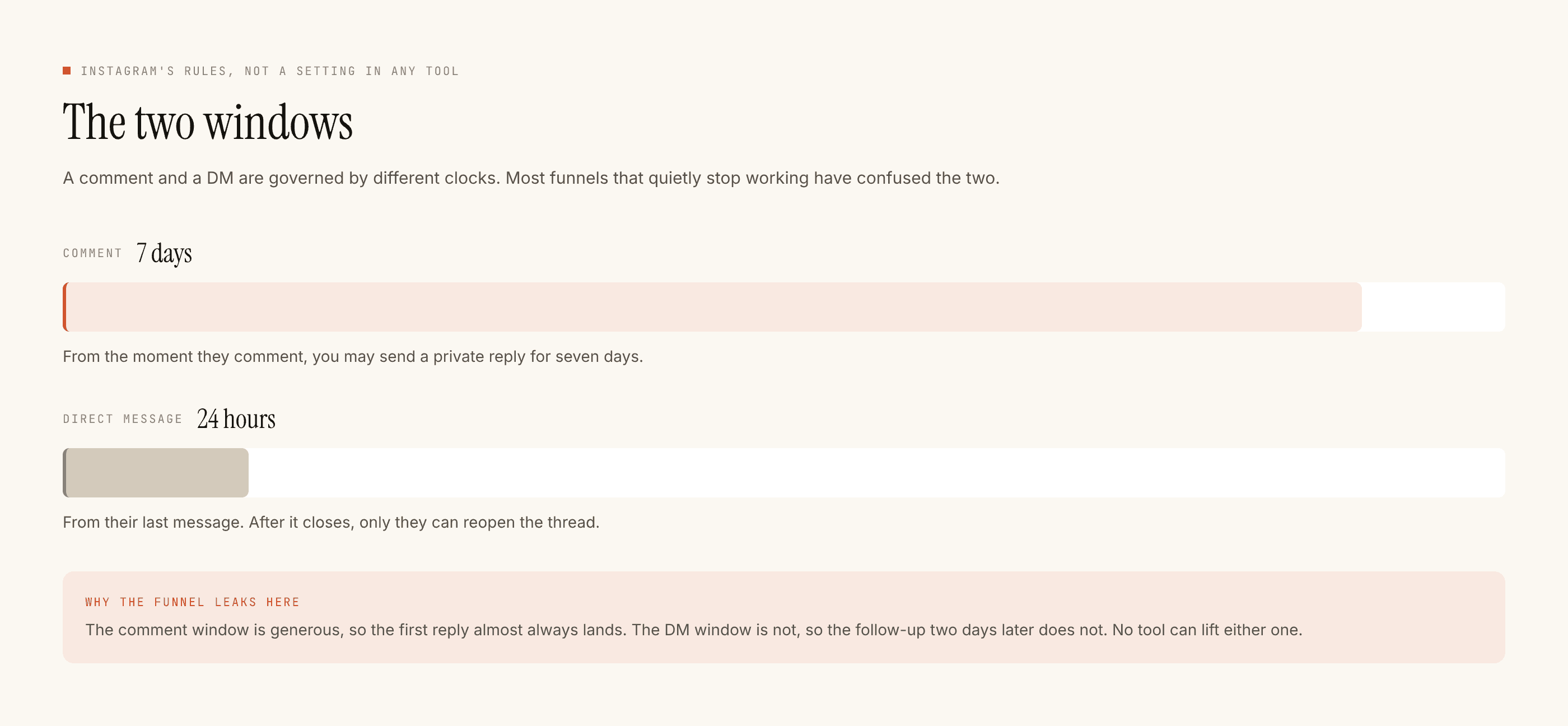
A comment reply lives inside a 7-day window from the comment itself. After that the API will not accept a reply to that comment, and no tool can change it.
A direct message lives inside a 24-hour window measured from that person's last message to you. Not from your last message. Not from when they followed you. Their message starts the clock, and their next one restarts it. This is why a "nurture sequence" that drips messages over five days is not a thing a compliant Instagram tool can offer: on day two the window is shut.
On a post you published this morning, neither clock is a problem. On a post from a fortnight ago, one of them is, and the symptom is silence rather than an error.
What actually puts an account at risk
Not the existence of a rule. Four specific behaviours, and all four are things a tool can either do or refuse to do on your behalf:
- Messaging people who never messaged you.
- Sending the same string to everyone, forever, so the account reads as a vending machine.
- Hammering a retry when the platform said no, rather than recording the refusal and stopping.
- Volume with no upper bound, on an account with no history of that volume.
A tool built on the Graph API cannot do the first one at all. The other three are design decisions, and the way you check whether a tool made them is to ask what it does when a send is refused. If the answer is a red dot and nothing else, that is not a safety story.
Every check, in a fixed order
Every outbound reply passes through the same gate before anything is drafted. The order is fixed and the first check to fail stops the send.
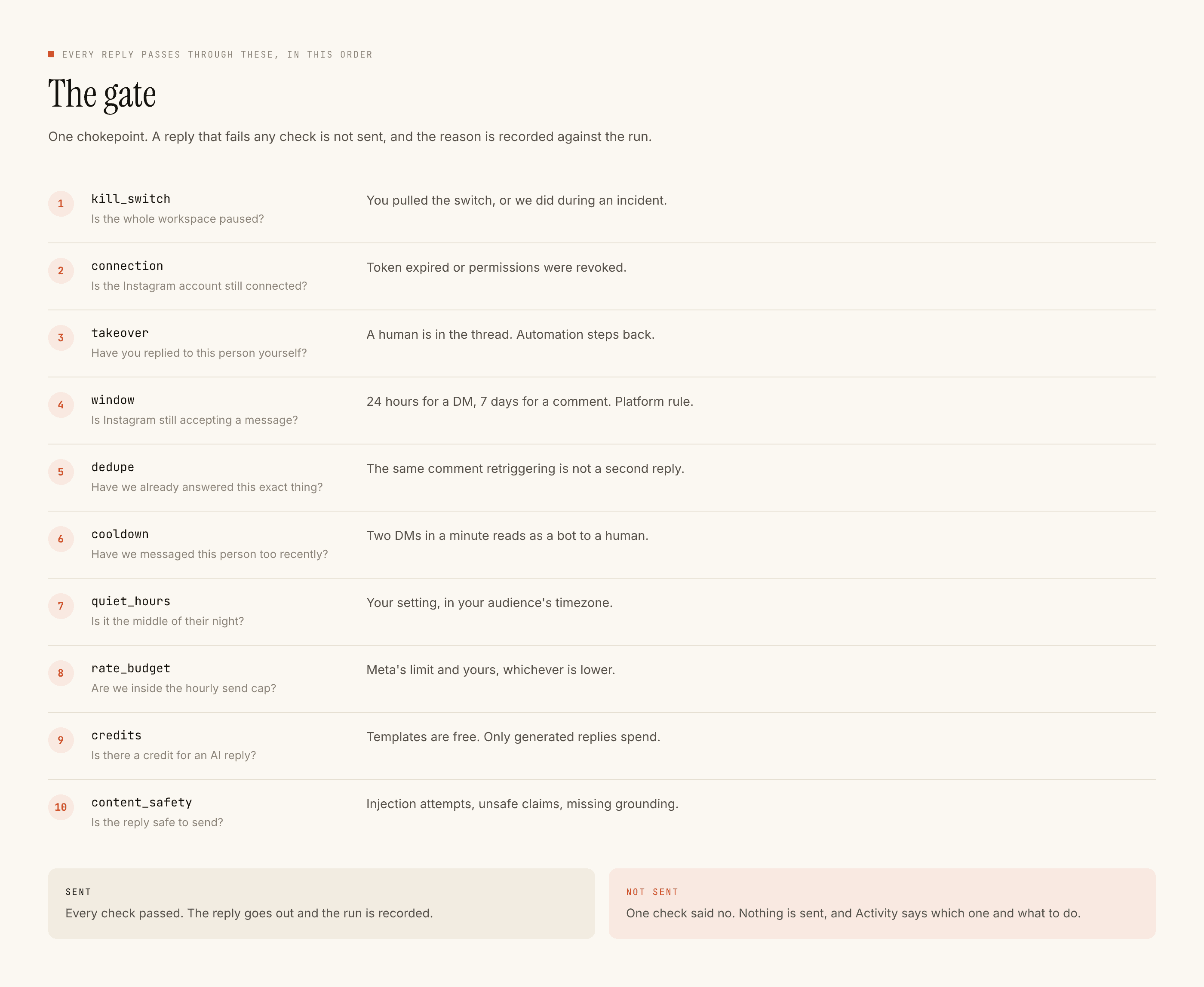
Our own kill_switch (not a customer control — it is how we pause while we
look into something), connection, takeover, auto_reply_off,
complaint_pause, window, dedupe, burst, bot_loop, cooldown,
quiet_hours, account_rate_limit, rate_budget, free_dm_cap,
credits, content_safety.
Three of those are worth reading twice.
takeover stands the automation down in a thread the moment you click
Take over on it in the Inbox. It is a gate check rather than a setting, which
means you cannot accidentally leave it off, and it is the thing that stops a
customer receiving a template thirty seconds after you personally answered
them from there. Replying in the Instagram app does not pause it.
dedupe exists because Instagram redelivers events. The same comment can
arrive twice. Without a dedupe key, that is two replies to one person.
window is the two clocks above, enforced rather than hoped about.
Every refusal is written into Activity with the name of the check that stopped it and a sentence saying what would change it. A blocked list is not a bug list — most of it is the platform's rules working correctly, and reading it once a week is how you find the one entry that is actually your fault.
Building one, end to end
The builder asks for the same things in the same order every time, top to bottom. There is an optional step for asking the person for an email, phone or first name after the DM.
- When this happens. Comments on a post, and which post: any post, one chosen post, or posts you pick. Scope to specific posts unless you genuinely mean the whole account.
- Only if. The words that should trigger it. Keywords match any of them, where one match fires the rule, or all of them, where every listed word must appear. Any is right nearly always. The same step takes the words that should stop it,
not interestedbeing the one everyone needs and nobody thinks of on the first pass, plus Only the first time somebody triggers this and an optional time window. - Then do this. Reply to the comment is the public reply: a short line under the post. It is a receipt, not the answer — it tells that person to check their DMs and tells the next hundred scrollers that commenting gets a response. "DM kar diya 📩" beats a paragraph.
- Send a private reply. The actual answer, in the inbox, subject to the 24-hour clock.
- Name it and go live. Tick Treat people who trigger this as leads and somebody who asked a question is saved to Leads, which is worth having even when the reply was unremarkable. It is off by default.
Keyword matching ignores case and punctuation, so PRICE? and price are
the same string to the matcher. What it does not do is guess. It does not know
that pricing is a form of price, and it will not infer that "how much??" is
a price question. If you want those matched, you list them.
The trigger word also has to exist somewhere a human will read it. "Comment SIZE and I will send the chart" is the highest-leverage sentence in the whole setup and it lives in your caption, not in the builder.
Try it, and the preview beside the builder
The live preview beside the builder lets you type a pretend comment and shows whether the rule would fire, plus the public reply and the DM exactly as they would look. It does not replay comments you already received; it tests the rule, not the past, so type in a few real ones from the post.
On the automation's page, press Test it and use Try it: type what somebody might write and it shows the replies as they would go out, with every check run against the live account. Nothing is sent. To read it for tone rather than correctness, comment the keyword from a second Instagram account and receive the real thing.
Then Go live, on one post. Not the account. One post, for a few days, until its blocked list looks boring.
A rule you can describe in one sentence is a rule you can debug at nine on a Monday morning.
What this does not do
We reply to people. We do not create posts. There is no caption generator, no hashtag tool, no content calendar, no scheduling or publishing, no follower growth feature and no analytics product. There is no WhatsApp, Messenger or Telegram. There is no flow-builder canvas, no broadcast and no multi-step nurture sequence — the last of those is the 24-hour window again, not a missing feature. Leads leave as CSV; there are no one-click CRM integrations.
If that list rules us out, it is better to know now than after connecting an account. The roadmap says which of them are decisions rather than gaps.
What it costs, in shape rather than in numbers
A templated reply — one you wrote yourself — is free and unlimited. Comment replies stay uncapped on every plan; DMs on Free are capped at 1,000 every rolling 30 days, gone on Lite and up. A credit is spent only when the AI writes something new for a specific message, and that is one credit for one reply. Nothing is metered per contact, per follower or per conversation, so a post that does unusually well does not produce a larger invoice.
The free tier is 100 credits and no card. Credit packs are $3.99 for 1,000 credits, $14.99 for 4,500 and $39.99 for 12,000 (₹299, ₹1,099 and ₹2,999 in India). The credits page is the exact accounting of what spends one.
Where to go from here
If you are building a comment rule today, the comment automation guide is this page's build section at full depth. If the DM side is what you need, the 24-hour clock behaves differently enough to deserve its own guide. And if you want to know what changes when the model writes the reply instead of you, that is here.
For the argument rather than the instructions, the honest version of the safety question and what ban risk actually is are the two worth your time. If you are choosing between tools, the comparisons name who each one is genuinely better for.