Answering
Comment automations. A trigger — one post or a set of them, plus keywords matched any-of or all-of — a public reply under the comment, and a private reply in the inbox. Negative keywords stop a rule that would otherwise fire. Matching ignores case and punctuation.
DM automations. The same shape, on messages sent to you, inside the window Instagram allows.
Comment to DM. The public reply is a receipt; the private message carries the answer. One rule handles both, because they are two halves of one action rather than two automations to keep in sync.
Try It. Type a message yourself in the builder and see whether the rule would fire, on which keyword, and exactly what would go out. Nothing is sent and nothing is recorded. Test on myself does the real thing to your own account before anyone else sees it.
Deciding
Ten checks run before a word is drafted, in a fixed order, and any one of them can stop the send: kill switch, connection health, human takeover, the messaging window, dedupe, per-person cooldown, quiet hours, rate budget, credits, content safety.
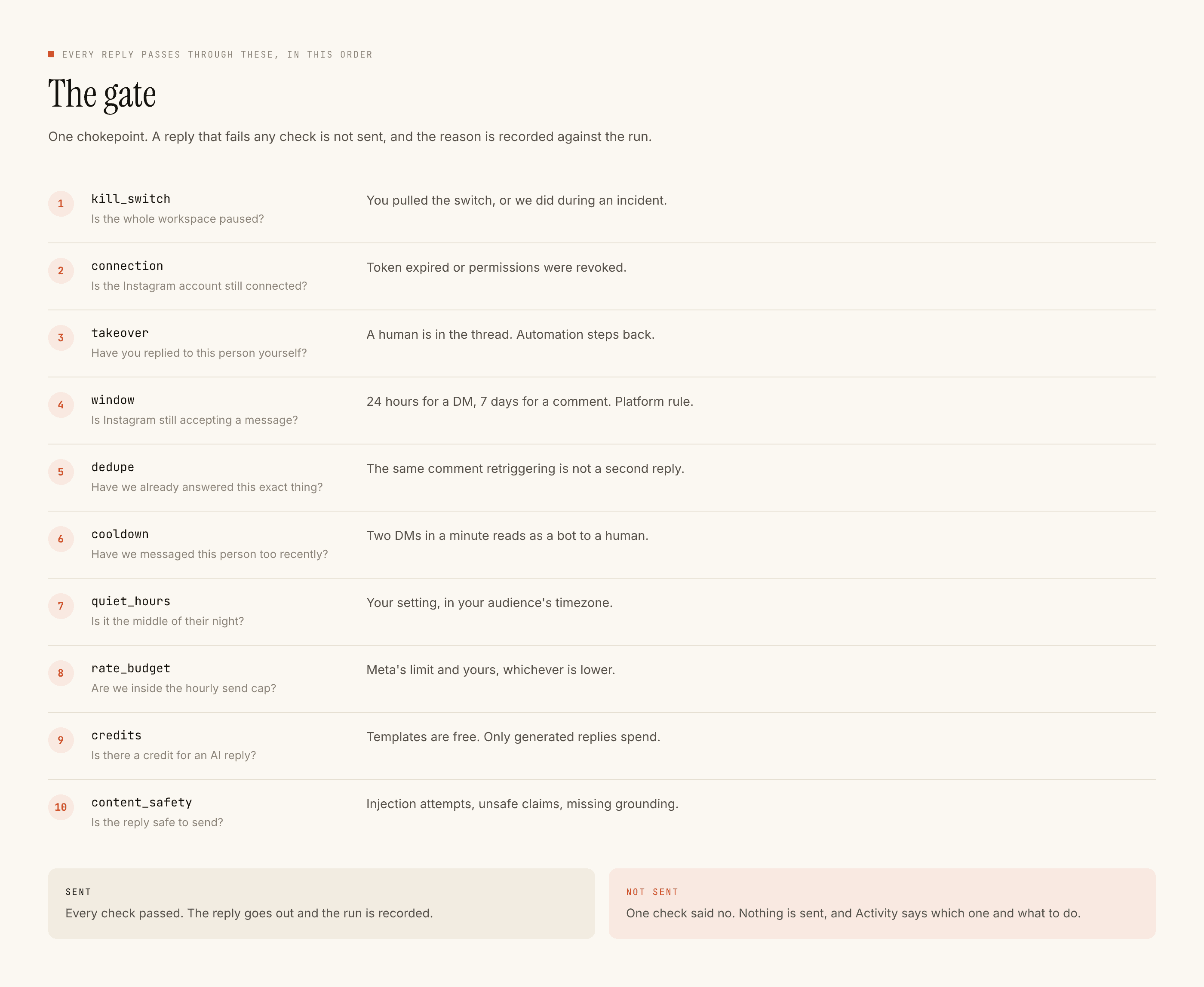
Takeover is worth calling out. The moment you reply to a thread by hand, the automation stands down in it. It is a gate check rather than a setting, which is what makes "the tool never talks over me" a guarantee instead of an intention.
Sounding like you
Voice DNA is built from replies you actually wrote, not from a tone picker. Voice rules sit beside it for things you want stated rather than inferred — words you never use, the sign-off you always use.
Knowledge holds the facts a reply should be grounded in: your prices, your timings, your policies. A generated reply that cannot be grounded falls back to your written template. The guide on AI replies walks through setting this up.
Contact memory means a returning person is not asked something they already told you.
Seeing what happened
Activity lists every run — what fired, what went out, and what was refused with the reason. The blocked view is the same list filtered to refusals, each row naming the check that stopped it and what to do about it.
The inbox is the conversation view, with takeover and the window clock on each thread. Leads captures whoever triggered an automation with their handle, their exact words, the post it came from and the time, and exports as CSV.
Your name on your links
Branded links puts your own domain on every link an automation sends:
yourbrand.com/l/… instead of postengage.ai/l/…, with HTTPS issued and
renewed for you. It comes with link insights: taps per day and hour,
device, the app a link opened in, country, and which link and rule did best.
Instagram's own link-preview fetches are filtered out of every count, on every
plan. Included in Studio, or $7 a month as an add-on;
the setup guide takes two DNS records.
Running it with other people
Named seats with roles, on the plans that include them. Administrative actions are written to an append-only record. Impersonation by our own staff requires a reason and leaves a trail — the security page sets out how.
Your data
Export everything held about a person as a file. Erasure walks a fixed list of tables in a fixed order, and it is the same list that drives the export, so what you can download and what gets deleted cannot drift apart. Details on the privacy page.
What it does not do
The important half.
Not built
Why
Also not built
Why
If your setup depends on any of those, another tool is the better buy and the comparison pages name which one, on each page, specifically.
The platform limits you inherit
Not ours, and no tool can remove them.
A professional Instagram account connected to a Facebook Page is required. A comment can be replied to for seven days. A DM can be sent only within twenty-four hours of that person's last message, and only they can restart that clock. We can act on your account and nobody else's.
What the two windows mean in practice is worth reading before you build anything, because almost every "why didn't it send" question turns out to be one of them.
Where to start
The comment automation guide builds a working rule in about ten minutes, and the pricing page explains what any of it costs — which for a template-only setup is nothing.