Guide · 6 min read
What to check before you migrate an Instagram setup off ManyChat
On this page
Nobody switches because a comparison table told them to. They switch because something specific broke. This is the audit that tells you whether moving fixes your version of that, and the parts of your setup that will not be coming with you.
People do not leave a tool because a listicle ranked another one first. They leave because something specific broke, and then they go looking for a place where that specific thing does not break.
So the useful version of this page is not a ranking. It is an audit: name what broke, check whether it is fixed on the other side, and find out early which parts of your setup are simply not coming with you.
First, name the thing that broke
Four reasons show up in our inbox, and they do not have the same answer.
- The bill grew with your audience rather than your usage. Contact-based metering means a viral Reel is an invoice. This is a metering-shape problem and moving genuinely fixes it.
- You are paying for channels you do not use. You run Instagram, and you are on a plan built for four platforms. Moving to an Instagram-only tool fixes this, and costs you those platforms permanently.
- The flows got too complicated to reason about. A canvas with nineteen branches that nobody dares edit. Moving to a simpler model fixes this only if the complexity was accidental. If your business genuinely needs branching, you need a canvas.
- You could not tell why a message did or did not send. This is a diagnosability problem, and it is the one worth switching over.
If your reason is not on that list, write it down in a sentence before going further. A migration undertaken for a vague reason ends with two subscriptions.
What ManyChat does that we do not
This part first, because everything after it is wasted if one of these is load-bearing for you.
Those are five real capabilities and ManyChat has them. If your Instagram automation is the small half of a setup whose other half is WhatsApp, moving here splits your operation across two tools and you will spend the saving on the friction.
Also missing: one-click integrations. Leads leave as CSV and that is the only door out. If a Zapier hop is currently gluing your funnel together, that glue does not exist here.
What actually rebuilds
The core Instagram pattern moves cleanly, because it is the same pattern everywhere: somebody comments a word, they get a public reply and a DM.
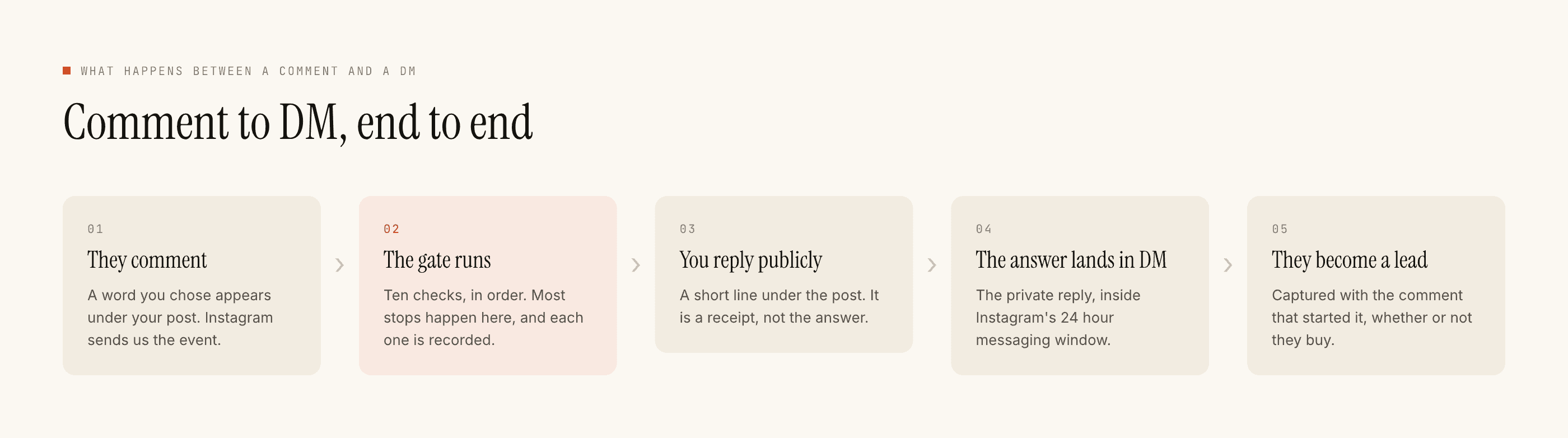
Rebuilding one rule means: the post, the keywords, the negative keywords, the public reply, the private reply, capture to Leads. The comment guide walks each field, and if you are moving inbound DM rules too, the DM guide covers what changes once the twenty-four hour clock is involved.
What does not survive the copy-paste is everything that was holding state: tags, custom fields, saved audiences, anything a flow was branching on. Those were built on a contact database, and there is not one here.
The contacts you cannot bring, and why
This is the part that surprises people on day one. Your old tool has a list of everyone who ever triggered a flow, and it feels like an asset you are carrying across. You are not, and neither would any other tool on the official API.
The reason is the twenty-four hour window. You may reply to somebody for a day after their most recent message to you, and almost every name on that old list last spoke to you weeks ago. They are not lost contacts; they are closed conversations, and no product can reopen them by importing a CSV. The only thing that reopens one is the person writing to you again.
So plan the migration around new conversations rather than old ones. Export the old list for your records, keep it wherever you keep customer data, and accept that its value is as a reference rather than as an audience you can message on arrival.
The metering difference, since that is usually the reason
Worth understanding as a shape rather than as a number.
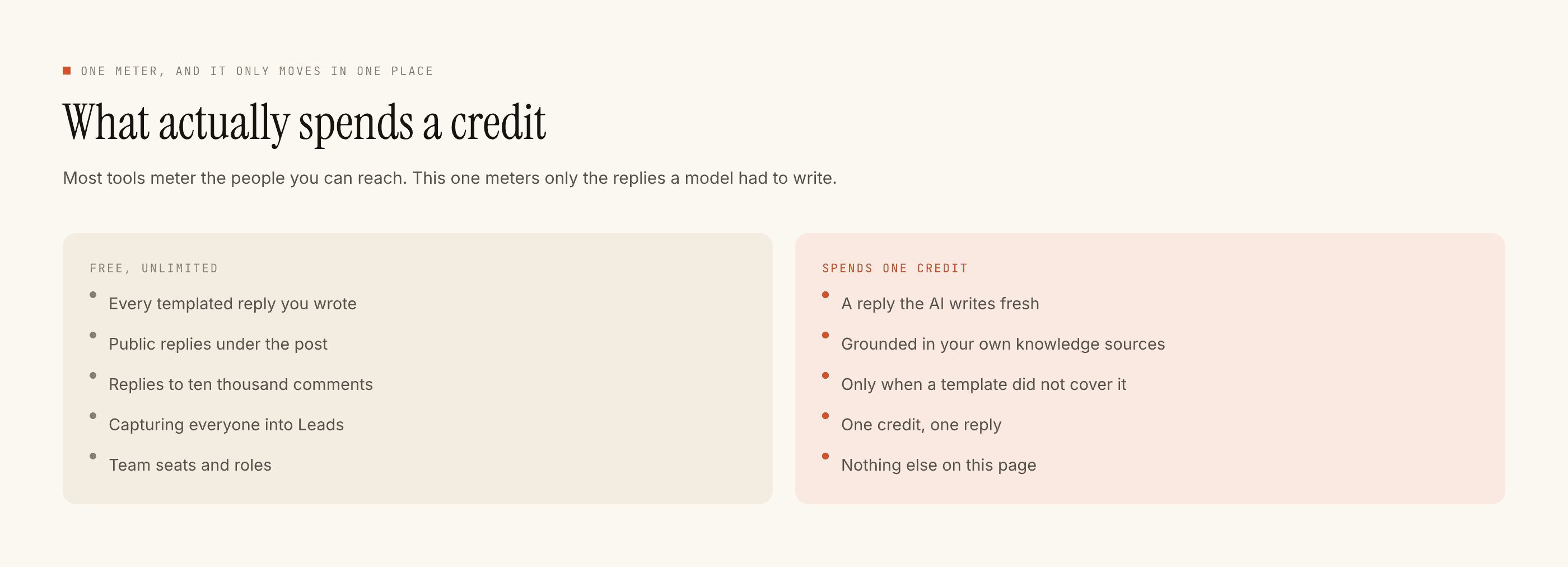
One credit, one AI-written reply. Templated replies — the ones you wrote yourself in the builder — are free and unlimited, however often they fire. The free tier is 100 credits, no card, and packs start at ₹499.
The practical consequence is that a post going unexpectedly wide does not change what you owe, unless you specifically asked the AI to write for every commenter. Whether that arithmetic beats your current bill depends on your numbers, and current prices for both sides, with the date they were checked, live on the comparison pages rather than on this one — a price quoted without a date is a price that will be wrong by the time you read it. How we check anything we say about another product is written down too.
The migration, in the order that avoids double-sending
- Inventory what is live. Open the old tool and list every automation that fired in the last month. Most people find the list is shorter than they expected and that two rules do almost all the work.
- Sort into three piles. Rebuilds directly. Does not exist here. Needs a different plan entirely — which for broadcasts and sequences usually means email.
- Rebuild the top rule only. Point it at a post the old tool is not watching, so one comment cannot be answered by both. Two tools replying to the same comment is the one genuinely bad outcome of a sloppy migration.
- Test on myself. The full pipeline runs and the result arrives in your own account, so you see what would have gone out before anyone else does.
- Go live and read Activity for a week. Every refused reply names the check that stopped it —
kill_switch,connection,takeover,window,dedupe,cooldown,quiet_hours,rate_budget,credits,content_safety, in that order. If you switched for diagnosability, this is the week you find out whether it worked. - Move the rest, then cancel. Not before. A cancelled subscription is difficult to un-cancel at the same price.
Two tools answering the same comment is the only genuinely bad outcome of a migration. Everything else is an afternoon.
Before you cancel anything
Check four things. That every automation you listed has been rebuilt or deliberately abandoned. That your leads from the old tool have been exported while you still have access. That nothing downstream — a spreadsheet, an email tool — was being fed by an integration that is about to stop. And that a week has passed with the new setup running and the blocked list looking boring.
If step one of that list turns up a WhatsApp broadcast you forgot you were sending, that is the audit doing its job. Stay where you are.
If you are still deciding
The four reasons people leave, worked through separately is the better read when you have not yet named your own, and the version specifically about a bill that outgrew the use covers the metering argument in more detail than fits here.
Whichever way it goes, do the inventory first. It takes twenty minutes and it is the only part of a migration you cannot do badly and recover from later.
Questions people ask
Can I import my ManyChat flows and contacts?
No, and treat any tool that claims otherwise with suspicion. Flows do not have a common export format, and Instagram conversations belong to Instagram rather than to whichever tool was reading them. A migration means rebuilding rules by hand, which is usually a few hours for a setup of any normal size.
What does ManyChat do that PostEngage does not?
WhatsApp, Messenger and Telegram, none of which we ship. A visual flow-builder canvas with branching. Broadcasts to a saved audience. Multi-step nurture sequences. If your setup depends on any of those, moving here is a downgrade and you should not do it.
Will my automations keep running during the switch?
Yes, if you overlap deliberately. Rebuild one rule here while the old one is still live, but scope the new one to a post the old tool is not watching, so the same comment cannot be answered twice. Cancel only after a full week of clean Activity on the new side.
How do the costs compare?
They are metered differently, which matters more than any single figure. We charge one credit per AI-written reply, with templated replies free and unlimited, and nothing metered per contact or per follower. Prices with the date they were checked live on the comparison pages rather than here.