Guide · 6 min read
How to find the people with a deadline before the window closes on them
A hot lead on Instagram is not a score. It is somebody who told you what they want and when they want it, inside a conversation that expires. This guide is about catching those and answering them first.
Open an actual DM thread and list what is in it. The words they typed. When they typed them. Which of your automations first caught them. Whether they have said anything since.
That is close to everything. It is a short list, and the shortness explains most of what goes wrong when people talk about hot-lead detection, because a product claiming to know more than that is either inferring or guessing, and those two words are not synonyms.
A definition that can be wrong
"Hot lead" usually means "someone we have a good feeling about", which is fine in conversation and useless in a system: a term that cannot be wrong cannot be improved.
The version that holds up on Instagram has two clauses:
- They named a specific thing. Not "love this", not "info?" — a product, a date, a size, a package. Specificity is the cheapest signal there is and it is written in plain text.
- There is a deadline. Sometimes they say it: "shaadi hai next month". Sometimes the platform supplies it, because their message started a twenty-four hour clock and after that you cannot reply at all.
That second clause is the one Instagram adds and a CRM does not. On this platform heat expires whether or not the person cools off, because the messaging window closes on its own schedule. Somebody who was ready to buy on Tuesday is unreachable on Thursday, not because they lost interest but because you no longer have permission to send.
Heat expires here for a reason that has nothing to do with the customer. The window closes on its own.
If you want the argument for that definition worked through properly, it has its own post.
What you can actually build
There is no intent classifier in this product and no lead score. What there is: keyword triggers, capture to Leads, and a person reading an inbox. That combination handles more than it sounds like it does, as long as you set it up deliberately.
The move is to stop treating all triggers as one pile. Split your keywords into two groups.
Answer automatically
Route to a human
Build the second group as its own automation, with its own keyword list — price, kitna, book, available, bulk, order — and a public reply that acknowledges without committing. The private reply should do two things: confirm you saw it, and set a time. "Ek min, checking — 10 min mein exact price bhej deti hoon" is a better hot-lead reply than a pricing table, because a pricing table ends the conversation and a promise keeps the window open.
Build the keyword list from your own inbox, not from a list
The temptation is to copy a list of high-intent trigger words from an article. Do not. Scroll back through the last two hundred messages you received and write down the actual phrasings people used on you, because they are specific to what you sell and to where your customers are from.
A jewellery account gets "customise ho jayega?". A tuition centre gets "batch kab start hoga". A photographer gets a date before anything else — "23rd free hai?" — and no generic list contains that. Matching ignores case and punctuation, so you do not need variants for capitalisation, but you do need the words themselves, because the matcher does not infer: price will not catch pricing, and book will not catch booking.
Add negative keywords in the same pass. "Not interested", "just asking", and anything that means somebody is admiring rather than buying. A high-intent rule that fires on compliments trains you to ignore the queue it produces, which defeats the whole exercise.
Capture, so you can find them again
Leave capture to Leads on for every automation, and especially for the high-intent one. A conversation you handled well and never recorded is a conversation you cannot follow up.
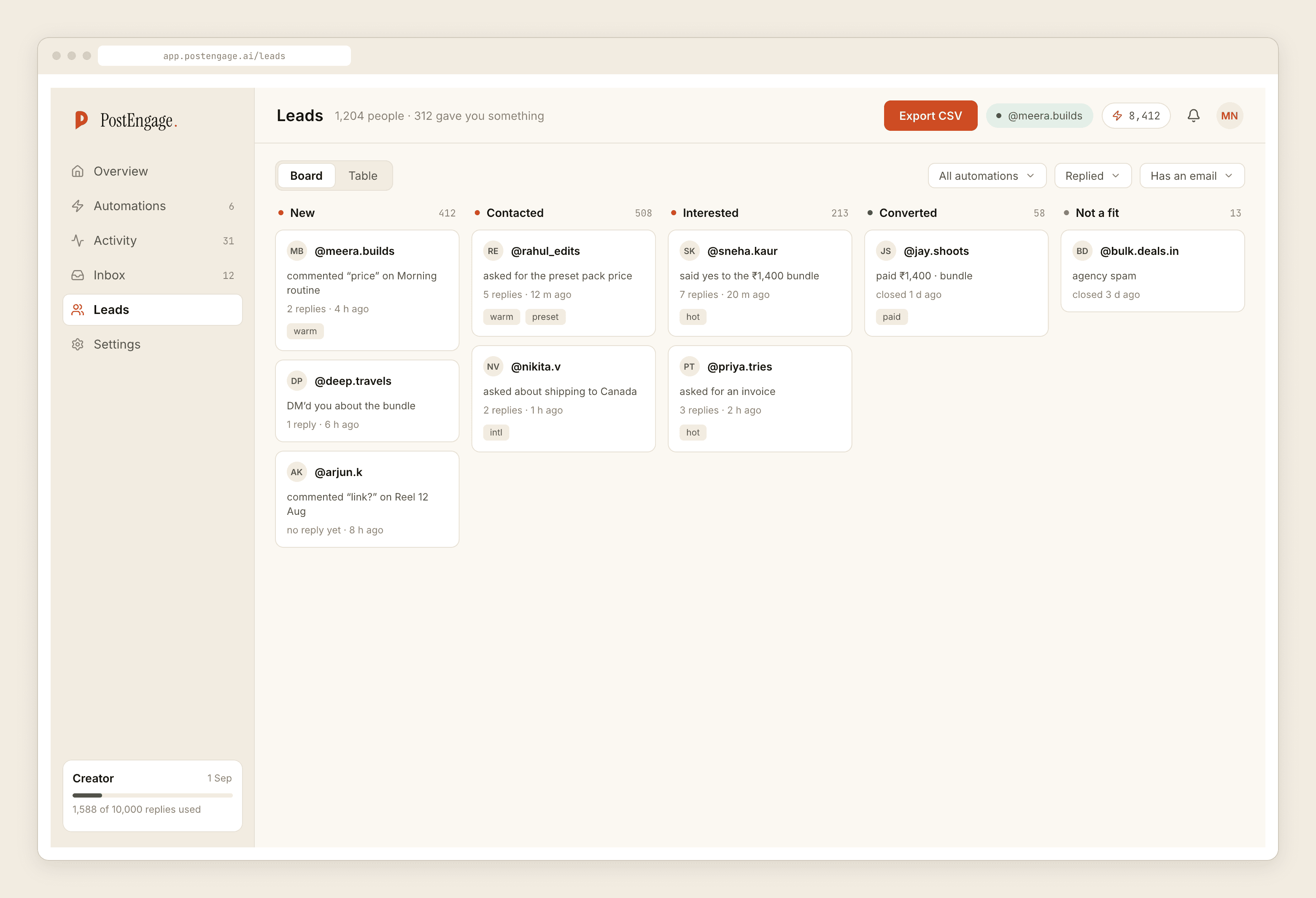
The Leads list is most useful when you filter it to the high-intent automation and treat what is left as a to-do list for the day. That is a much lower-tech idea than "AI lead detection" and it works, because the sorting was done at capture time by a keyword you chose, rather than afterwards by a model guessing at intent.
What a lead record actually holds
Worth knowing exactly, because people assume either much more or much less.
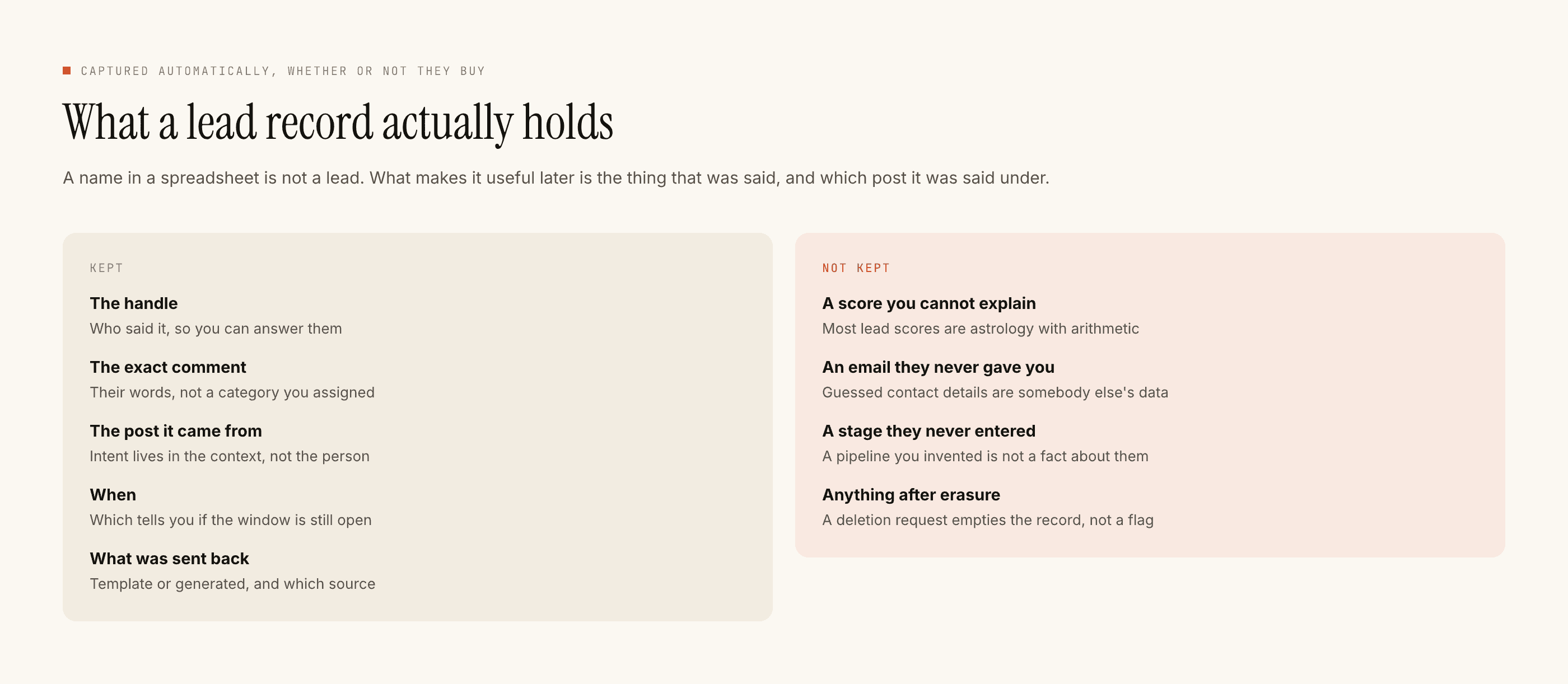
It holds what the conversation contained and the automation that caught it. There is no enrichment, no third-party append, and no scoring column. If a field is in the record, somebody typed it into Instagram.
Leads leave as CSV. There are no one-click integrations, so if your follow-up lives in a spreadsheet, a CRM or somebody's email, the export is the path. That is a real limitation and it is better stated plainly than discovered later; how the data is handled while it is here is written down separately.
The part that is still your job
Speed is the lever, and not because of anything mystical about response times. It is because the window is finite and shared attention is not. A person who asked a price at 9pm and got an answer at 9pm is still in the conversation. The same person at 9pm the next day is in a different mood and possibly outside the clock.
So the honest operating rule is: automate the questions you can answer in your sleep, and use the time that frees up to answer the ones with money attached yourself. Takeover exists precisely for this — the moment you reply by hand, the automation stands down in that thread and does not come back.
What to do next
Build the split. One automation for the predictable questions, one for the ones with a deadline in them, both capturing to Leads, both tested on yourself before they go live. The comment guide covers every field in the builder if you have not built one yet.
Then, once it is running, read the inventory of what a thread actually contains before you buy anything that promises to score it for you. Knowing what signal exists is what makes you hard to sell to.
Questions people ask
What counts as a hot lead on Instagram?
Two clauses, both checkable: the person named a specific thing they want, and there is some deadline attached, whether stated or implied by the platform itself. "How much for the blue one, need it by Friday" qualifies. "Nice post" does not, however many followers they have.
Does the product score leads automatically?
No. There is no scoring model, no intent classifier and no analytics product here. What exists is keyword routing you define, a Leads record for every captured conversation, and a CSV export. Anyone selling you a number should be asked what it is computed from.
How do I stop a hot lead being answered by a template?
Give the high-intent keywords their own automation with a short reply that buys time and says a person is coming, then answer it yourself. Takeover stands the automation down in that thread the moment you type, so there is no risk of a template arriving after your real answer.
Where do captured leads go?
Into the Leads view, with the trigger that caught them, the message that matched, and the conversation they came from. They leave as CSV. There are no one-click CRM integrations here, so an export is how the list reaches anything else you use.