Comparison · 5 min read
ManyChat Getting Expensive? Read the Meter Before You Migrate
People do not usually notice the price. They notice the slope. The invoice was fine in March, mildly annoying in July, and in November it is a line item somebody asks about in a meeting. Nothing changed on the pricing page. What changed is the number being multiplied.
This is worth understanding before you migrate, because if you move to another tool with the same meter you will have the same conversation next year with a different logo on the invoice.
The slope comes from the unit, not the rate
Most of this category has historically metered on contacts: distinct people your automation has spoken to at least once. We are deliberately not quoting anyone's current rate here, because vendors change them and a wrong number in an article is worse than no number. The rate is not the interesting part anyway.
Here is the shape, with round numbers.
You run a small store. Around 400 comments a month deserve a reply.
| Month | Contacts on the meter | Actually still talking to you |
|---|---|---|
| 1 | 400 | 400 |
| 4 | 1,600 | maybe 200 |
| 12 | 4,800 | maybe 250 |
By month twelve you are paying for 4,800 people. Most bought nothing. Several asked one question in March and never came back. All of them are on the invoice, and none of them are receiving anything.
The bill is indexed to reach. Revenue is indexed to conversion. Per-contact pricing quietly assumes those are one number.
Then a Reel travels. Eleven thousand people comment in three days, and your permanent floor moves up by eleven thousand. That is the month people start searching for alternatives.
Two cases where switching is the wrong move
We would rather say this than have you migrate and regret it.
You use the multi-channel part. If WhatsApp or Messenger flows are carrying real revenue, the contact bill is buying you something. We do not do WhatsApp at all. Moving to us would mean rebuilding that elsewhere, and the total cost goes up, not down.
The bill is genuinely small relative to what it earns. If the automation books appointments worth many times its cost, the slope is unpleasant but the ratio is fine. Migration costs a fortnight of attention. Spend that fortnight on something with a worse ratio.
What the other meter looks like
The alternative is charging for work performed. A reply sent costs something. A contact who is not being sent anything costs nothing, so a quiet month is a cheap month and a dormant audience is free to keep.
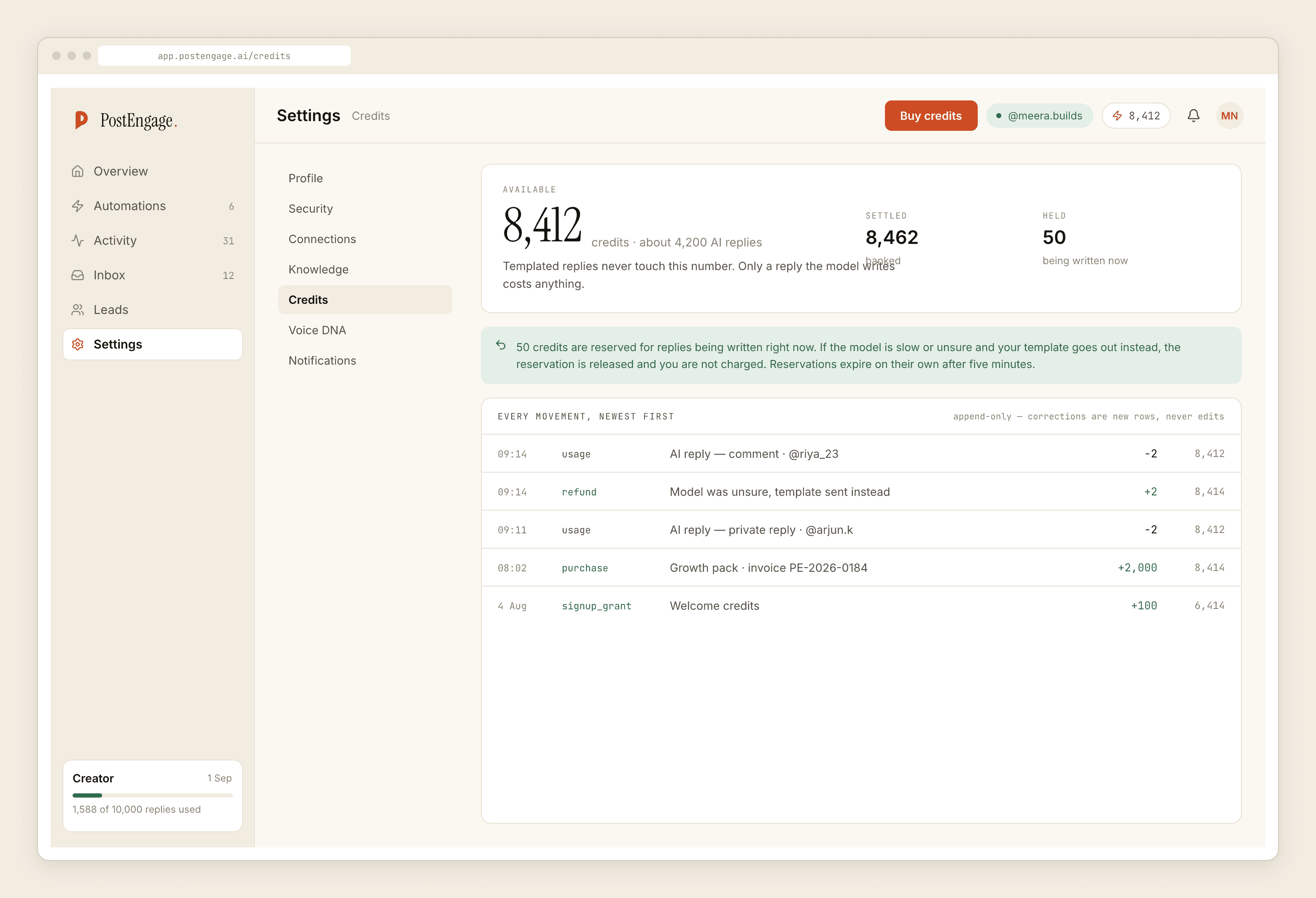
That model has its own failure case, and it is worth naming: if every reply requires a model to write it from scratch, per-reply pricing becomes expensive fast. Which is why the split has to be real.
What should be free
What is worth paying for
Our free tier is 100 credits with no card, and packs start at ₹499. Templated replies never touch credits at all. For most accounts that means the viral week is loud but not expensive, because a viral week is overwhelmingly the same four questions repeated.
Before you migrate, do the boring measurement
Most people estimate their volume wrong in both directions. An hour of counting beats a month of guessing.
- 01
Count real replies for two weeks
Not contacts. Replies your automation actually sent. Multiply by 26. That is your annual send volume, and it is usually lower than people expect.
- 02
Sort them into buckets
Group the replies by what was being asked. Most accounts find four or five buckets covering the large majority. Those buckets are your templates, and templated sends are free with us.
- 03
Price the remainder
Whatever falls outside the buckets is the part that needs generating. That, and only that, is what a per-reply meter charges you for.
- 04
Run both tools for two weeks
Do not switch anything off. Point the new one at a single account and one surface, read every reply it produced, and compare against what your existing setup sent that day.
- 05
Export before you cancel
Templates, keyword lists, and your record of who said what. Get them out while the account is still live, not after.
The checks matter more when a post travels
The month the bill spikes is usually also the month the automation was under the most pressure, and cost is only half of what goes wrong then.
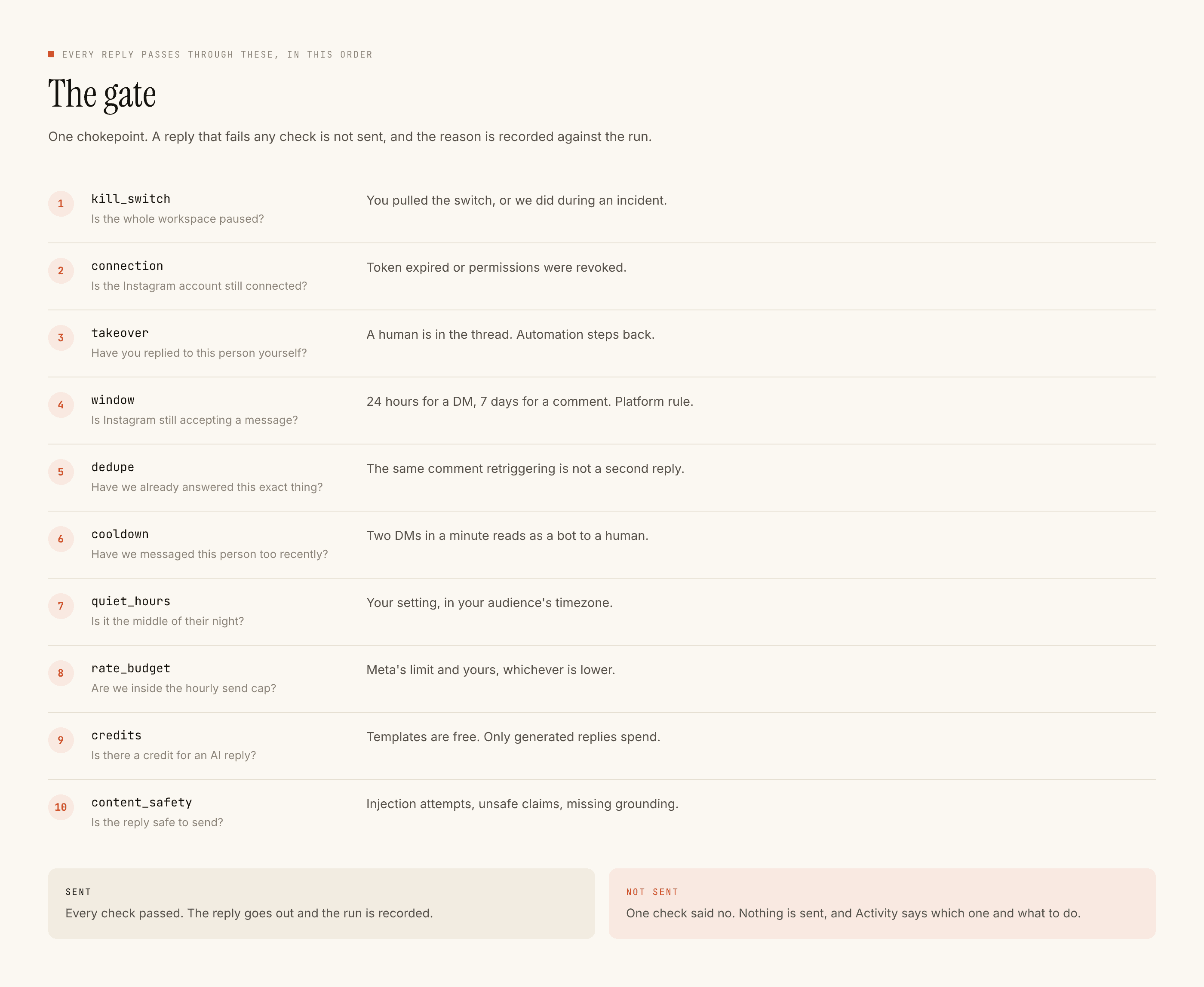
Ours runs ten checks in a fixed order before anything sends: kill switch, connection, takeover, window, dedupe, cooldown, quiet hours, rate budget, credits, content safety. First failure stops it and records the reason, so a viral post cannot become nine hundred identical messages, and you can go back afterwards and see exactly why each skipped one was skipped.
Where this leaves you
If the invoice is the whole problem, the fix is changing what is counted, not shopping for a cheaper version of the same meter. Count your actual replies, sort them into buckets, and see how much of your volume is answers you have already written. For most small accounts that number is high enough to make the decision obvious.
If you are weighing the move itself rather than the meter, what to check before switching is the short version. For the wider survey, the alternatives by use case covers the non-cost reasons people leave, and free tiers covers what starting without a card actually gets you.