Compliance · 5 min read
Instagram Automation Rules in 2026: The Ones That Bind You
On this page
Most posts with this title are selling something and the fear is the sales pitch. This one is a list of the rules, where they come from, and what they mean for a business that answers comments and DMs.
None of these rules are ours. They are Meta's, they apply to your account rather than to the tool you chose, and they would apply if you had built the integration yourself.
Rule one: the other person starts
This is the rule everything else hangs off. On the official Instagram Graph API, a business may reply to people who have contacted it. It may not initiate.
Somebody who watched your Reel has not contacted you. Somebody who follows you has not contacted you. Somebody who bought from your website, abandoned a cart, attended your event or gave you their number has not contacted you. In every one of those cases there is no thread, no window and no permitted send.
This is why there is no cold DM feature anywhere in this product, no broadcast, no bulk send and no audience. Cold outreach is covered on its own terms, and the conclusion there is the same as here.
Rule two: two windows, both started by them
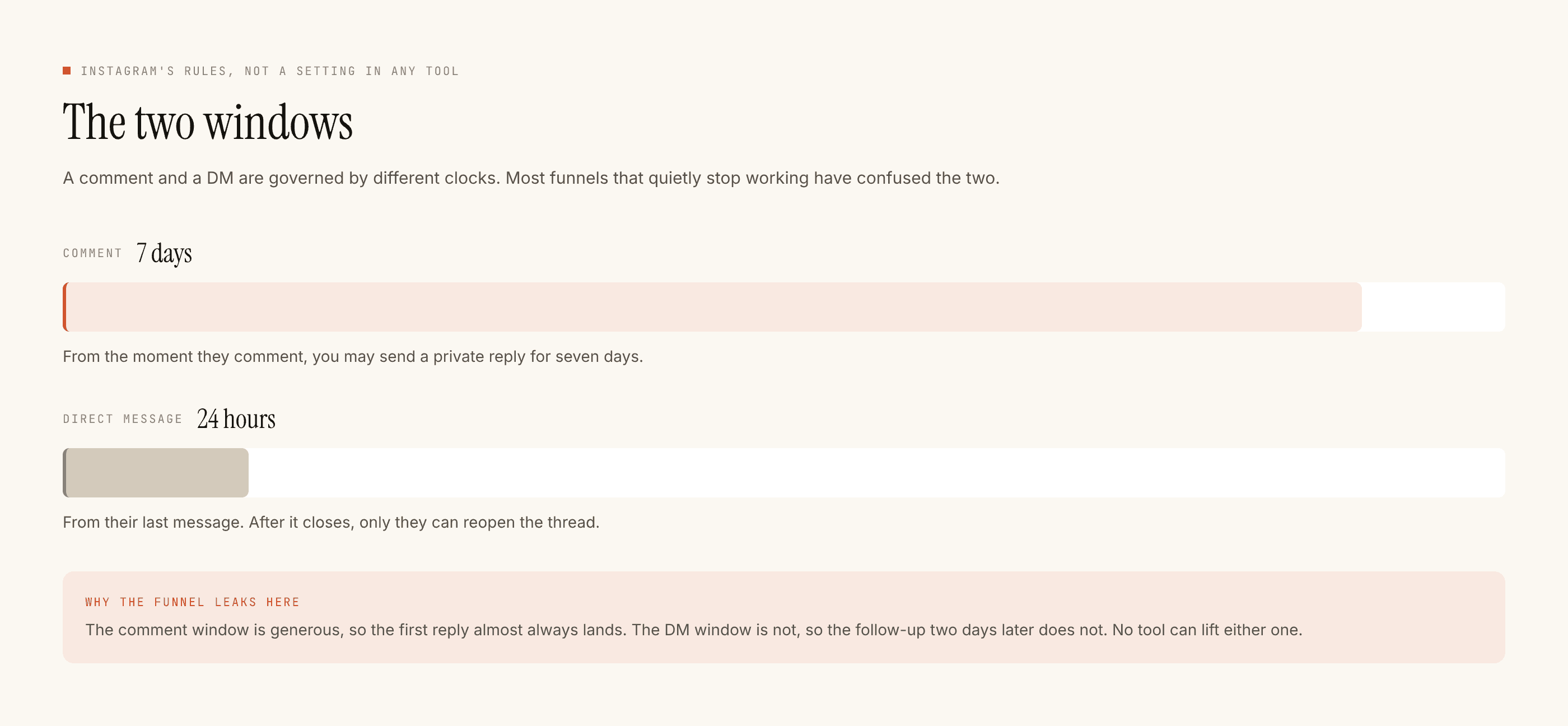
Comments: seven days. Somebody comments on your post; you have a week to reply publicly and to send them one private reply off the back of it.
Direct messages: twenty-four hours. Measured from their last message in the thread. Your own messages do not extend it. Waiting does not extend it. There is no paid re-open and no template that revives a closed thread. The only key is a new message from them.
Rule three: how the message is sent matters as much as what it says
There are two ways software can operate an Instagram account and the difference decides everything about your risk.
Official API
Credential-based
The right-hand column is against Instagram's terms regardless of how polite the messages are. It is also where almost every account-restriction story comes from. We are on the left-hand column and cannot be on the right: the connection is an OAuth handshake and the permissions granted on that screen are the ceiling on everything the product can do.
What actually gets an account restricted
Not "using automation". Instagram publishes messaging APIs and expects businesses to use them. The behaviours that draw enforcement are recognisable and mostly have nothing to do with tooling:
- Unsolicited bulk messaging. Sending to people who did not write to you, at volume. Structurally impossible on the official API, trivially possible with a credential-based tool.
- Follow, unfollow and like automation. Engagement performed at machine speed to manufacture reach. A different category of tool entirely, and the one most account bans trace back to.
- Identical messages at high frequency. The same text to many people in a short window looks like spam because it usually is.
- Selling or sharing account credentials. Including with an agency, a freelancer or a growth service. This is a seats-not-passwords problem and it has a clean answer.
- Content that violates the guidelines. The rules about what you may say apply in a DM exactly as they do in a caption.
Where the rules live in the product
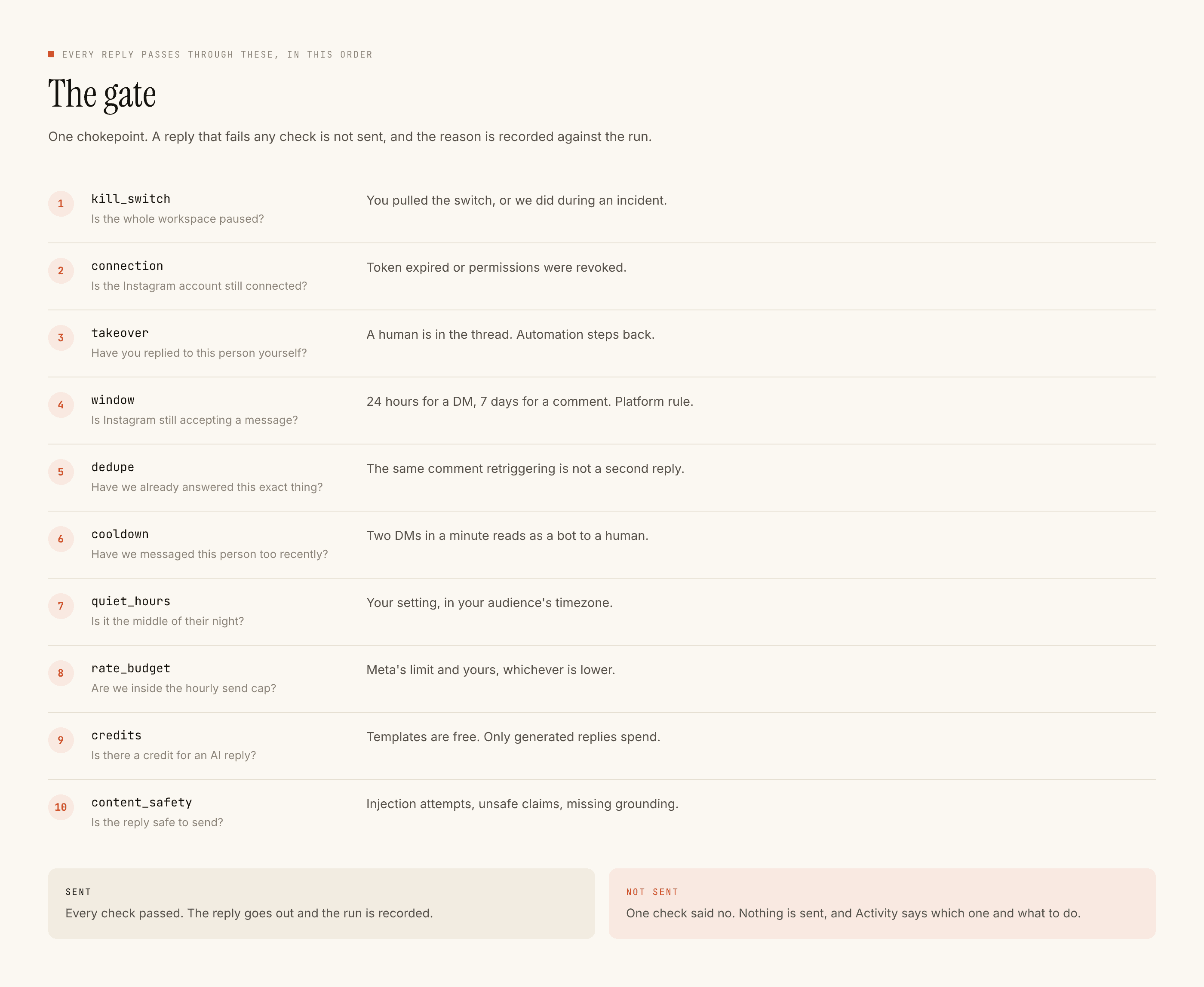
Ten checks run before any reply is sent, in a fixed order, and a blocked reply is recorded with its reason in Activity rather than silently dropped:
kill_switch, connection, takeover, window, dedupe, cooldown, quiet_hours, rate_budget, credits, content_safety.
Four of them are platform rules made mechanical. window refuses anything outside the seven days or the twenty-four hours. dedupe stops the same event being answered twice when Instagram redelivers it. rate_budget keeps sending inside sane limits. content_safety is the last gate before anything leaves.
Three more are about not being unpleasant rather than about compliance: cooldown, quiet_hours, and takeover, which stands the automation down the moment a human replies by hand in a thread.
The full reasoning for each is documented separately.
Three things that are not rules
There is no shadowban for replying to your own comments. Answering people who wrote to you is the intended use of the messaging API.
There is no follower threshold. The windows are properties of the conversation, not of your account size, verification status or plan.
There is no enterprise exception. No partner tier, no allowance, no configuration that lets you message somebody who has not messaged you. If a rule seems to have an exception somewhere, it is usually a different mechanism wearing the same name — ad formats that open a DM, for example, work because the person taps and they send the message.
Keeping up, without pretending to predict
Meta changes platform terms and API behaviour, and it does so without asking. The two windows have been stable for a long time and the initiation rule is foundational rather than incidental, but neither is a promise anybody can make on Meta's behalf, including us.
The practical habit is short. Read the permissions screen when you connect rather than clicking through it. Keep the connection healthy, because an expired token still shows an account name while sending nothing. And when something stops working, open Activity before you open a support chat — the reason is recorded there, in the check that refused.
If your concern is specifically account safety rather than the rules themselves, the ban-risk question is worth reading honestly. If it is data and permissions, that has its own post.