Compliance · 6 min read
How to Audit an Instagram Automation Tool in Fifteen Minutes
On this page
- Minute one: the signup form
- Minute two: read what it says you do not need
- Minutes three to six: the connect flow and the permissions screen
- Minutes seven to ten: four questions for the vendor
- Minutes eleven to twelve: the test that settles it
- Minutes thirteen to fifteen: what happens before a send
- What a compliant tool will never be able to promise

"Meta compliant" on a pricing page is a claim, not a certificate. There is no badge to look up and no registry you can search. What there is, instead, is a set of things a compliant tool cannot hide and a non-compliant one cannot fake, and you can check all of them before you hand over an account.
Fifteen minutes, in roughly this order. The first three take two minutes and remove most of the field.
Minute one: the signup form
Look at what it asks for next to your Instagram handle.
A password field ends the audit. Tools on the official API never see your password, because they never sign in as you — you authorise through Meta's own screen and the tool receives a scoped token. There is no configuration in which a compliant product needs your credentials.
Same conclusion, slightly slower, for these: a browser extension, a desktop app that must stay open, or a phone that must stay online and logged in. All three are ways of borrowing your logged-in session. A server-to-server integration needs none of them, because Meta is the one delivering the message.
Minute two: read what it says you do not need
Marketing copy is where non-compliance advertises itself, usually as a convenience.
The reverse is also a signal. A vendor that makes you convert to a professional account before anything works is not being awkward. It is being honest about a requirement it does not control.
Minutes three to six: the connect flow and the permissions screen
Start the connection but do not finish it. Two things to watch.
Where the login happens. The consent screen should be on Meta's own domain, in Meta's own styling, and it should look nothing like the product you just left. If a screen that resembles the vendor's app is asking for Instagram credentials, close the tab.
What is listed on it. This is the most useful screen in the whole audit and almost nobody reads it. Meta writes the plain-English line under each toggle, not the vendor, which makes it the only description of the tool's powers that the vendor did not author.
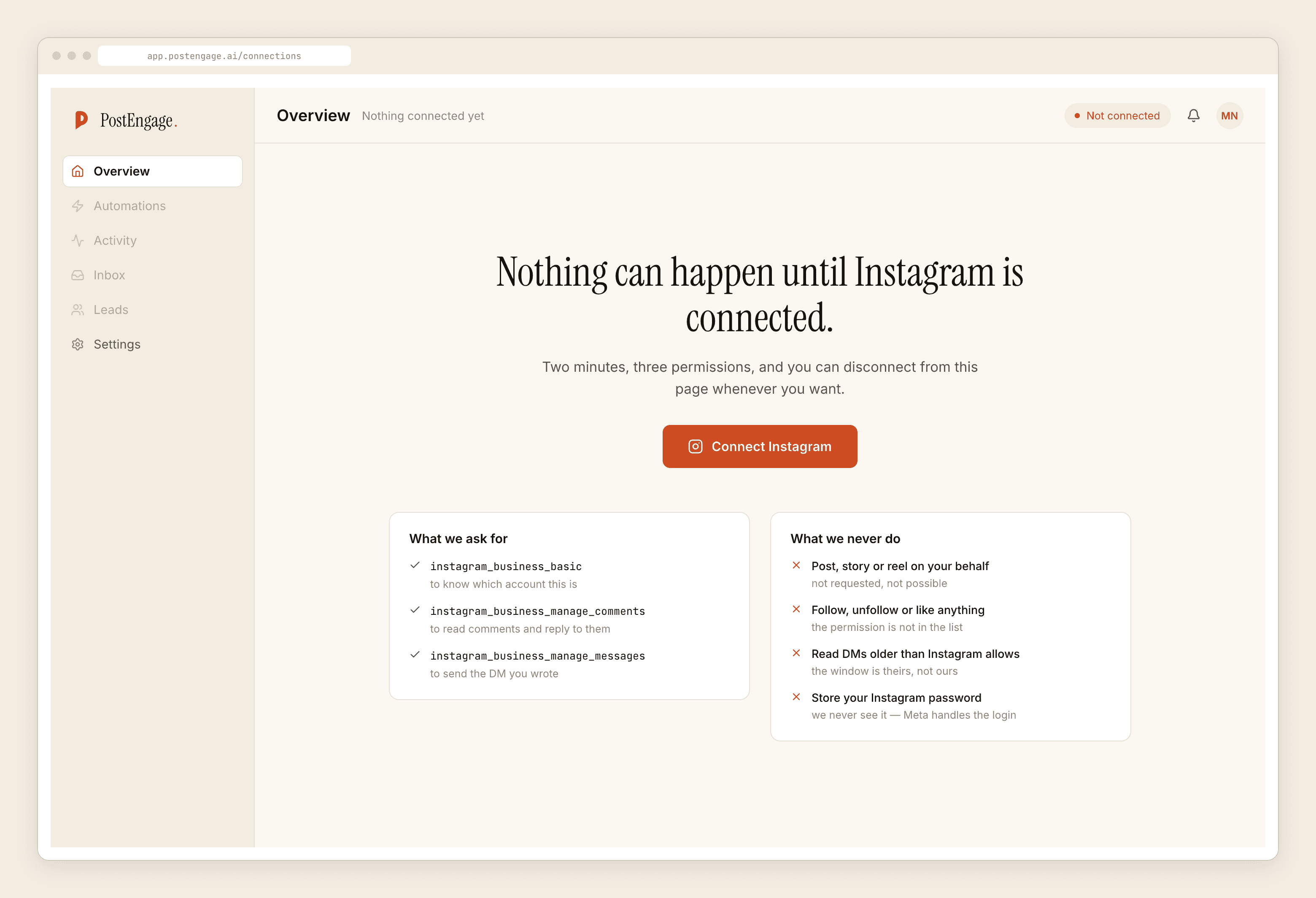
For a comment and DM tool, the honest set is narrow: read the comments on your own posts, reply to them, read and send messages in conversations where the person messaged you, and see which Pages you manage. That is the job.
Questionable to ask for
Reasonable for the job
A permission that has nothing to do with the feature you are buying is worth an email before you tick it. Sometimes there is a dull answer. Sometimes there is not.
Minutes seven to ten: four questions for the vendor
Send these in one message. The answers matter less than whether they are answered plainly.
- "What happens if a comment is nine days old?" The correct answer is that nothing sends, because the comment window is seven days. A vendor that says it still works is either wrong or not on the API.
- "Can I message someone who has never messaged me?" The correct answer is no. Not "yes with limits", not "we have a workaround". There is no cold-DM permission to apply for, and any vendor claiming one is describing a different mechanism entirely.
- "Are you approved for the messaging permission today, or is review pending?" Approval is the vendor's problem, but the wait becomes yours. Ask before you plan a launch around it.
- "What happens to my data if I delete the account?" A compliant vendor has an answer involving token revocation and message deletion. A vague one has told you where the messages actually live.
Minutes eleven to twelve: the test that settles it
This is the definitive one, and it works even if every previous answer was reassuring.
Connect the tool. Then go to your Facebook or Instagram settings, find business integrations, and revoke the tool's access there — in Meta's interface, not the vendor's.
A tool on the official API stops immediately and completely. Its token is gone, and the next attempt to send fails with a connection error it should show you honestly. A tool riding your session does not notice, because Meta never issued it anything to revoke. It keeps working, which is the whole problem in one observation.
Minutes thirteen to fifteen: what happens before a send
Compliance gets you a licence to send. It does not stop you sending something you will regret, and the enforcement that catches badly-behaved compliant tools is real, if slower. We wrote about that in what actually triggers a restriction.
So ask what runs before a reply goes out, and ask to see where refusals are recorded.
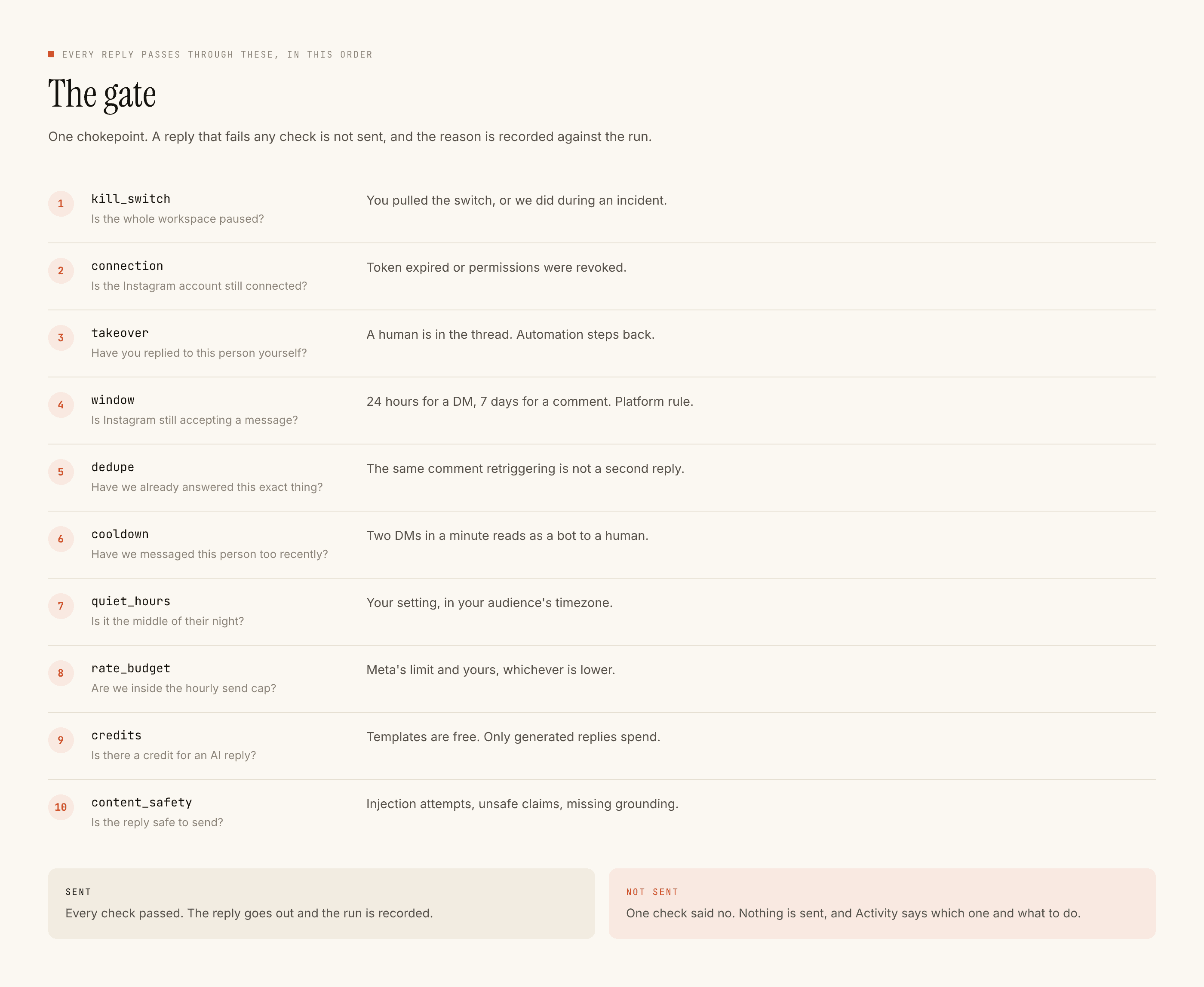
The things worth having: a stop that takes one click, deduplication so nobody gets the same reply twice, a cooldown, quiet hours, an hourly ceiling, and automation that steps back once a human takes over the thread. Ours run in a fixed order and a blocked reply keeps its reason.
What a compliant tool will never be able to promise
Useful to know so a competing pitch does not sound better than it is. Nobody on the official API can offer you cold DMs to a scraped list, replies to comments older than seven days, DMs outside the twenty-four hour window without a human in the loop, or mass following or liking.
If one of those is on the feature list, you have finished the audit early. If none of them are, you are comparing products on the things that actually differ between them, which is the shorter and more useful comparison.