Playbooks · 5 min read
Replacing the Link Tree: What to Build in Its Place
Say the disclaimer first, because it decides whether you should keep reading.
We do not build link-in-bio pages. There is no page builder here, no short links, no click tracking, no landing pages, no QR codes, no analytics of any kind. Nothing in this product touches your bio. If you have a link tree, you will still have one after reading this, and you should — some of what it does has no substitute.
What follows is the narrower and more useful thing: most link trees are a menu of eight items shown to someone who arrived with one question, and there is something better to do with seven of those items.
The audit, which takes ten minutes
Open your link tree and write out every item on it. Then put each one in one of two columns.
A destination
An answer
The left column is what a bio link is for. Keep it. Ideally reduce it to one link, because a menu of one is a menu people use.
The right column is the interesting part. Every item in it is a question somebody asked you, converted into a page, and then put behind two taps and a page load. Those are the ones to replace.
Why the answer beats the page
Somebody watching a reel at eleven at night wants to know what the thing costs. The link-tree route is: leave the post, go to the profile, tap the link, wait for a browser, land on a menu, find the right item, tap again, wait again, scan a page written for everybody, find the price.
The comment route is: type a word, stay in the app, read a message.
There is no click tracking here so I am not going to give you a number for what each of those transitions costs, and anybody who gives you one made it up. But the direction is not in dispute, and the mechanism is not laziness. The intention that started the tap was small, and it was competing with a notification.
The full comparison of the two routes is written up separately, including what the DM route costs you, which is real. This post assumes you have decided and want the build.
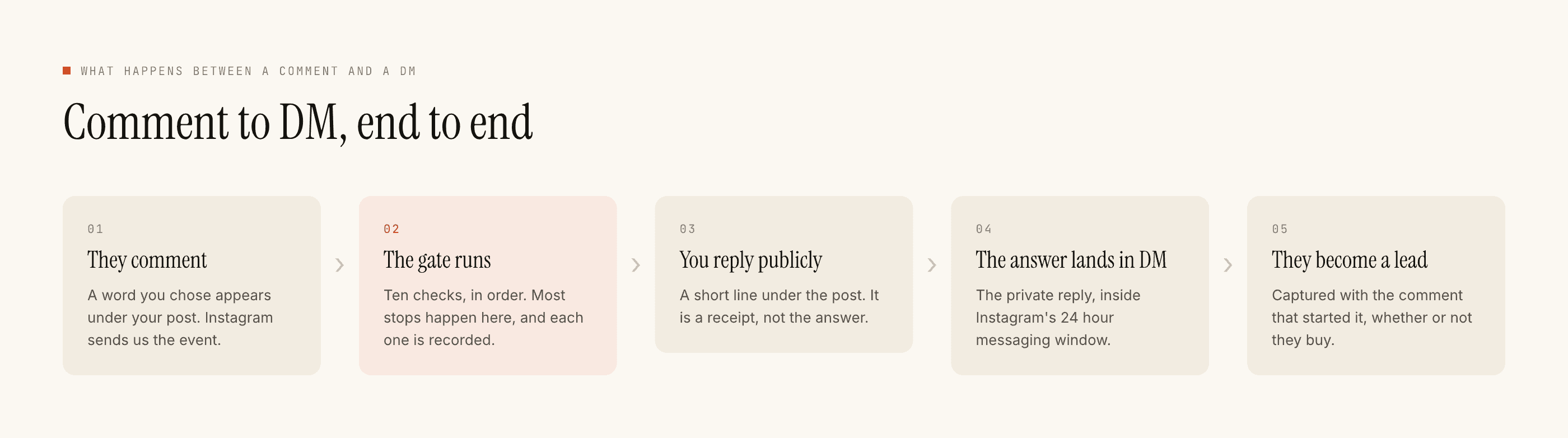
The build: one ask per post, not one keyword for everything
Here is the mistake people make when they move off a link tree. They set up a single automation with the keyword info and put "comment INFO" on every post. That is a link tree with extra steps, because the reply then has to be a menu again.
The whole gain is that the answer can be specific to the post the person was looking at. So:
- One question per post. Decide, before you publish, the single thing this post makes people wonder. A price for a product reel. Availability for a restock. The syllabus for a course post. The dates for an event.
- A keyword that is the word they would type anyway.
price,size,dates,menu,stock. Matching folds case and punctuation, soPRICE?,price!!andPriceare one keyword and you do not need variants. People type these words unprompted, which means the automation catches the ones who never read your instruction. - The caption line is the interface. One sentence: "Comment PRICE and I'll send it." This is the step where these funnels actually fail — not in the software, in the caption nobody wrote.
- Scope it to the post, or a set of posts. Under Advanced. A
priceautomation running account-wide will answer a comment on a two-year-old reel about a product you discontinued. - Answer in the message. Do not reply with a link to the page you were trying to replace. If you send a link, you have rebuilt the link tree inside a DM and added a clock to it.
What you lose, honestly
Three things, and you should know them before you move anything.
Numbers. A link tree tells you how many people tapped. There is no click tracking, no attribution and no analytics here, so the DM route gives you a count of conversations and nothing resembling a funnel report. That is a real downgrade and it is worth saying out loud.
Passive discovery. The bio link works for anyone who wanders onto your profile without ever engaging. A comment trigger only fires if you asked. Nothing here reaches the silent visitor.
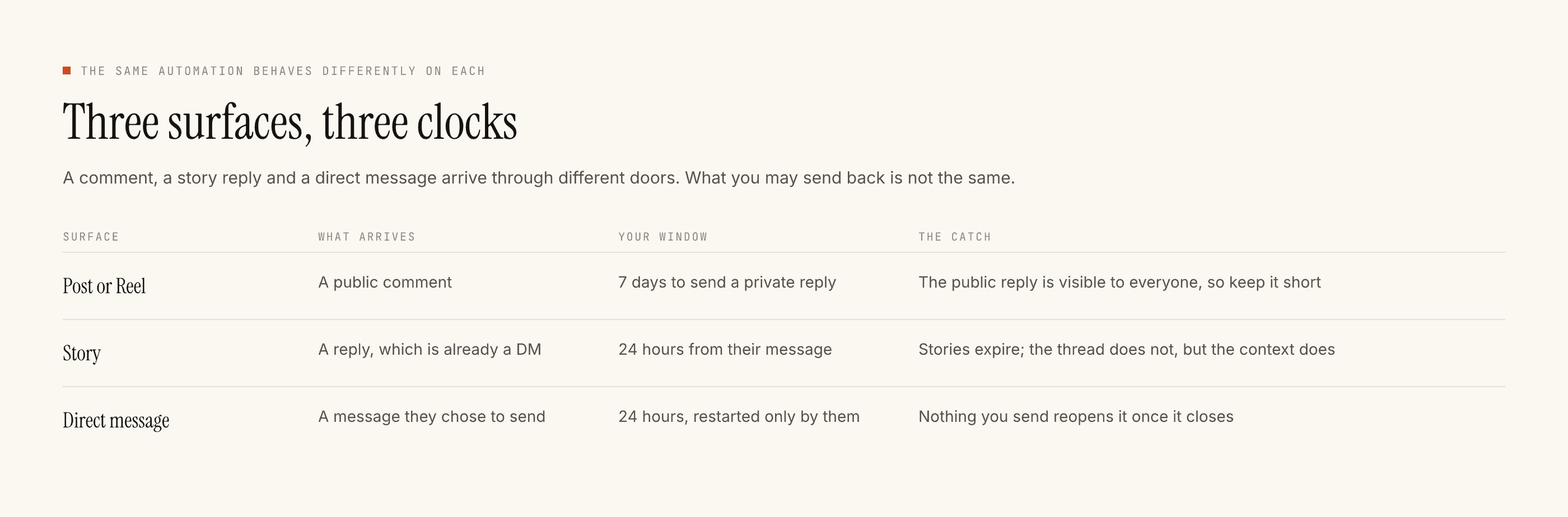
Permanence. A page sits there for a year. A DM thread has a twenty-four hour window restarted only by their message, so a conversation you did not finish is finished.
That is why the left column of the audit stays. The two mechanisms are not competitors; they fail in different places, and most accounts should run both and stop treating it as a decision.
Start with one
Do not migrate the whole tree. Take the single item people ask about most — it is nearly always the price — and put it on your next three posts as a comment trigger. Leave the link tree exactly as it is.
If people use it, take the next item. If they do not, the problem is the caption line, not the mechanism, and you have learnt that for the cost of three captions.
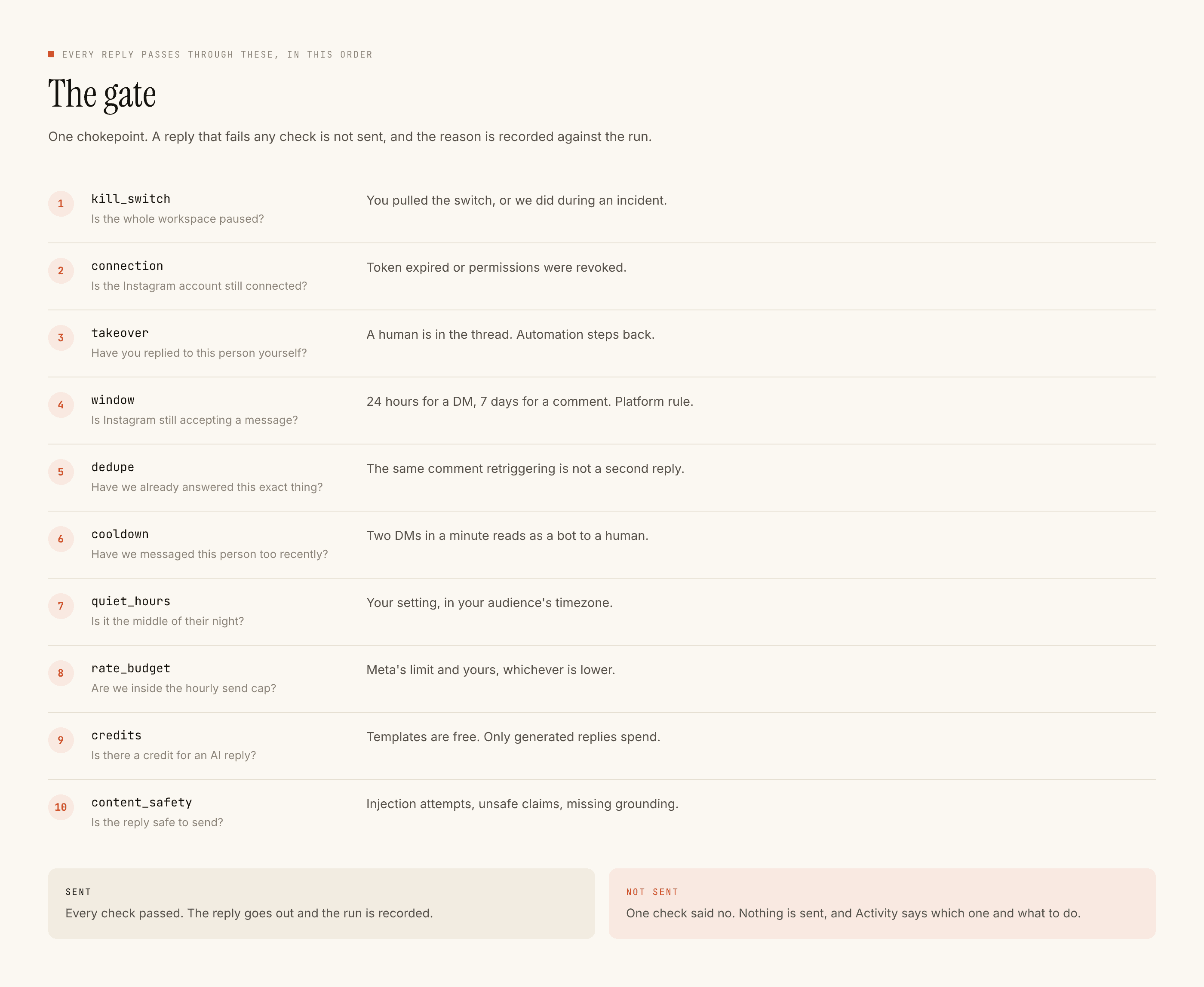
Templated replies are free and unlimited, so none of this has a running cost unless you ask the AI to write fresh answers at one credit each. Free tier is 100 credits with no card and packs start at ₹499.
Keeping the answer on-platform is the wider argument this sits inside, and the funnel with its leak points is the mechanical companion to the build above.