Comparison · 7 min read
ManyChat vs Chatfuel in 2026: Which One Fits Which Business
On this page
- They started in different places and it still shows
- On Instagram specifically, the overlap is larger than the marketing suggests
- Pricing: two different meters, and that is the whole comparison
- How to choose, in four questions
- What neither comparison usually covers
- Where we actually sit
- Before you commit to either
- FAQ
We build a competing product, so read this knowing that. What we can offer that a neutral review site cannot is the view from inside the same API. When you have implemented against Instagram's messaging endpoints yourself, you stop being impressed by feature lists and start noticing which constraints a product has decided to design around.
Both of these are real products. Both are Meta partners working through the official API. Neither is going to get your account restricted. The choice between them is about shape, not safety.
They started in different places and it still shows
Chatfuel came up as a bot builder. The centre of gravity has always been the conversation itself: what the bot says, how it branches, and more recently how much of that a model can handle without a human drawing every branch. At the time of writing its published positioning leans heavily on AI agents and on WhatsApp as a first-class channel rather than an add-on.
ManyChat came up as a marketing automation tool that happened to live in messaging. The centre of gravity is the funnel: capture, sequence, tag, broadcast, integrate with the rest of your stack. The flow builder is mature and there are more integration paths hanging off it than most small businesses will ever use.
That difference explains most of what follows.
ManyChat's instinct
Chatfuel's instinct
Neither instinct is wrong. They suit different businesses, and the business they suit is usually obvious once you say out loud what you want the tool to do after it replies.
On Instagram specifically, the overlap is larger than the marketing suggests
This is the part people underestimate. Everything on the official Instagram Messaging API operates inside the same box, and the box is not very big.
| Constraint | Applies to |
|---|---|
| Reply to a DM only within 24 hours of the person's last message | Every tool on the API |
| Reply to a comment within 7 days | Every tool on the API |
| No messaging people who never messaged you | Every tool on the API |
| Professional account plus a linked Facebook Page required | ManyChat and Chatfuel (PostEngage needs only the professional account) |
So on Instagram alone, the difference between these two is not what they are permitted to do. It is the builder, the integrations, the reporting, and how the tool behaves when volume spikes. Anyone showing you an Instagram feature matrix where one of them can send outside the window is showing you a mistake.
Pricing: two different meters, and that is the whole comparison
Most comparisons put these side by side as if the numbers were comparable. They are not, because the two products meter different things — and once you see what each one counts, the pricing question mostly answers itself.
| ManyChat | Chatfuel | |
|---|---|---|
| Free tier | 25 active contacts | Light — unlimited contacts |
| Paid entry | $14 / mo (250 contacts) | $49 / mo (AI PRO) |
| Mid tier | $39 / mo (2,500 contacts) | — |
| Metered on | active contacts | AI processing (fair use) |
| Over the limit | you are billed (~$0.05 / contact) | the bot pauses |
| Bring your own AI key | — |
Read the last two rows again, because they are the actual decision.
ManyChat bills you for growth. Contacts are people who have ever triggered your automation, and the number climbs. The reel that works is also the invoice that grows: 500 contacts past a 2,500 allowance is roughly another $25 on top of the $39. Your best month is your most expensive one.
Chatfuel stops instead of charging. Their own limits page is unusually plain about it: plans include unlimited contacts and unlimited messages, but AI processing carries a fair-use allowance per billing period, and if you exceed it "your bot pauses" — it stops replying until the period resets or you renew early. There is an escape hatch: hand them your own OpenAI key and the fair-use limit no longer applies, with OpenAI billing you directly.
Neither is a trick. They are opposite answers to the same problem, and they fail in opposite directions. One sends you a bigger bill after a good week. The other goes quiet in the middle of one.
Which is worse depends entirely on what you are running. A launch with a deadline cannot afford silence. A thin-margin business cannot afford an uncapped bill. Decide that before you compare anything else.
How to choose, in four questions
Does WhatsApp carry revenue for you? Then weigh WhatsApp capability above everything else on the list, and check each vendor's current WhatsApp story directly rather than trusting any comparison article, this one included. It is the fastest moving part of both products.
Do you need the automation wired into other systems? Ecommerce platform, CRM, email tool, ad platform. Breadth of integrations is a genuine advantage and ManyChat has historically carried the longer list. If your automation needs to hand off to five other systems, the tool with more connectors wins on arithmetic alone.
Do you want to draw the flows or describe the job? Some teams want an explicit branching diagram they can audit. Others want to describe what the agent should handle and let it work out the wording. That is a preference about control, and both preferences are reasonable.
Who maintains it in six months? A mature flow builder with a large tutorial ecosystem is easier to hand to a new hire. A newer, cleverer system is easier to set up and harder to explain.
Pick the one whose defaults you will not spend a year fighting. That decides more than any feature you compared.
What neither comparison usually covers
Both products can send a message. So can we. The interesting question is what happens in the second before sending, when something is slightly wrong.
A post goes unexpectedly wide and there are nine hundred comments. Someone comments twice. Someone comments at 2am. A team member replied by hand thirty seconds ago. The generated draft is technically fine but does not sound like anything you have ever written.
Whatever tool you evaluate, put those four cases on your list and test them deliberately rather than reading about them. Comment twice from a second account and see if you get two replies. Comment at midnight. Reply by hand mid-thread and see whether the automation notices and backs off. Then ask the tool why it skipped what it skipped, and see whether it can tell you.
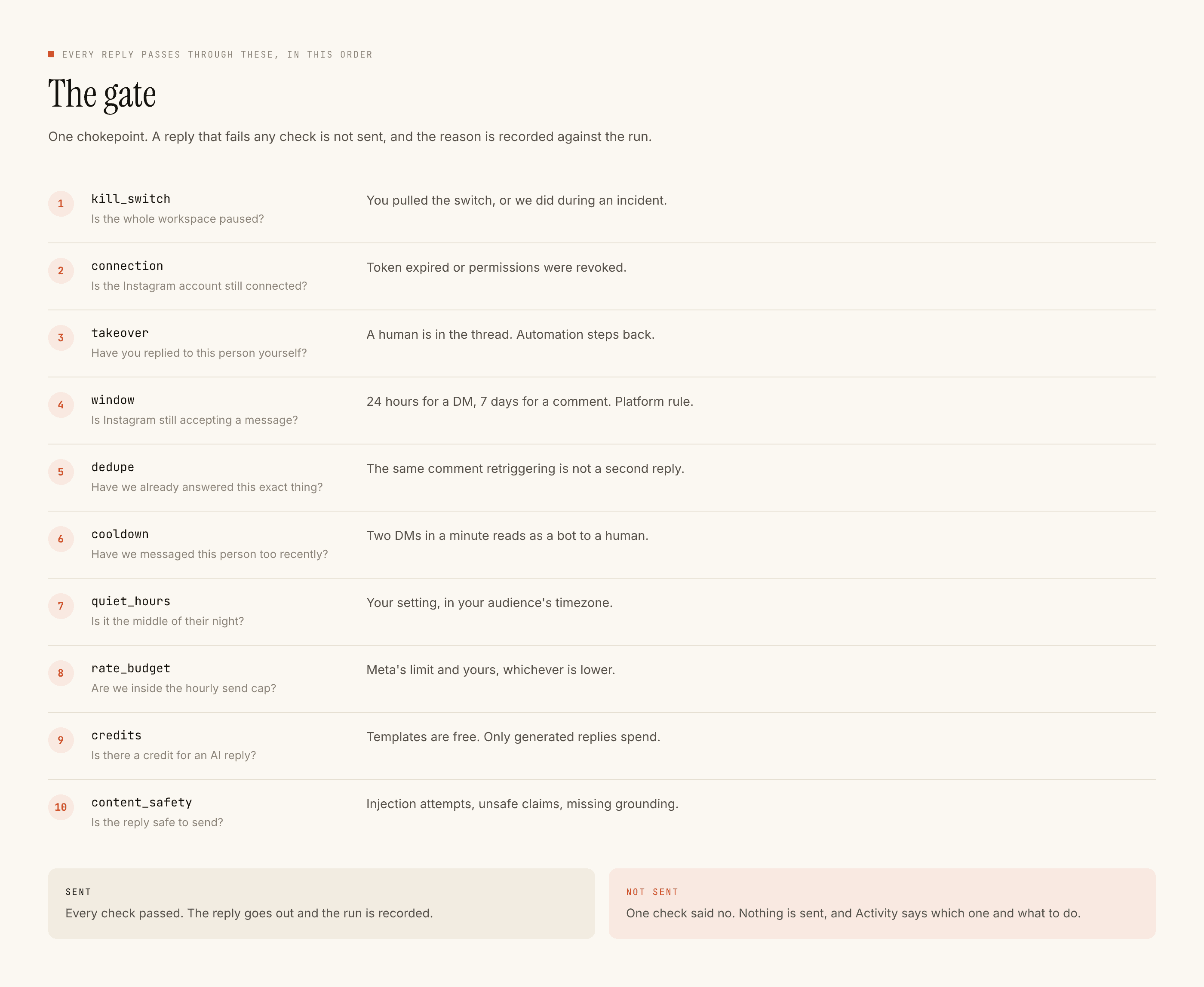
Our answer is sixteen checks in a fixed order before every send, from the kill switch to content safety. First failure stops the send and the reason is written down. That is the whole product philosophy, and it is a narrower product than either of the two above.
Where we actually sit
Not as a replacement for either, for most people. We do Instagram comments and DMs through the official API and nothing else. No WhatsApp. No post scheduling. Fewer integrations than either product discussed here, by a wide margin.
What we do instead is build a voice profile from replies you wrote yourself, draft against it, and fall back to your own template whenever the model is slow, unsure, or writing something not grounded in your words. Templated replies are unlimited and free. Comment replies stay uncapped on every plan; DMs on Free are capped at 1,000 every rolling 30 days, gone on Lite and up. Credits are spent only when something new gets written. Free tier is 100 credits, no card, packs from $3.99 (₹299 in India).
Before you commit to either
Checklist
If you want the direct version of that argument, PostEngage vs ManyChat is the honest head to head, and the Chatfuel alternative page covers the migration if that is the one you are leaving. If you are only here because of cost, read the meter first. If you have already decided to leave ManyChat, what to check before switching is the checklist. The mechanics of the move itself — exports, the overlap period, and why nobody can import your flows — are in what you lose when you switch.
Questions people ask
Which one is safer for my Instagram account?
Neither is a risk. Both are Meta partners on the official API, both connect through Meta's own permission screen, and neither will ever ask for your Instagram password. Account restrictions in this category come from browser-automation tools that log in as you — a different product category entirely.
Can either of them send a DM to someone who has not messaged me?
No, and no tool on the official API can. You may reply to a DM within 24 hours of the person's last message, and to a comment within 7 days. Any comparison showing one of them sending outside those windows is showing you a mistake.
Is Chatfuel's free plan really unlimited?
Unlimited contacts and messages, yes. The limit is on AI processing, and it is a fair-use allowance per billing period rather than a hard count. Static keyword replies, button flows and broadcasts do not draw it down — only AI-generated replies and AI classification do.
What happens to my flows if I switch?
They do not transfer. Both use their own flow format and there is no export path between them. What transfers is your keyword list and your reply copy, which is most of the value anyway — export both before you cancel anything, because a lapsed plan usually goes read-only.
Do I need a Facebook Page?
Yes, for both. They need a professional Instagram account linked to a Facebook Page. PostEngage needs only the professional (Business or Creator) account, no Page.