Comparison · 7 min read
Looking for a Chatfuel Alternative in 2026? Start With the Channel
On this page
- First, check whether your bot is actually broken
- The question that decides this is channel, not features
- What you give up, listed before what you gain
- What a narrower tool spends its attention on instead
- The migration is smaller than you expect
- Things that will not change no matter which tool you pick
- On price, and why we are not quoting theirs
- If you are choosing between the big two
- FAQ
Most people who ask us about leaving Chatfuel are not unhappy with it. They are unhappy with how much of it they are paying attention to. They built a bot, the bot works, and they use roughly a tenth of what is on the screen. That is a real reason to move, and it is a different reason from the tool being bad.
Chatfuel is not bad. It is a Meta partner on the official API with a long history in conversational bots, and at the time of writing its published positioning leans on AI agents and multi-channel reach including WhatsApp. If you need any of that, this article should end here and you should stay.
First, check whether your bot is actually broken
A large share of people searching this phrase are not shopping. Their bot stopped answering and they assume it is faulty. Usually it is not.
Chatfuel's plans include unlimited active contacts and unlimited messages, but AI processing carries a fair-use allowance per billing period. Their own limits page is unusually direct about what happens at the end of it: if you exceed the allowance, your bot pauses. It stops replying to incoming messages until the period resets or you renew early.
Three things worth knowing before you migrate over this:
- Static automations do not draw it down. Keyword replies, button flows and broadcasts are unlimited whatever your volume. Only AI-generated replies and AI classification count against the allowance.
- Two accounts on the same plan can burn it at very different rates. Consumption depends on how much your agent reads per reply — your knowledge base, your instructions, and the length of the conversation so far. A 50,000-character knowledge base costs more per reply than a 5,000 one.
- There is an escape hatch. Supply your own OpenAI key and the fair-use limit no longer applies; OpenAI bills you directly.
If your bot went quiet mid-campaign, try that order before you move anything. Trimming a bloated knowledge base is an afternoon; a migration is longer.
The question that decides this is channel, not features
Everything else follows from it.
Stay on a multi-channel tool
A single-channel tool is enough
We are the second column and only the second column. We do Instagram comments and DMs through the official Meta Graph API. No WhatsApp, no Messenger, no post scheduling or publishing. Fewer integrations than Chatfuel by a long way. If any of those matter, the honest recommendation is not us.
What you give up, listed before what you gain
Comparison articles that put the concessions at the bottom are hoping you do not scroll. So, plainly, what you lose moving from a full conversational platform to something like ours:
- Channels. Instagram only. Anything on WhatsApp has to be rebuilt somewhere else.
- The flow builder. We have no visual branching canvas. If your bot has fifteen decision nodes and you want to see them laid out, we are the wrong shape.
- Integrations. A short list rather than a long one.
- Ecosystem. Fewer tutorials, fewer agencies who already know the tool, fewer templates to copy.
Those are not small. For a business running a genuine multi-channel funnel, they outweigh anything below.
What a narrower tool spends its attention on instead
Two things, mainly.
Voice. We build a profile from replies you actually wrote yourself, not from a personality dropdown. Drafts are written against that profile. When the model produces something that is not grounded in your own words, or it is unsure, or it is simply slow, your own template goes out instead. The generated reply is the upgrade, not the default.
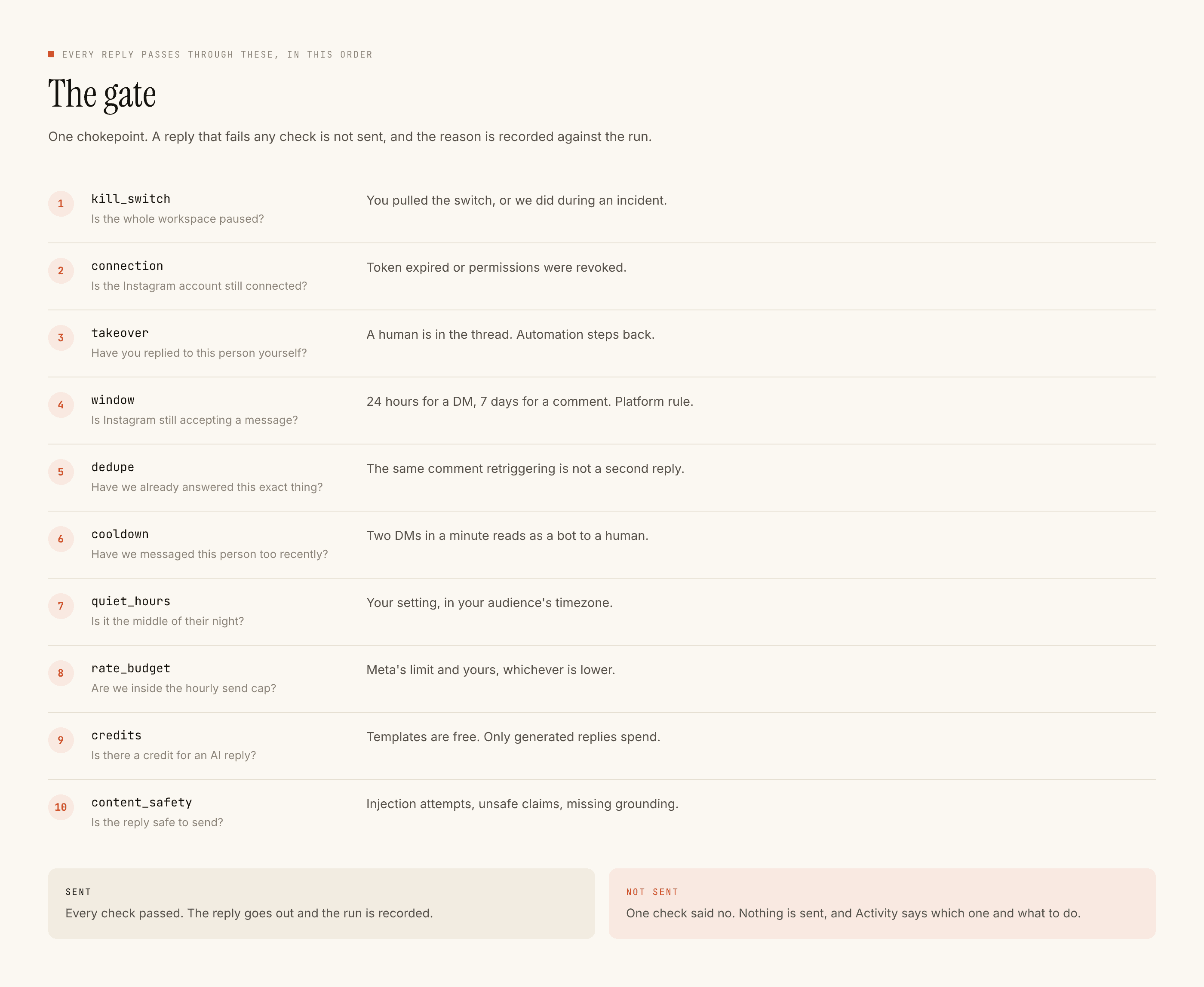
Restraint. Sixteen checks run in a fixed order before anything sends: kill switch, connection, takeover, auto-reply switch, complaint pause, window, dedupe, burst, bot loop, cooldown, quiet hours, account limits, rate budget, free DM cap, credits, content safety. The first failure stops the send and the reason is recorded, so a skipped reply is a decision you can go and read rather than a mystery.
Any tool can send a message. The useful ones can decide not to, and tell you why afterwards.
The migration is smaller than you expect
Because the part you are moving is smaller than the tool you built it in.
- 01
Export your reply text
Not the flow diagram. The actual sentences your bot says. Most accounts find between six and fifteen distinct messages doing all the real work, and that is what carries over.
- 02
Sort them into buckets
Group by what was being asked. Shipping, price, availability, booking, the link. Four or five buckets usually cover the large majority of an inbox.
- 03
Connect Instagram through Meta consent
Professional account, authorised on Instagram’s own screen. Nobody types an Instagram password anywhere. If a tool asks for one, close the tab.
- 04
Paste the buckets in as templates
Templated replies are unlimited and free with us, so this step alone covers most of your volume at zero running cost. Comment replies stay uncapped on every plan; DMs on Free are capped at 1,000 every rolling 30 days, gone on Lite and up.
- 05
Run both for two weeks
Leave Chatfuel on. Point us at one account and one surface, and read every reply we produced against what the old setup sent the same day.
- 06
Turn the old one off last
Only after a full posting cycle, including at least one post that did better than average. Cancel after the export, never before.
Things that will not change no matter which tool you pick
Worth knowing so you do not evaluate us on something nobody can do.
Reporting is another one. If Chatfuel's analytics are why you are staying, check what any alternative shows before migrating rather than after. Smaller tools usually have thinner dashboards, and ours is no exception. What we do give you is a per-reply record: what was sent, whether it was templated or generated, and for anything skipped, which of the sixteen checks stopped it.
On price, and why we are not quoting theirs
Vendors change published pricing and a stale number in an article is embarrassing for the person who wrote it. What is stable is the model. Historically this category meters contacts, meaning distinct people who have ever messaged you, which is a number that only climbs. A person who asked one question in March is still on December's invoice.
We meter work instead. Templated replies are free and unlimited. Credits are spent only when the model composes something new. The free tier is 100 credits with no card, and packs start at $3.99 (₹299 in India). That shape is better if most of your inbox is the same handful of questions, which for most small accounts it is. It is worse if every single reply genuinely needs writing from scratch, and we would rather you knew that before signing up than after.
If you are choosing between the big two
We wrote ManyChat vs Chatfuel without putting ourselves in the middle of it, because for plenty of businesses the right answer is one of those two and pretending otherwise wastes your afternoon. If cost is what brought you here, the meter arithmetic applies to any per-contact tool, not just one. And if you have already decided to move, what you actually lose when you switch covers the export and the overlap period.
Questions people ask
Why did my Chatfuel bot stop replying?
Most often the fair-use AI allowance for the billing period ran out. Chatfuel's limits page states that when usage exceeds the allowance the bot pauses until the period resets. Renewing early resets it immediately; supplying your own OpenAI key removes the limit entirely, with OpenAI billing you directly.
Does Chatfuel really give unlimited contacts?
Yes — unlimited active contacts and unlimited messages are included. The metered resource is AI processing, not people. That is the opposite of ManyChat, which meters active contacts and bills roughly $0.05 for each one past your plan.
What does Chatfuel cost?
The Light tier is free with no card and covers Instagram, Facebook and WhatsApp automations, a shared inbox and contact management. AI PRO is $49 a month, with a discount for annual billing. Figures as published in August 2026 — check before you commit, they move.
Will I lose my flows if I switch?
Yes. Flow formats do not transfer between tools and there is no export path. What transfers is your reply text and your keyword list, which is where most of the value actually sits. Export both before you cancel, because a lapsed plan usually goes read-only.
Is a single-channel tool ever the right answer?
When Instagram comments and DMs are the whole job. If WhatsApp or Messenger carries real revenue, or your automation feeds a CRM through connectors you depend on, a multi-channel platform is worth its overhead and you should stay on one.
How long should I run both tools in parallel?
Through at least one full posting cycle including one post that did better than average, which is where the differences actually show. Point them at different posts, never the same one — two tools answering one comment sends the person two DMs.