Compliance · 5 min read
Instagram Automation Security: What to Harden on Your Side

Nobody loses an Instagram account to cryptography. They lose it to a password shared in a WhatsApp group two years ago, an agency that still has access, or a tool that was given the keys and then forgotten about. The security work that pays is boring and almost all of it is on your side of the connection.
Here is the honest split: what a vendor should be doing, how to check, and then the things only you can do.
The connection is the whole perimeter
An automation tool on the official Graph API never holds your Instagram password. You authorise through Meta's own screen, Meta issues a scoped token, and that token is the entire relationship. Which means the security question is not "is my password safe with them" — they never had it — but "what can that token do, and can I take it away".
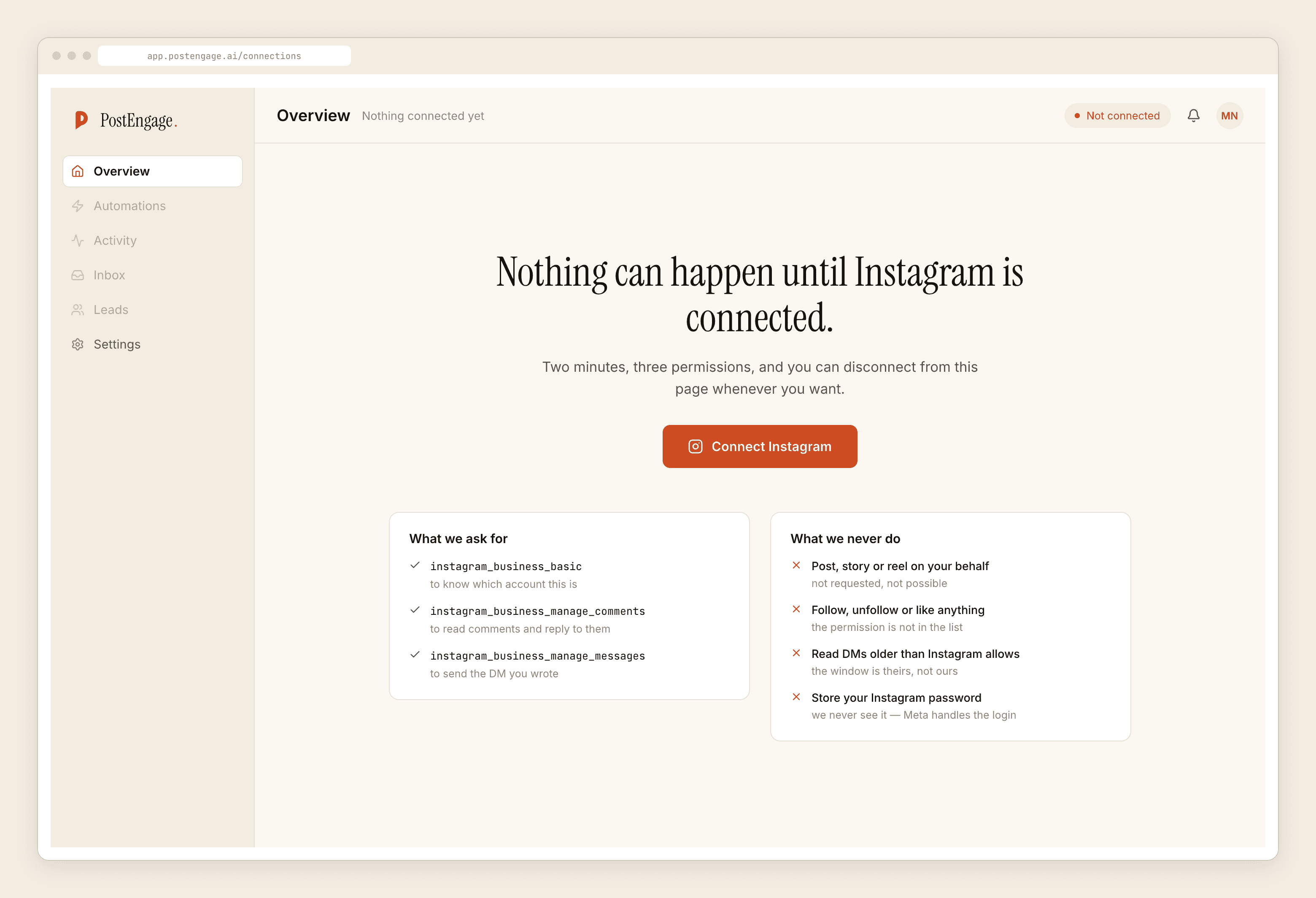
Two consequences worth internalising. First, granting only what the job needs is real risk reduction, not paperwork — a token that cannot publish cannot be made to publish. Second, revocation lives in Meta's business integrations screen, not in the vendor's dashboard. Practise pressing it once on a real account so you know where it is before the day you need it.
What a vendor should be able to say about credentials
You are entitled to ask, and the answers should be short and unhesitant.
Account passwords are hashed with a modern memory-hard algorithm — never stored in plain text, never recoverable, and not retrievable by support. If a vendor can tell you your own password over chat, that is the end of the evaluation. Platform tokens are held encrypted rather than as readable text, and are used server-to-server; nothing about the connection lives in your browser, which is why no extension is needed and why a tool demanding one is doing something else.
Everything moves over encrypted transport. That is table stakes now and is not worth a paragraph in a marketing page, so treat a vendor who brags about it the way you would treat a restaurant advertising clean plates.
What I would not expect a vendor to publish is the specific algorithm, the library, or the parameters. That is a map for somebody, and a security page that reads like a configuration file has confused disclosure with assurance.
The refusal log is a security control
Most people file "what gets blocked" under safety rather than security, and then miss what it is for.
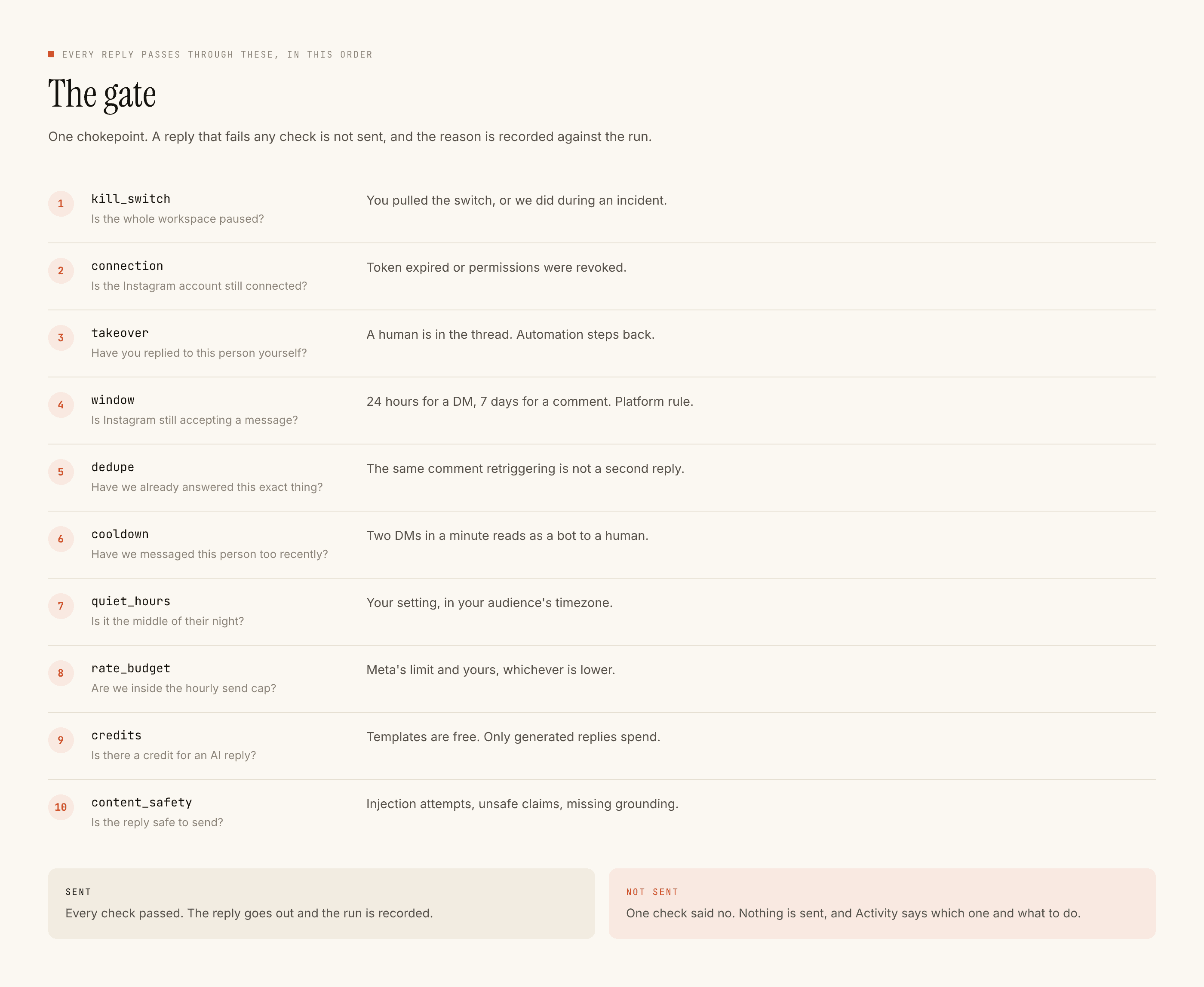
The order matters more than the list. kill_switch is first because a stop must be absolute and must not depend on anything else being healthy. connection is second because a revoked token should fail fast and loudly rather than half-working. takeover sits third so that a human replying by hand always wins over the machine. Then window, dedupe, cooldown, quiet_hours, rate_budget, credits, and content_safety last, on the text that is actually going out.
A system that refuses and records why is auditable. A system that just stops is a mystery, and mysteries get resolved by guessing.
rate_budget in particular is a security control wearing a politeness costume. It is the thing that means a compromised or misconfigured automation on a viral post sends a bounded number of messages rather than an unbounded one. The blast radius is a number somebody chose in advance.
The five things only you can fix
Ranked by how often they are what actually went wrong.
- Stop sharing the login. One account per person, always. A shared password cannot be rotated when someone leaves, cannot be attributed when something happens, and cannot be revoked without breaking everybody.
- Two-factor on the Instagram and Facebook accounts themselves. The automation tool is not the soft target. The Meta account behind it is, and it is the one that owns the Page.
- Run an access review the day someone leaves. Freelancer, agency, ex-employee, the intern who set it up. Same week, not eventually. Include the Meta business integrations list, not just your own tools.
- Audit the integrations list quarterly. Everyone accumulates connected apps they no longer use. Each one is a live token pointed at your account. Revoking is free and instantaneous.
- Use Test on myself before Go live. Not a security control on paper, but it is how you find out that an automation is going to message the wrong people before it messages them.
What to do the hour something looks wrong
Order of operations, because the instinct is to open a support ticket first and that is the slowest path.
Hit the kill switch. It is one click and it is first in the gate for exactly this reason — everything downstream stops regardless of what else is broken. Then revoke in Meta's integrations screen if you are not certain the problem is confined. Then read Activity: what went out, what was refused and why, and whether the pattern says misconfiguration or something worse. Then the ticket, now with evidence attached.
A misconfigured trigger and a compromised account look identical for the first five minutes. The kill switch is cheap and reversible; deciding which one it is can wait until nothing further is being sent.
The thing that is not a security control
Obscurity. Not telling people how the system behaves does not make it safer — it makes misbehaviour undetectable to the person best placed to notice, which is you. Ask a vendor what runs before a send and where refusals are recorded. If the answer is vague, that is the answer.
Worth reading next: what actually triggers a restriction, which is the platform-risk half of the same subject, and the fifteen-minute audit for the questions to ask before you connect anything.