Lead generation · 5 min read
Instagram Event RSVPs: A Captured List Is Not a Guest List
The date mechanics of running an event through automation — how everything you write expires on one day, and how the seven-day comment window can outlive the event itself — are covered properly in the event marketing post. Read that one for the calendar problem.
This post is about the RSVP. Specifically about what one is here, which is less than most event playbooks assume, and what you have to do differently because of it.
An RSVP here is a row in a file
There is no registration system. No ticketing, no seat count, no attendance list, no check-in, no capacity limit that anything enforces. When somebody comments "interested" and your automation captures them, what has been created is a line in a leads list saying that this account expressed interest in this thing on this date.
That is genuinely useful. It is not a guest list, and the difference will cost you a venue booking if you forget it.
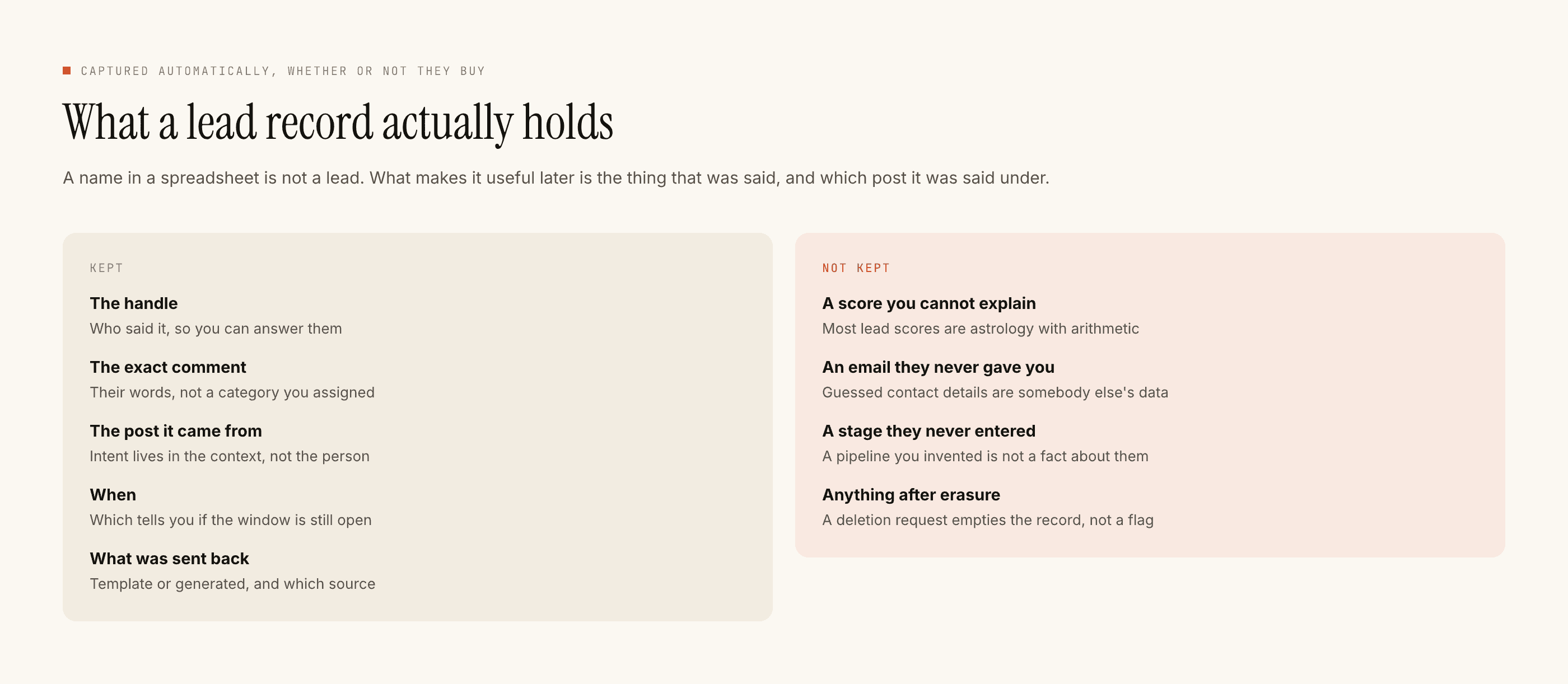
The practical consequences are three. You do not have a headcount, you have an interest count, and the two differ by a wide and unpredictable margin. You cannot deduplicate against anybody who also registered on your website. And nothing in that file will tell you who turned up, because nothing here can know.
You cannot remind them. This matters more for events than anywhere.
Every RSVP playbook ever written is built on a reminder sequence. A week out, a day out, an hour out, a link at the moment the thing starts. That entire structure is unavailable.
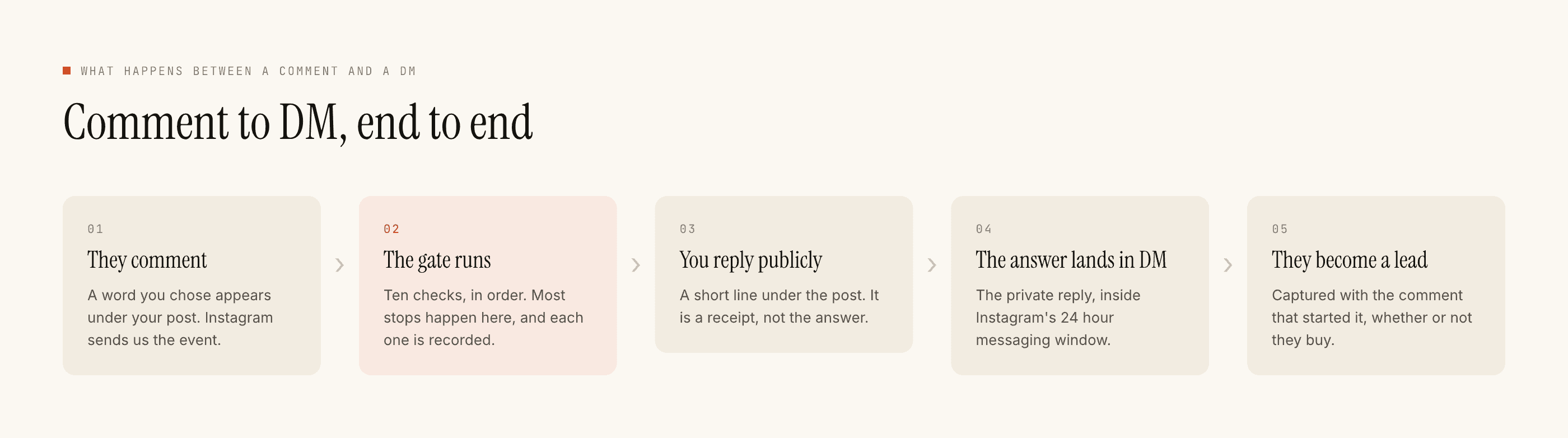
A DM thread stays open to you for twenty-four hours, and the clock restarts only when the other person messages you — not when you message them. An event reminder is by definition sent later. By then the thread is shut. There is also no scheduler, no delayed send, no broadcast and no sequence, so even a same-day nudge has nothing to fire it. Both of those are independently fatal to the idea. The reminders post takes the mechanics apart if you want the long version.
Every message this sends is a reply. An event reminder is not a reply to anything, which is why it cannot exist.
So the RSVP reply is not the first message in a sequence. It is the only message, and it has one job beyond acknowledging: move the person somewhere that can reach them before the event.
Your email list. Your ticketing page. A page that offers them a calendar file to add themselves. Whatever you already run that has an outbound channel. None of that is this product — there are no integrations, no email sync, no calendar, no WhatsApp — but the handoff is a link, and a link is something a reply can carry.
Which means the reply has to be self-sufficient
Write it as though it is the last thing this person will ever hear from you, because it very likely is.
- Confirm what they are interested in, by name. People comment on three events in a week and forget which is which.
- The date, the start time, and the timezone. Obvious, and routinely missing, and the single most common reason somebody misses an online session.
- Where. For a physical event, the address as a human would give it — landmark, floor, which gate. For an online one, whether the link comes by email and roughly when.
- The one action that gets them properly registered. A single link. Not two options.
- What happens if they do nothing. Whether interest alone is enough to walk in, or whether the link is mandatory. Say it plainly, because most people will assume the comment was enough.
Point five is the one that decides your turnout. If commenting "interested" felt like registering, a good number of people believe they have registered.
Ask for exactly one thing
There is no form. There are no fields, no conditional questions, no multi-step capture. What you have is a reply and whatever the person types back inside the window.
Which means you get one ask, and adding a second one costs you more than the second answer is worth. Decide before you build which single piece of information makes the list actionable for you.
If the event is online and you send links by email, the ask is an email address. If it is a paid workshop, the ask is that they open the ticketing page, and the list is only a chase list. If it is free and physical and you just want a rough sense of numbers, do not ask for anything at all — a captured handle is enough and every extra question reduces the count.
Two settings that are specific to an event weekend
Quiet hours. The default sensible window is wrong here in one direction. People decide to attend things in the evening, and an event announcement travels most in the hours after it is posted. Narrow the quiet window for the days around a launch, and set it in your attendees' timezone, not the tool's.
Rate budget. An event post can travel much further than your usual content, and an uncapped automation answering a thousand comments in an hour is how an ordinary good day starts looking like spam to Meta. The cap turns the spike into a queue, which for something with a date attached is exactly what you want — nobody minds a reply forty minutes later, and everybody minds an account restriction the week of the event.
The costs and the edges
Templated replies are free and unlimited; a credit is spent only when the AI writes a new reply. An RSVP acknowledgement is fixed text, so an announcement that goes further than expected does not cost more. Free tier is 100 credits with no card, packs from ₹499.
No registration, no tickets, no payments, no headcount, no reminders, no scheduled sends, no calendar, no CRM sync, no WhatsApp, and no messaging anybody who has not messaged you first. Interest exports as a CSV, and turning that file into a guest list is a person's job.
Takeover applies as always: the moment somebody on your team replies by hand, automation is out of that thread. And the clocks stay real through the whole campaign — seven days on a comment, twenty-four hours in a DM, restarted only when they write again.
If the point of the event is the list rather than the room, building an email list from DMs is the more useful post, and DM lead magnets covers the same handoff for anything you are giving away.