Playbooks · 5 min read
Event Automation: Everything You Wrote Expires on One Date
Most automations you build are evergreen. Shipping takes three days, the studio is in Indiranagar, the course costs what it costs. Those templates are true in November and still true in March, which is why nobody thinks about their expiry.
An event is not like that. An event has an hour, and the hour after it, every sentence you wrote is a lie. "Doors at 6" is a lie. "Book your seat" is a lie. "See you Saturday" is a lie with a slightly embarrassing quality to it.
That single property changes the whole build. Everything below follows from it.
The trap: the window outlives the event
Here is the specific failure, and it catches people who did everything else right.
A comment can be replied to for seven days after it is posted. That is the platform's window, not ours. So a comment left the evening before your event is still inside its window two days after the event finished — and if the automation is still on, it will cheerfully reply "register here, limited seats" to somebody reading about a thing that already happened.
The DM side has the opposite shape. A DM thread stays open for twenty-four hours and restarts only when they message you. So you cannot send anyone a reminder the morning of the event, or a link to the recording afterwards, unless they happen to write to you first.
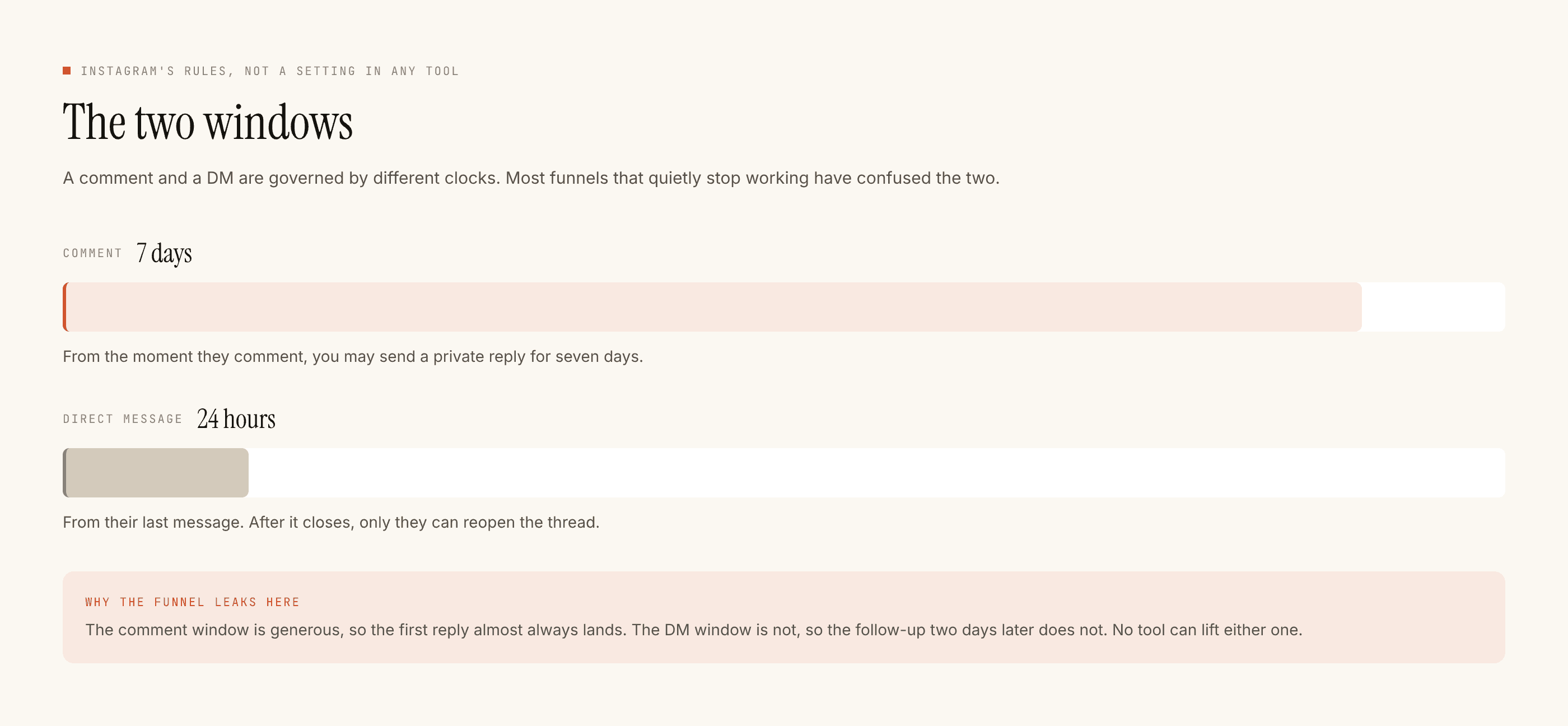
If your event plan has the words "reminder the day before" in it, the reminder is an email, a calendar invite, or an SMS. It is not this. There is no broadcast and no sequence here, and the platform would not permit one anyway.
Build it as phases, and switch rather than edit
The temptation is one automation you keep editing as the event approaches. Do not. Build a separate automation per phase, scoped to the posts belonging to that phase, and switch them on and off.
- Announce. Trigger on a word you put in the caption. Reply with the date, the city, and where to register. Nothing about seats, because you do not know yet.
- The week before. A different post, a different automation. Logistics: venue, nearest metro, timing, what to bring, whether food is included. This is the phase with the highest volume and the most repetition, so it is where the templates pay.
- The day itself. Almost everything off. You are at the event and nobody is reading Activity. If anything runs, it says one thing: we are live, here is the room. Quiet hours matter more than usual here, because an evening event and a 9pm quiet-hours setting will silently hold exactly the messages you wanted answered.
- After. New automation, new post, new tense. The recording, the photos, the next date. Nothing carried over from before.
Switching is a single act you can do at 11pm on your phone. Editing is a rewrite you will do badly at 11pm on your phone. That is the entire reason for the rule.
Which surface you are on decides which clock applies
Events generate chatter across all three surfaces and they do not behave the same way.
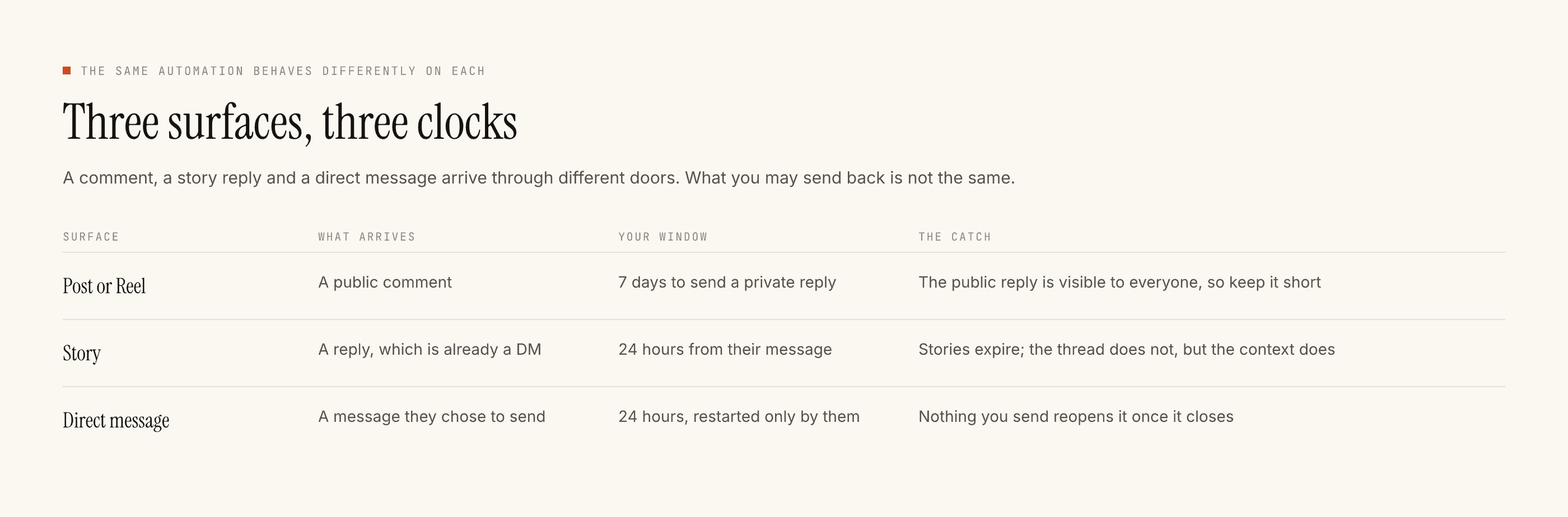
The practical consequence: your countdown stories, your day-of stories, your reposts of attendees — that is manual work by a human at the event. Build the automation around the announce post and the logistics post, and staff the rest.
What must never be automated for an event
Anything that is a commitment about a scarce or changing thing.
Seat availability. We do not hold inventory and cannot count anything. A template saying "seats still available" is true until it is not, and the moment it is not, it is still sending.
Ticket confirmation. Nothing here confirms a booking, issues a ticket, or takes a payment. There is no ticketing integration and no calendar integration.
Venue or time changes. If something moves, that is a post, a story and an email, all written by a person. Do not discover a venue change through an automated reply that still names the old address.
Refunds and cancellations. Put refund, cancel, postponed and complaint on the negative keyword list before you go live, not after the first one arrives.
The morning after
Two things, in this order.
Export the leads. Everyone who asked about the event is a lead row with the post and keyword that produced them. It exports as a CSV. There is no CRM sync and no one-click integration, so if it needs to reach anything else, it reaches it as a file you download and upload. Do this before you tidy anything up.
Read Activity. The blocked list tells you what the event actually did: how much arrived after hours, how often a human took over, how many replies were stopped because the DM window had closed. That is your operational debrief and it is more honest than the recap post.
The wider version of this problem
An event is the sharpest case of a general rule: any template containing a date, a price, a deadline or a stock claim belongs to a campaign automation, never an evergreen one. Events make you learn it because the expiry is dramatic and the same weekend.
Seasonal campaigns teach the same lesson more slowly and more expensively, because the expiry is quiet and nobody notices for months. That teardown is here, and it is worth reading if you run anything that recurs.
For the mechanics underneath all of this, the checks explain what stops a send and why, and the paced setup guide is the version to follow if this is your first automation and the event is in three weeks.