Playbooks · 5 min read
Writing an Honest ROI Report With No Attribution at All

There is no ROI report in this product, and there is not going to be one produced by pressing a button, because the ingredients for it do not exist. No link tracking. No conversion events. No attribution. No way to join a person in your leads list to a payment in your bank account.
If you need a monthly report — for a client, for a partner, for yourself — you write it by hand. This post is about what can honestly go in it, which is more than nothing and less than the reports people are used to receiving.
The shape that survives scrutiny has three sections: what it cost, what it did, and what we believe and why. The first is arithmetic. The second is counting. The third is clearly labelled as belief, and that label is the thing that makes the whole document trustworthy.
Section one: what it cost, exactly
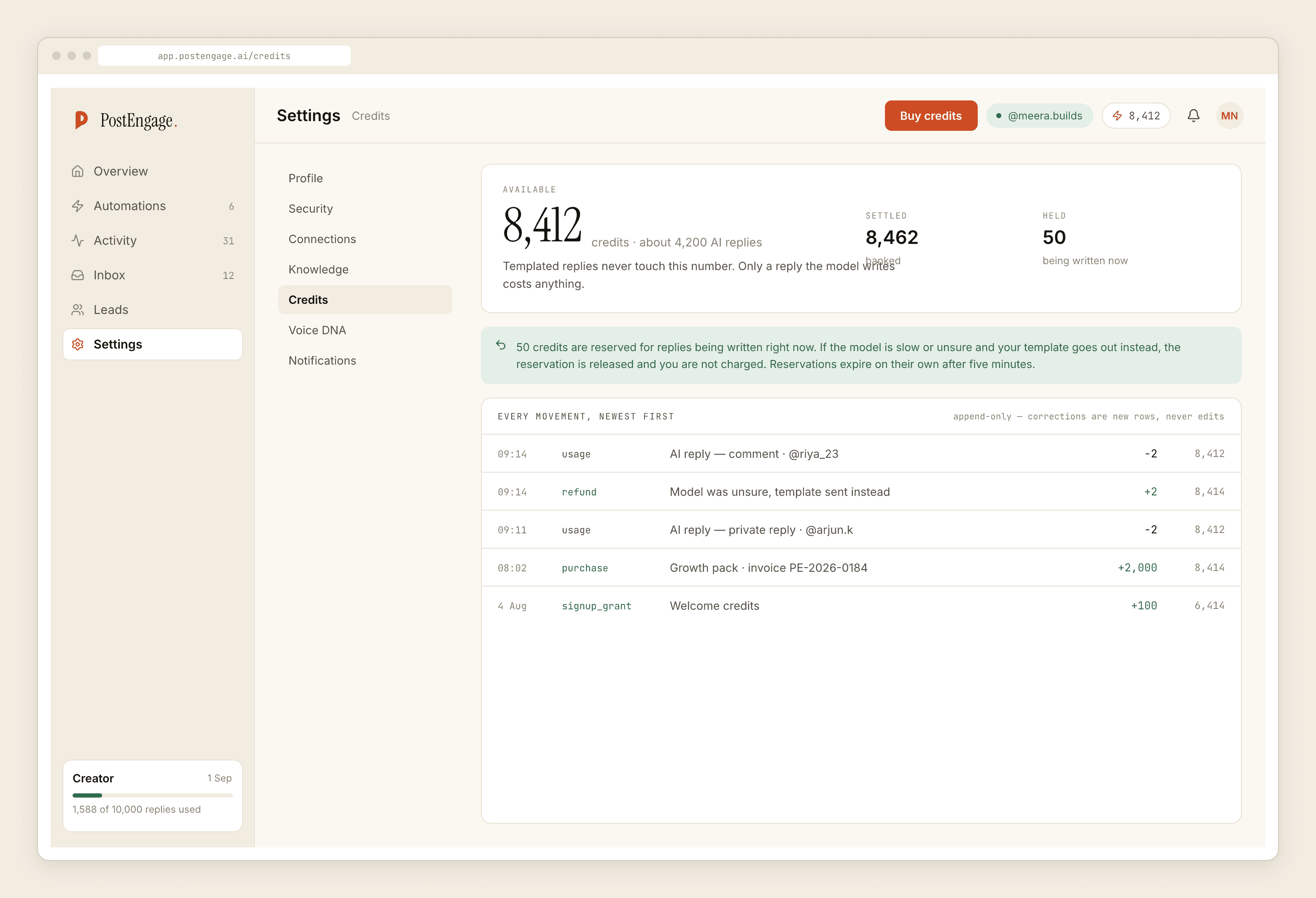
This is the only part that is genuinely precise, and it is precise to the rupee.
The credit ledger records one row per generated reply. One credit, one reply. Templated replies are free and unlimited and never appear in it, which is why a heavily templated setup produces a very short ledger. The free tier is 100 credits with no card; packs start at ₹499.
Add the time. Hours to build the automations, plus whatever you spend each week reading Activity and answering the messages the automation routed to you. Estimate it and say that you estimated it.
That is your denominator, and it is defensible. You can put it in front of anybody.
Section two: what it did, counted
Four counts, all of them real, none of them revenue.
Replies sent. How many people got an answer they would not otherwise have got, or would have got much later.
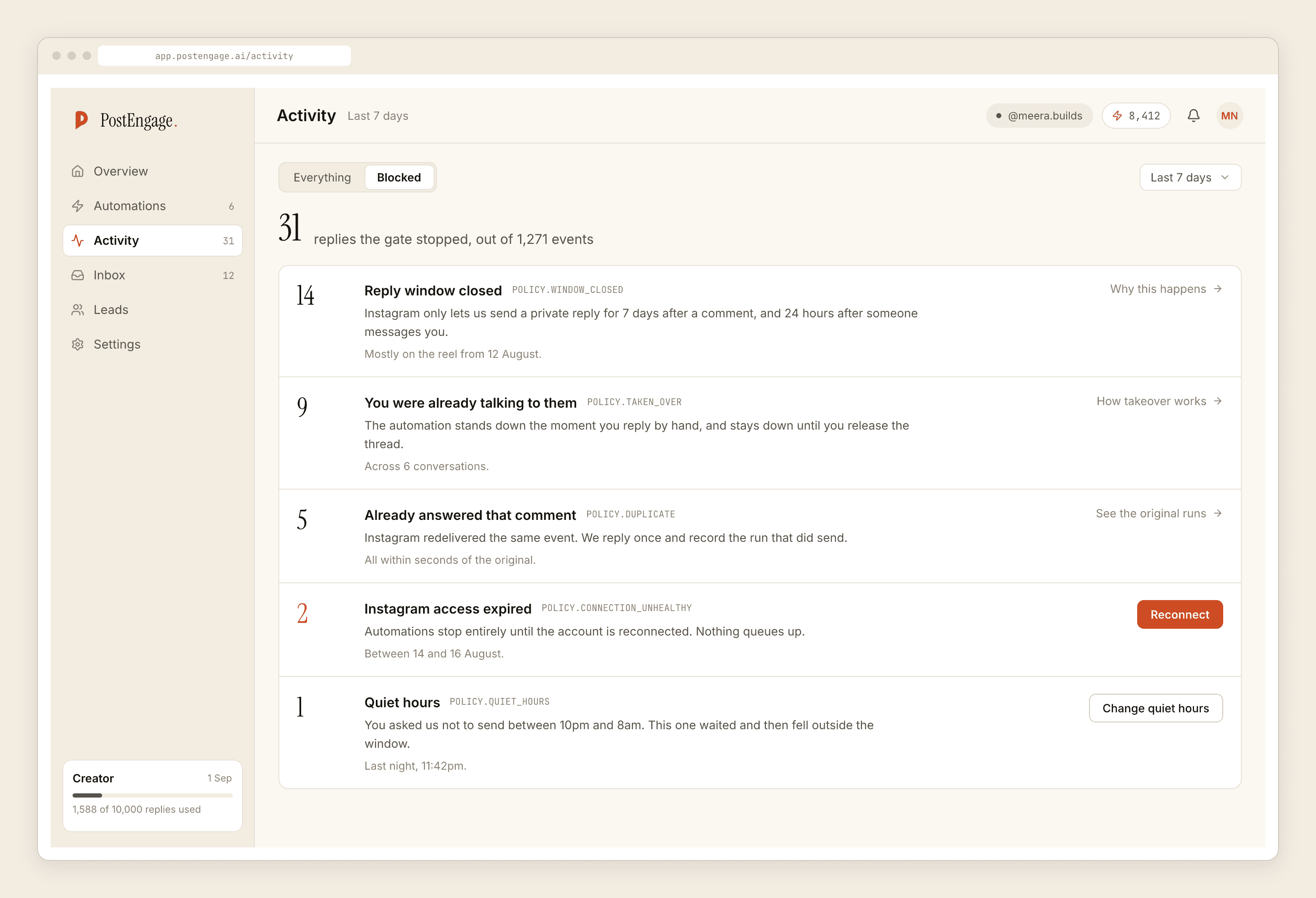
Replies blocked, and why. From Activity, grouped by reason. This is the most interesting number in the report and the one clients never expect. A stack of window rows means comments arriving on posts older than seven days. rate_budget means a post travelled and the cap held the queue.
Leads captured. People who typed something and are now written down with what they said and which post caught them.
How many replied. The single most meaningful count available, because a reply is the only unambiguous evidence that a real person read the message and engaged with it.
Section three: what we believe, and why
Now the hard part. You cannot say how much revenue this produced. Nobody using this product can, and anybody presenting such a figure has estimated it and dressed the estimate as a measurement.
What you can do is be explicit about the reasoning and the evidence:
- Name the conversations. Two or three, by handle, with what they said and what happened afterwards. Verbatim beats summary. A client remembers one real customer sentence longer than any chart.
- Ask, off Instagram. Add "how did you hear about us" to your own checkout, invoice or intake form. It is imperfect and self-reported and it is still the only real link between the inbox and the money. The argument for asking instead of inferring is worth reading before you promise anybody attribution.
- Keep the two ledgers apart. Instagram activity in one column, revenue in another, with a sentence explaining what connects them and how confident you are. Do not multiply across the gap.
- Say what changed operationally. Nobody waits until Monday for an answer. The 2am enquiries are captured. Comments on old posts stopped disappearing. These are outcomes, they are true, and they are why people keep paying for the thing.
The time-saved calculation, done without lying
The most common way to make an ROI report look good is replies sent multiplied by minutes per reply multiplied by your hourly rate.
You can do this. You cannot present it as measurement. The count of replies is real; the minutes figure is your own guess; the hourly rate is a modelling choice. Write it as "at our estimate of X minutes per reply" and let the reader adjust the assumption. A report that shows its arithmetic is more persuasive than one that shows a total, because the reader can argue with it and end up agreeing.
An estimate labelled as an estimate is evidence. The same estimate labelled as a measurement is a liability.
For agencies reporting to clients
The pressure to invent a number is strongest here, because the client expects a dashboard and you are handing over a page of counts.
The move that works is to reframe the deliverable before the first report rather than after. Say plainly that Instagram DMs are an untracked channel, that no tool on the official API attributes them, and that you will be reporting cost exactly, activity exactly, and outcomes as evidence rather than arithmetic. Clients accept this far more readily than agencies expect, and it protects you the first time somebody checks a claim.
Then over-deliver on the third section. Real quotes from real conversations, and the one operational change that would not have happened otherwise.
Where the counts come from
Three stores, and there are only three: Activity, Leads and the credit ledger. What a single row in each of them can and cannot tell you — including the joins that do not exist between them — is documented in detail, and it is the piece to read before you design your report template. When it comes time to move the lead data somewhere else to work with it, it leaves as a CSV, which is the whole of the export story.