Playbooks · 5 min read
Best Time to Post on Instagram? Read Your Own Comments First

Every few months a new chart goes round claiming to know the best time to post on Instagram. They are averages across millions of accounts in every timezone, so the answer they give is an answer about nobody in particular.
Your own account already has better data. Each comment on your posts has a time on it. Put a month of them on a grid of weekdays and hours and the pattern of your actual audience shows up. This page explains how to read that grid, how the Content page turns it into a suggested time, and when you do not have enough comments for it to mean anything yet.
Why your comments beat a chart
A published chart cannot know three things about you. Where your followers live, what they do for a living, and what your posts ask of them. A bakery's followers and a night-shift nurse's followers keep very different hours, and both differ from an account whose audience is spread over four timezones.
Comments are a good signal for a practical reason. Each one is a real person acting at a real time, and the account owner can see them for every post. They are also the action that matters most if your post asks people to comment a word to get something in their DMs.
A global best-time chart answers the question for an average account. Your comment history answers it for yours.
How to read the grid
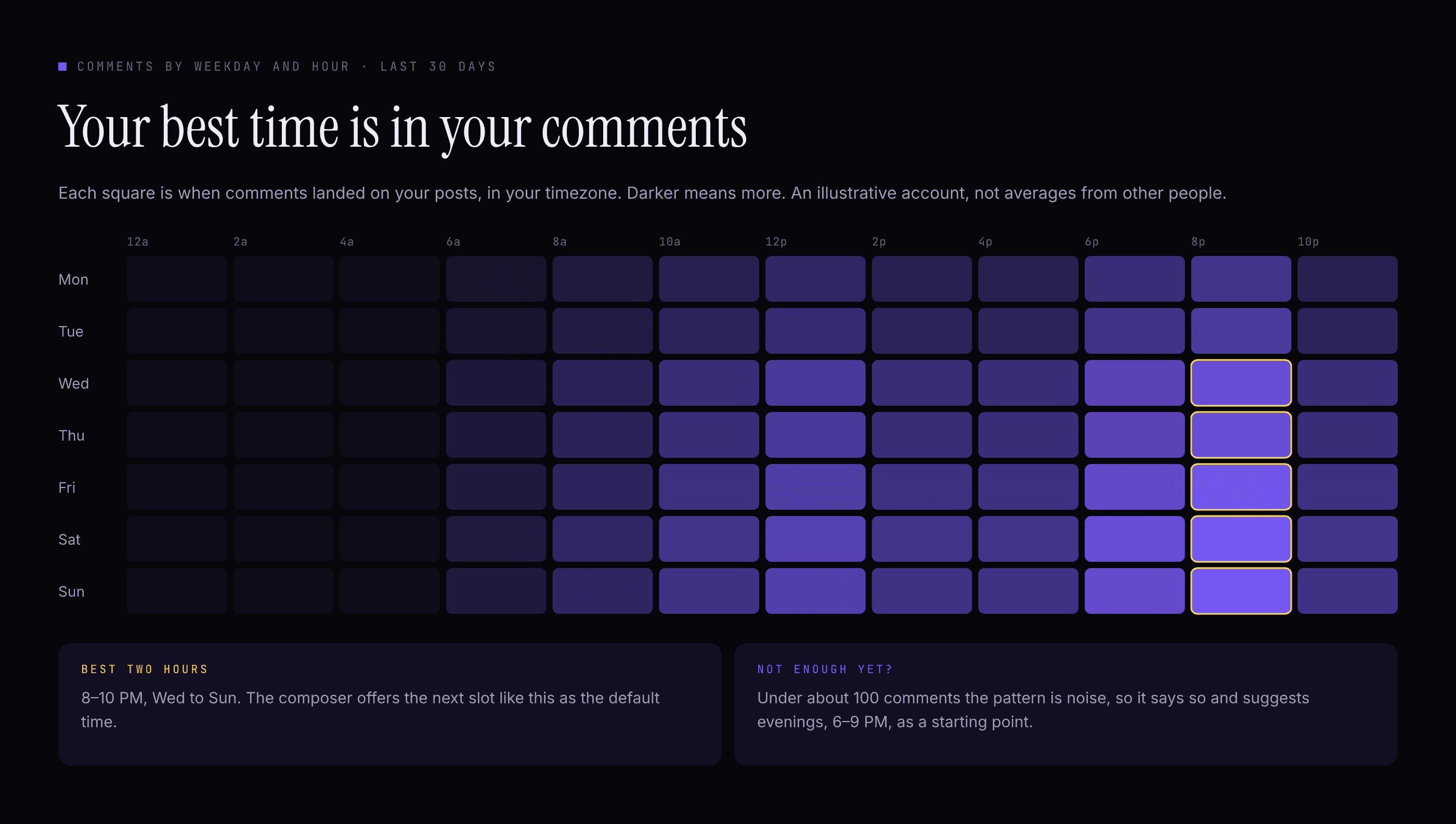
Rows are weekdays and columns are times of day, in your timezone. The figure groups them in two-hour bands to fit the page; the card in the app shows each hour. Each square counts the comments that landed there over the last 30 days. Darker means more.
Three things to look for:
- A stretch, not a spike. One hour that lit up because a single post took off is not a habit. A run of two or three busy hours that repeats across several days is.
- Which days carry it. Plenty of accounts are busy in the evening on some days only. "Wednesday to Sunday" is more useful than "evenings".
- The quiet hours. Knowing when almost nobody comments is as useful as the peak. That is a bad time for a post that asks people to act.
How the suggestion is worked out
The Content page does that reading for you. For each connected account it takes the comments from the last 30 days and places them on a seven-by-24 grid in the account's timezone. Then:
- It smooths each hour with its neighbours. That way a steady stretch beats one lucky hour.
- It ignores thin squares. An hour with fewer than three comments is not ranked at all, however it looks.
- It finds the best two-hour stretch and the days that carry it. The card reads something like "7–9 PM, Wed to Sun", and lists your top hours with how many comments landed in each.
- It offers the next good slot. When you start a new post, the composer fills in the next of your three busiest hours that falls in the coming week, at least 20 minutes out. You can change it.
If there are fewer than about 100 comments in the window, it does not pretend. The card says how many it has, and the suggestion falls back to evenings, 6 to 9 PM, labelled as a common starting point rather than something learned from your account.
What to do with the answer
The busy stretch is not where every post goes. It is where the posts that ask for something go.
If a post says "comment GUIDE and we will send it", it needs people around to see it while it is fresh. Schedule it in your busiest stretch, with its comment-to-DM rule attached so the first comment is answered straight away. The scheduling guide covers that.
Posts that ask for nothing are more flexible. They can fill the quieter days, and they keep the account active without competing with your important evening.
Then look again in a month. Audiences shift with seasons, school terms and whatever you started posting about. A suggestion based on the last 30 days keeps up with that on its own, but it helps to notice when the peak moves.
Checklist
When there is not enough data yet
Small accounts often sit under the line for a while, and that is fine. Post at evenings for a few weeks, keep asking questions in captions so people have a reason to comment, and the grid fills in. Spreading posts across different days and hours early on helps too. You cannot learn that Tuesday mornings work if you never post on a Tuesday morning.
Scheduling and best times are on every plan, including Free. If you are planning a whole week rather than one post, the content calendar guide puts it together.
Questions people ask
What is the best time to post on Instagram?
The best time for your account is when your own followers comment, which a generic chart cannot know. Look at when comments arrived on your posts over the last month, by weekday and hour, in your timezone. If you have too few comments to see a pattern, evenings are a reasonable place to start.
How many comments do I need before my own data means anything?
We use about 100 comments over 30 days as the line. Below that, one busy post can make a random hour look like a habit, so the suggestion falls back to evenings and says so.
Why use comments rather than likes or reach?
A comment has a timestamp and a person behind it, and it is the action a comment-to-DM post needs. It is also something the account can see for every post without extra permissions.
Does PostEngage pick the time for me?
It suggests one. When you start a new post, the composer fills in the next of your three busiest hours that falls in the coming week, and you can take it or choose your own.