Playbooks · 6 min read
Flash Sale Automation: Plan for the Load, Then the Takedown

Most automations you build handle a trickle. A few comments an hour, spread across posts, arriving at whatever pace your account normally runs at. A flash sale is not that. A flash sale is six hours in which everything that would have happened over a fortnight happens at once, followed by a moment after which every sentence you wrote is false.
Two problems, and they need separate preparation. This post is about both, in that order.
The load half
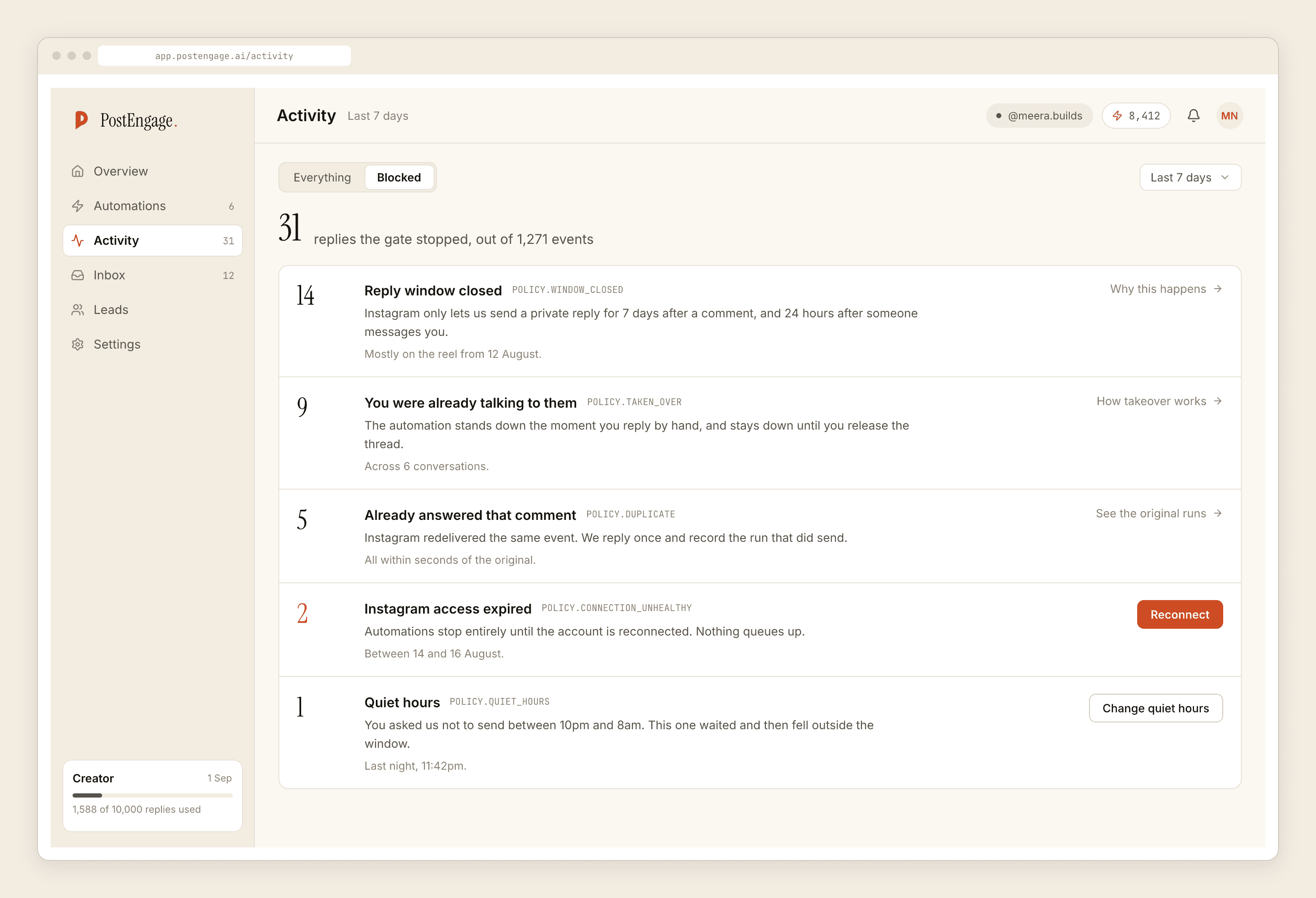
When a sale post travels, the comment volume does not queue politely. It arrives in bursts, and three checks in the gate go from theoretical to load-bearing.
rate_budget is the one that will produce most of your blocked rows. There is a cap on how fast replies go out, it exists to keep the account healthy, and during a flash sale you will hit it. Replies do not vanish — the check refuses the send and records the reason, which is the behaviour you want from a system that is protecting an account you cannot easily get back.
dedupe matters more than usual because Instagram redelivers events more often on posts with heavy activity. Without it, the person who commented once gets two identical DMs during your busiest hour.
cooldown stops the enthusiastic customer who commented on all four of your sale posts receiving four messages in the same minute.
Budget the rate before you budget the discount
The practical planning move is to decide, in advance, what the automation is allowed to spend its throughput on.
If you run one automation on the sale post with one broad keyword, everything competes for the same budget: the buyer asking whether the size is available, the person typing "🔥", and the account that comments on every post in the niche. The buyer waits behind the emoji.
So narrow the trigger. Use the specific-posts scope so the sale automation only watches the sale posts. Use negative keywords aggressively — nice, wow, first, bhai, and the reaction words your comments always fill with. Every comment your automation correctly ignores is throughput returned to a comment that mattered.
Throughput is finite during a sale. Every reply you send to nobody is a reply you did not send to a buyer.
The template you will have to delete
Now the second half, which is the one that causes lasting damage.
A flash sale template is a sentence with a deadline in it. "Flat 40 off till midnight, comment SALE for the code." It is true for six hours. It is a lie for the rest of the reel's life, and the reel keeps getting found, and the seven-day comment window means a comment left today is answerable today whether or not the sale ended on Tuesday.
This is the same rot that kills seasonal campaigns, arriving faster. The Diwali-template teardown is the long version of the argument, and a flash sale compresses it into a single evening.
Write the template knowing you will delete it:
- Put the sale template in its own automation. Never add sale wording to an automation that also answers your evergreen questions. When the sale ends you switch off a whole automation, and nothing permanent needed editing, so nothing permanent got broken.
- Scope it to the sale posts only. Under Advanced. This is the single setting that stops the sale wording leaking onto your back catalogue.
- Name the end time in the template, in words a customer can check. "Till 11:59 tonight, 22nd." Not "today", which is true forever.
- Put the takedown in the calendar before you press Go live. A time and a named person. Not "after the sale" — a time.
- Write the after-template now, while you are calm. One line: the sale has ended, here is where the regular prices are. You will not want to write it at midnight.
What must not go in the automation
Stock claims. "Only 3 left" is a fact that changes minute by minute and your automation has no idea what the number is. There is no inventory connection here, no stock lookup, no cart. A template that claims scarcity will be claiming it after the item is gone.
Anything about a payment. "Paisa kat gaya but no order" arrives during every sale. Put payment, refund, failed, paisa, charge, order nahi aaya in the negative keyword list so the automation sends nothing and the person reaches you. A cheerful sales template on top of a failed payment is the worst message this product can send on your behalf.
Any promise you cannot keep at volume. "Reply and we will confirm within the hour" is a commitment you make to everyone simultaneously.
Quiet hours and a sale that ends at midnight
Worth knowing before it surprises you. Quiet hours hold replies until morning. If your sale runs to midnight and quiet hours start at ten, the last two hours of comments get answered the next day, by which time the offer has expired and the template is wrong.
Either move quiet hours for the day, or end the sale earlier than the quiet window, or accept it and make sure the after-template is live before the quiet period releases its queue. Pick one deliberately. The bad version is discovering it from a customer.
What it costs
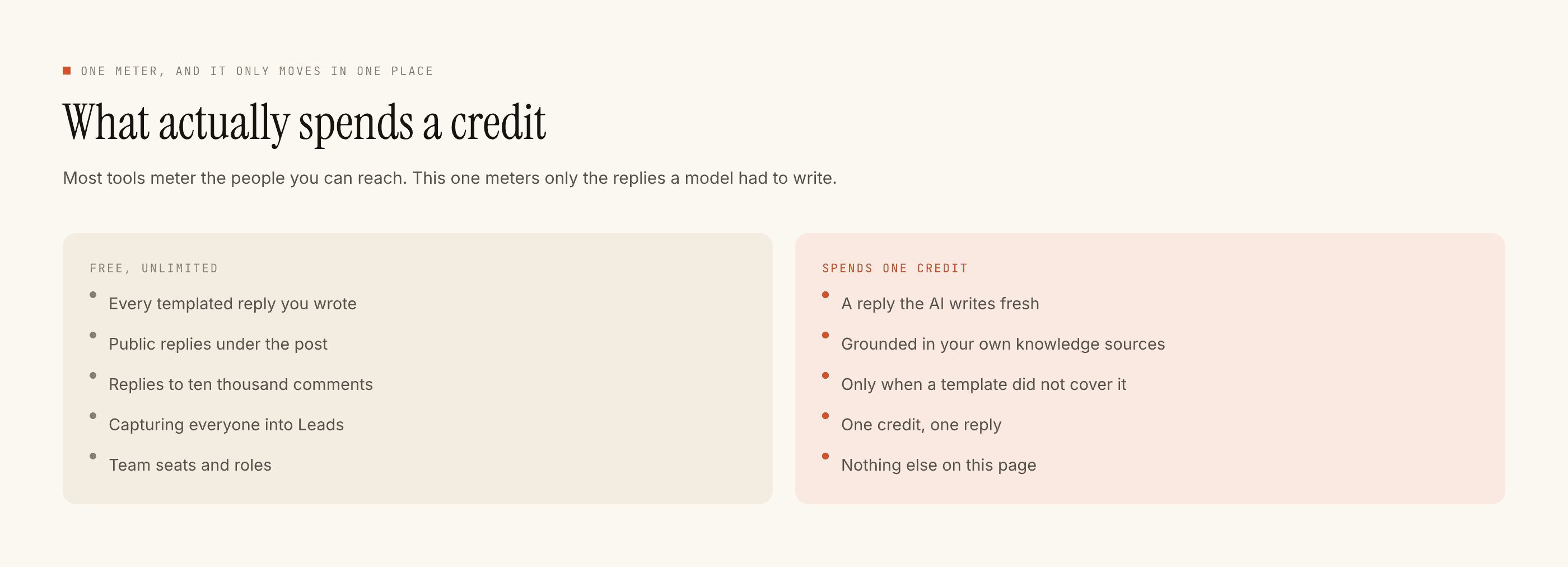
Templated replies are free and unlimited, which is what makes this shape of campaign reasonable — your busiest evening of the year costs nothing extra as long as the answers are ones you wrote.
Credits move only when the AI writes something new, one credit per reply. A sale generates unusual questions, so expect the meter to move more than on a normal week. Free tier is 100 credits with no card and packs start at ₹499. If the balance hits zero mid-sale, generated replies stop and your template goes instead — a downgrade in reply quality, not an outage.
The morning after
Switch the automation off. Export the leads as a CSV, because there is no sync and no integration and the file is the whole handoff. Then read one hour of Activity from the peak and write down which question you had no template for, because that is next month's template.
If speed under load is the part you want to work on, replying faster has its own post, and the event version of the expiry problem is worth reading alongside this one.