Tutorial · 5 min read
Is the WhatsApp Business API Free? The Honest Breakdown

Search for this and you will find two kinds of page. One says the WhatsApp Business API is completely free. The other says it costs a fortune. Both are describing a different layer of the same stack, and neither tells you which layer your money actually leaves from.
There are three layers. Only one of them is genuinely free, and it is not the one people mean.
Layer one: access to the platform
This part is free, and it is the source of every "free API" headline.
Meta does not charge a licence fee for the WhatsApp Business Platform. You create a Meta Business account, get the business verified, create a WhatsApp Business Account, register a phone number, generate a token, and start making requests. There is no plan to buy, no seat count, no minimum commitment. Hosting for the Cloud API sits on Meta's infrastructure rather than yours, and that hosting is not billed to you either.
Receiving is free too. Inbound messages arrive at your webhook and Meta does not meter them.
So if the question is "can I get API access without paying anybody" — yes, and you can do it this week.
Layer two: the conversations, which Meta charges for
This is where the money is, and it is unavoidable.
Meta prices WhatsApp per conversation, not per message, and it sorts conversations into categories — marketing, utility, authentication, service. Rates differ by the recipient's country and Meta revises them, which is exactly why you should distrust any article that quotes you a number. Check Meta's own pricing page on the day you are budgeting, not a blog post from last year.
Two structural things follow from per-conversation pricing:
- A long conversation is not more expensive than a short one within the same session. Answering three follow-up questions properly costs the same as answering one badly.
- Volume of contacts you initiate is the real cost driver. Replying to people who wrote to you behaves very differently on the bill from broadcasting to a list.
Layer three: whatever software you use
The API returns JSON. It does not come with an inbox, a template manager, an agent assignment model, analytics, or a way for a non-engineer to change the reply copy on a Friday.
Most businesses therefore buy software, and this is the layer where "free" gets marketed hardest. A vendor free tier is a real thing and it is usually bounded by contacts, active conversations, agent seats, or the number of automations you can run. It is a free tier of their product. It does not cover Meta's per-conversation charges, which pass through to you either directly or on the vendor's invoice.
When a page says the WhatsApp API is free, ask which of the three layers it is talking about. It is almost always the first, and the bill comes from the second.
The comparison worth making
We do not have a WhatsApp product to sell you, so here is the honest structural comparison instead — Instagram, where PostEngage does work, is metered on a completely different axis.
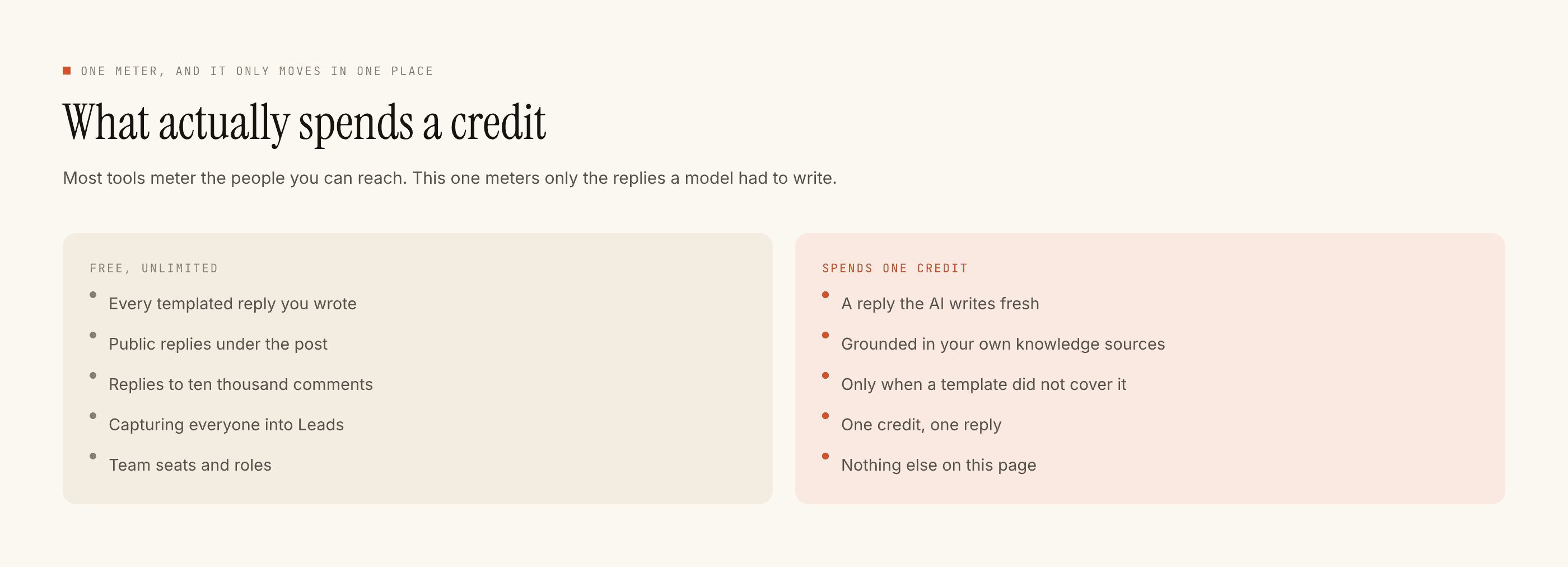
On Instagram, delivery costs nothing. Meta does not bill per DM. So a tool built on that API can make templated replies free and unlimited, which is what we do — a credit is spent only when the AI writes a genuinely new reply, one credit per reply. The free tier is 100 credits with no card, and packs start at ₹499.
On WhatsApp, delivery itself is the metered thing. That single difference explains why WhatsApp tooling is priced per message or per conversation almost everywhere you look, and Instagram tooling usually is not. It is not vendors being greedier on one channel. It is the underlying economics of the platform.
What "free" can honestly get you
If your budget is genuinely zero and you want to be on WhatsApp today, the honest answer is the free WhatsApp Business app on a phone. Away messages, quick replies, labels, a catalogue. No API, no integration, no automation beyond what the app itself does — but it is free in the way people mean the word, and for a small business answering a few dozen messages a day it is often enough.
The moment you want an order update fired by your store, or a reminder sent at 9am without someone tapping send, you have crossed into the Platform, and the Platform is metered.
The short version
The API costs nothing to reach. Conversations cost money, set by Meta, varying by category and country. Software costs whatever the vendor charges, and their free tier is about their software.
If you want the cost model in more depth — what drives it up, what pulls it down — that is a post of its own. If you are weighing this channel against the one we actually ship on, the comparison is here.