Playbooks · 5 min read
Your Back Catalogue Still Answers Comments, Years Later
Somebody finds episode 34 this week. It came out in 2024. They listen on a commute, come back to the grid, find the post you made for it, and comment asking whether the guest has written anything else.
Nothing else on Instagram works like that. A sale post is dead in a week, a launch reel is dead in nine days, a restaurant's menu carousel is a rolling present tense. A podcast episode is a library item, and the comment you just got is the ordinary behaviour of a library.
Almost all automation advice is written for content that decays. This one is not.
The window runs from the comment, not from the post
This is the mechanical fact that makes a back catalogue worth automating, and it is the one most people get backwards.
The seven-day comment window is measured from the comment. It has nothing to do with when you posted. A comment left today on an episode post from eighteen months ago is answerable today, for the next seven days, by an automation you built once and forgot about.
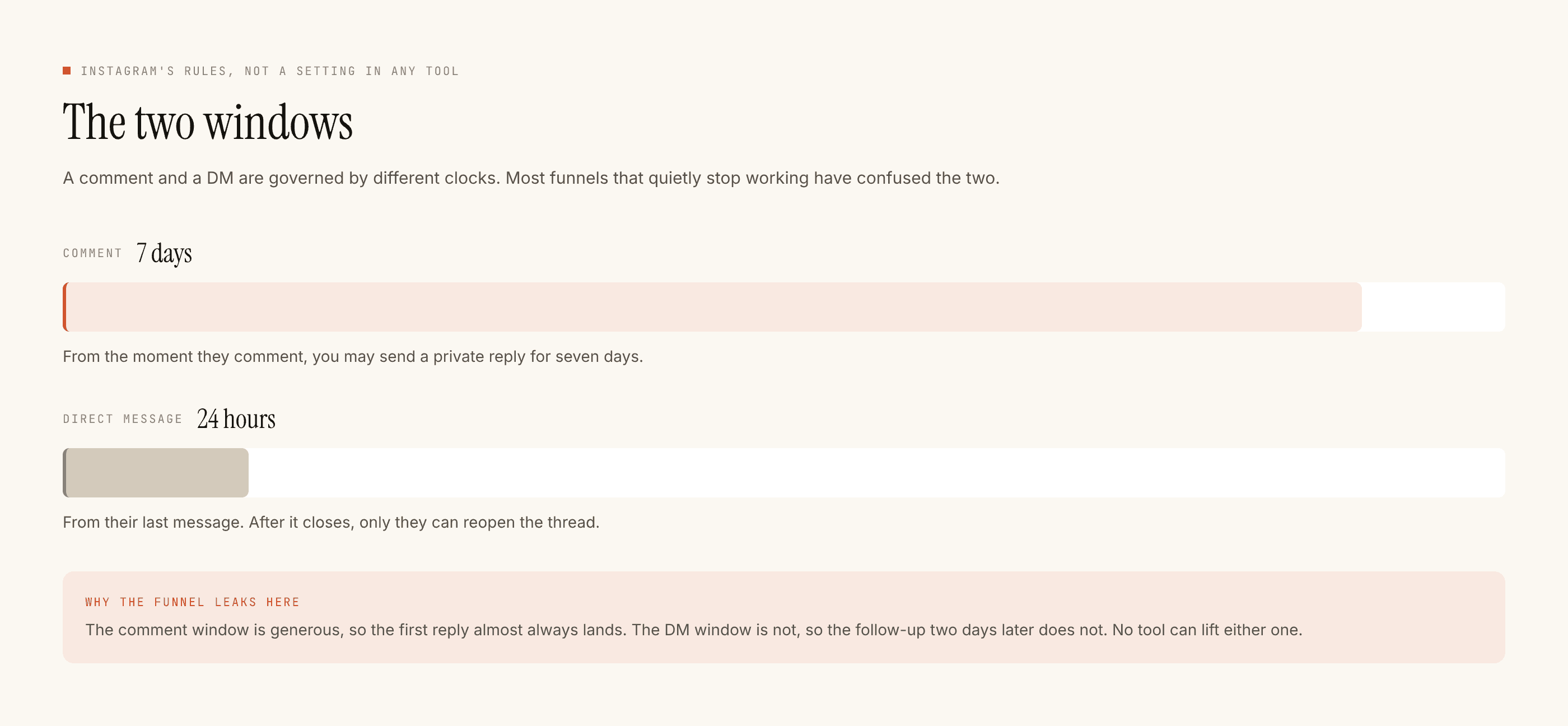
The DM clock behaves the way it always does — twenty-four hours inside a thread, restarted only by their next message — so the practical rule is the same as everywhere: put what they need in the first reply, because you do not get to reopen the thread on your schedule.
An automation per episode, and the set only grows
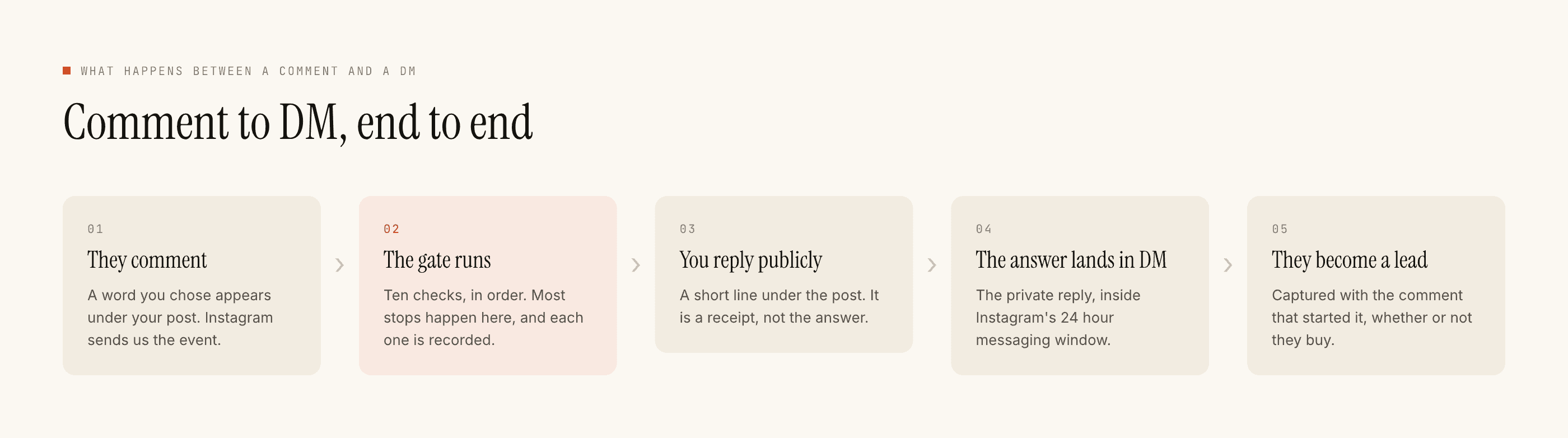
Because the trigger is a post plus its keywords, and Advanced lets you restrict to specific posts, the natural build for a show is one small automation per episode, added on the day you publish it and never removed.
Episode 34's automation sends episode 34's link. Episode 51's sends episode 51's. Each one is three lines of template, costs nothing to run, and keeps working for as long as the post exists.
- Pick a trigger word that is not in ordinary comments. For a show the temptation is
LINK, which appears in half your comment section already.EP34or the guest's surname fires only when somebody means it, and it survives being typed on a phone. - Say the word in the caption. "Comment EP34 and I'll send the episode." The line in the caption is what makes the automation exist for the reader — no line, no comments, no flow. This is the part that is genuinely your job and not the tool's.
- Restrict it to that post. Under Advanced. A show with sixty episode posts and one account-wide trigger is a show that sends the wrong link.
- Capture to Leads, on. Somebody who wanted an episode enough to comment for it is the closest thing a podcast has to a warm audience list.
- Test on yourself, then go live. The test runs the whole pipeline and delivers to your account, which for a per-episode build is the only way to catch the copy-paste error where episode 52 sends 51's link.
A show's automation gets more valuable with age, which is the opposite of every other account on this blog.
The other half of a podcast inbox is not listeners
Worth planning for, because it arrives in the same place and wants opposite handling.
Pitches. Guest pitches from publicists, from founders with a book, from agencies representing four people at once. Sponsor enquiries, some real and most not. And people asking to come on the show themselves, which is sometimes the best guest you will get that year and usually not.
None of that should be answered automatically. Put the vocabulary on the negative-keyword list — pitch, guest, feature my, sponsor, collab, PR, media kit — and route it to a human. A templated reply to a genuine sponsor is expensive, and a templated reply to a publicist is the beginning of a thread you will regret.
What this costs, which for a catalogue is nothing
Templated replies are free and unlimited. Sixty episode automations, each sending a fixed link, spend no credits at all — ever. A credit is spent only when the AI writes a new reply, and for a show that is a small minority of messages: the ones asking something genuinely unlike anything else.
Free tier is 100 credits with no card. Packs start at ₹499 when you need them.
What it will not do
It does not publish, schedule, or post anything. It does not read your RSS feed, know your episode numbers, or update itself when you release something — every episode automation is one you made. It cannot message people who have not messaged you first, so it cannot tell your followers a new episode is out. No WhatsApp, no CRM sync; captured listeners leave as a CSV. And it stands down for any conversation the moment you reply by hand.
If the comment-to-DM mechanic is new, start with how the flow actually works, then choosing the trigger word is the decision this whole build turns on. The paced setup guide covers the first week in the right order.