Comparison · 5 min read
Best Instagram DM Automation Tools in 2026, Compared

You have a reel that gets comments, you want each commenter to get a DM, and every tool in this category says it does that. They mostly do. Where they really differ is the part the landing pages bury: what the bill is counted in.
This post compares seven tools on that, using prices read from each vendor's own pricing page on 18 October 2026. We build one of the seven, so read our row with that in mind, and check every number before you pay. They move.
First, the one check that matters more than price
Every tool below that we could verify connects through Meta's permission screen. That matters more than any feature, because the alternative is a tool that logs in as you with your password, and acting as you is exactly what Instagram restricts accounts for.
You can check it in under a minute: click connect, and see where you land. If it is Instagram's own screen listing permissions, the tool uses the official API. If it is a form asking for your Instagram password, close the tab.
How the bill is counted
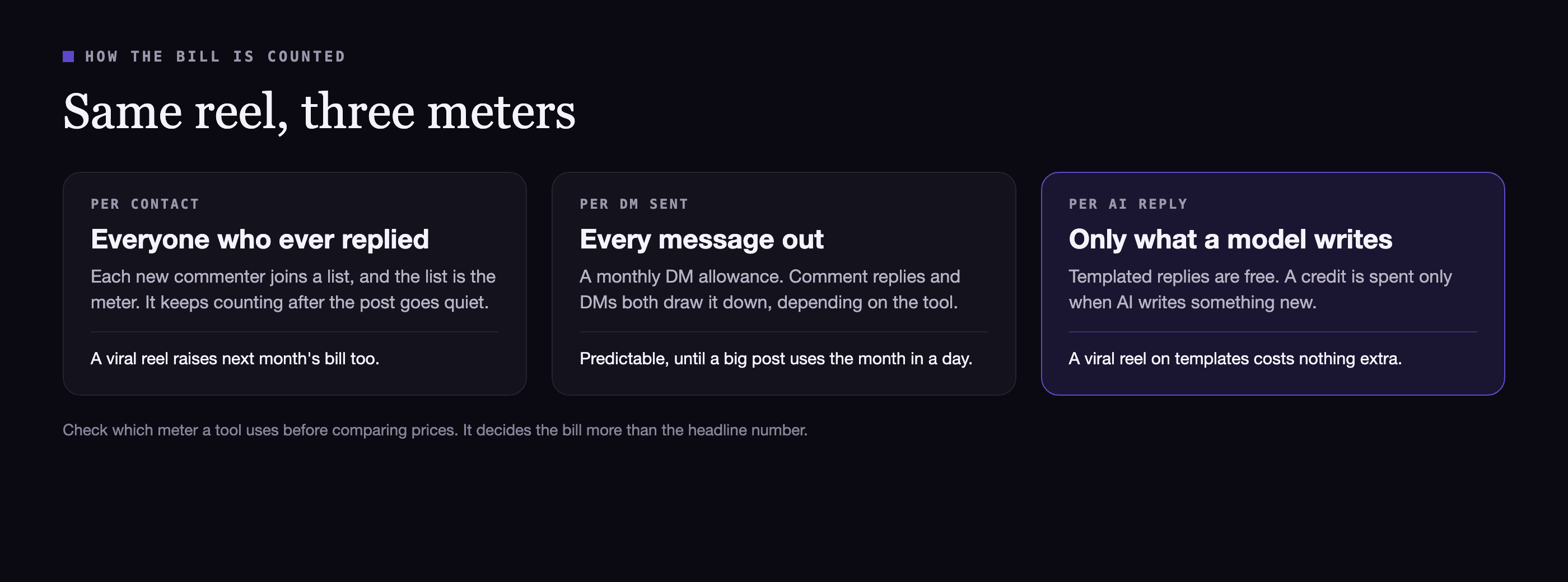
There are three meters in this category:
- Per contact. Everyone your automation ever spoke to joins a list, and the list is what you pay for. It keeps counting after the post goes quiet.
- Per DM. A monthly allowance of messages. Predictable, but one big post can use most of a month in a day.
- Per AI reply. Templated replies are free and you pay only when a model writes something new. This is how we price.
None of these is wrong. The right one is the one that matches how your account actually behaves: steady trickle, or occasional spike.
The comparison
Prices are the vendor's own, in US dollars, as listed on 18 October 2026. "Billed yearly" means the monthly figure assumes an annual payment.
| Tool | Free plan | Cheapest paid | What it counts |
|---|---|---|---|
| PostEngage | Unlimited comment replies, 1,000 DMs every 30 days, 1 account | Lite $4/mo, Creator $12/mo | AI-written replies |
| CreatorFlow | 500 DMs a month, 1 account | Pro $15/mo ($12 billed yearly), 5,000 DMs | DMs |
| LinkDM | 1,000 DMs a month, 1 account | Pro $19/mo, 25,000 DMs, 3 accounts | DMs |
| Zorcha | Unlimited messages and contacts, per its page | Pro $14.99/mo ($9.99 billed yearly) | Plan tiers and AI credits |
| Spur | None, 7-day trial | AI Acquire $12/mo billed yearly, 1 Instagram channel | AI credits |
| Chatfuel | None, free trial | Business $18/mo billed yearly | Plan plus AI credits |
| respond.io | None, 7-day trial | Starter $79/mo billed yearly | Monthly active contacts |
ManyChat is the name most people search for, and it is missing from the table on purpose. Its pricing page was behind a bot check every time we tried to read it, and third-party trackers disagree about its current free plan. Check manychat.com/pricing yourself; our notes on its free plan cover what to look for.
Which one for which account
You run comment-to-DM on reels and mostly send the same answer. Templates cover you, so you want a tool where templates are not metered. Ours keeps comment replies unlimited on every plan, and Lite at $4 removes the DM ceiling. LinkDM's free 1,000 DMs a month is also generous for this.
You post rarely but sometimes go viral. Avoid per-contact pricing. A single spike should not raise the bill for the months after it. A DM meter with a high ceiling (LinkDM Pro lists 25,000 a month) or a per-reply meter handles spikes better.
You want AI to write answers to varied questions. Compare what one AI reply costs, not the plan price. Our Creator plan includes 3,000 AI replies a month for $12. Spur and Chatfuel bundle AI credits into plans, and their pages define a credit differently, so read the definition before comparing.
You are a team handling Instagram alongside WhatsApp, email and web chat. That is what respond.io is built for, and the price reflects it. If Instagram is the only channel that matters to you, it is likely more tool than you need.
You manage several client accounts. Count accounts per plan: LinkDM Pro lists 3, our Studio plan includes 5 accounts and 3 team seats for $29, and Zorcha's higher tiers scale up from there.
What to test in the first hour
Pricing pages do not tell you how a tool behaves under pressure. These do:
- Connect through Meta's screen. Confirm it is the official API.
- Comment on your own post from a second account. Time the reply. A good tool answers in seconds.
- Comment twice. You should get one DM, not two. Duplicate DMs read as a bot.
- Turn the automation off mid-test. It should stop at once.
- Look for a log that says why. When a reply does not go out, the tool should tell you the reason, not leave you guessing.
Checklist
The short version
- Check the official API first, price second.
- Find out what the bill counts: contacts, DMs or AI replies.
- Match the meter to your account: steady trickle or occasional spike.
- Use the free plan on your best post before paying anyone, including us.
If you want to try ours on a real post, the free plan has no card and no time limit, and comment replies never run out. Our full pricing is on one page, and the comparison pages carry the date each rival's prices were last checked.
Questions people ask
What is the best free Instagram DM automation tool?
It depends on what runs out first for you. On 18 October 2026, LinkDM's free plan listed 1,000 DMs a month, CreatorFlow's listed 500, Zorcha's listed unlimited messages and contacts, and ours includes unlimited comment replies plus 1,000 DMs every 30 days. Count how many DMs your best post produced last month and pick the free plan that covers it.
Is it safe to automate Instagram DMs?
It is when the tool works through Meta's official API. You can check that yourself: connecting should send you to Instagram's own permission screen. If a tool asks for your Instagram password instead, it is acting as you, and that is the behaviour Instagram restricts accounts for.
Why is ManyChat not priced in this comparison?
Its pricing page sat behind a bot check every time we tried to read it on 18 October 2026, and third-party trackers disagree about its current free plan. We would rather send you to the source than print a number we could not read ourselves.
Do these tools work outside the US?
The Instagram side works the same everywhere, because it is Meta's API. What changes is billing currency and support hours, so check both before you pay.