Playbooks · 6 min read
Event Planners on Instagram: Never Confirm a Date
Open any event planner's inbox in season and the messages rhyme.
"27 November free ho?"
"Do you have the 8th of December open"
"14 Feb ko ek proposal setup karwana hai, possible?"
Almost every enquiry leads with a date, because the date is the only fixed thing the person has. Venue, budget, guest count and theme are all still moving. The date is not.
Which is unfortunate, because a date is the one thing this product cannot check. There is no calendar here. No booking, no availability, no sync with whatever you actually keep your bookings in. Nothing in an automated reply has any idea whether the twenty-seventh is free, half-committed, or already a 400-guest sangeet.
Why "yes" is the most expensive word in the template
The instinct is to write a warm, fast, positive reply, because the enquiry is hot and the competitor down the road answers in two minutes.
Consider what a confident automated yes actually costs in this trade. Auspicious dates cluster — the same twenty people are asking about the same four days in November, and they are asking in the same week. A template that reads as availability, sent twenty times, does not produce twenty leads. It produces a set of families who believe they have your team on a day you can staff once.
Unwinding that is not a refund conversation. It is a phone call to a mother of the bride six weeks out, and it costs you the referral chain behind her, which in this business is the entire pipeline.
In most inboxes a wrong automated reply loses a customer. Here it loses a date you had already sold to somebody else.
The same applies to the soft versions. "Should be fine!" is a yes. "I think we're open" is a yes. "Usually we can accommodate that" is a yes with a lawyer's hedge, and nobody reads the hedge.
Say the true thing instead, which is short
There is a sentence that is honest, fast, and does not cost you anything: the date is being checked by a person and you will hear back today.
That is genuinely all the reply needs to do, and it does something the enthusiastic version does not. It sets the expectation that a human is involved, which is exactly the impression an event planner wants to give in the first thirty seconds anyway. Nobody hires a planner because the DM was automated.
- Capture the date first. It is the field that sorts everything else. Whatever else the automation collects, it collects this.
- Ask what kind of event, in their words. Wedding, sangeet, corporate offsite, birthday, product launch. This decides who calls back.
- Ask where, at city level. Not the venue, not the address — whether it is in your operating radius is the only thing that matters at this stage.
- Stop there. No budget question, no guest count, no theme, no "which package are you looking at".
That last step needs defending, because the budget question is the one every planner wants automated.
The person messaging you is usually not the person deciding
This is specific to event work and it wrecks automated qualification.
The DM comes from the bride's cousin, the office admin who was told to "find someone", the friend who is good at Instagram, the younger brother. They are enthusiastic and they do not know the budget. Ask them in a DM and you will get a number, confidently given, invented on the spot, and now it is in your leads export as though it means something.
Worse, a template that quotes against that number is quoting to a person with no authority to accept it, who will relay a half-remembered version of it to the person who does.
Budget, scope and guest count are conversations with the decision-maker. The automation's job is to find out enough to get the right person on a call, and nothing more. Package names have the same problem in a smaller way: "Gold package" in a template gets read as a fixed scope at a fixed price, and event scopes are never fixed.
The lead time makes the twenty-four hour window irrelevant
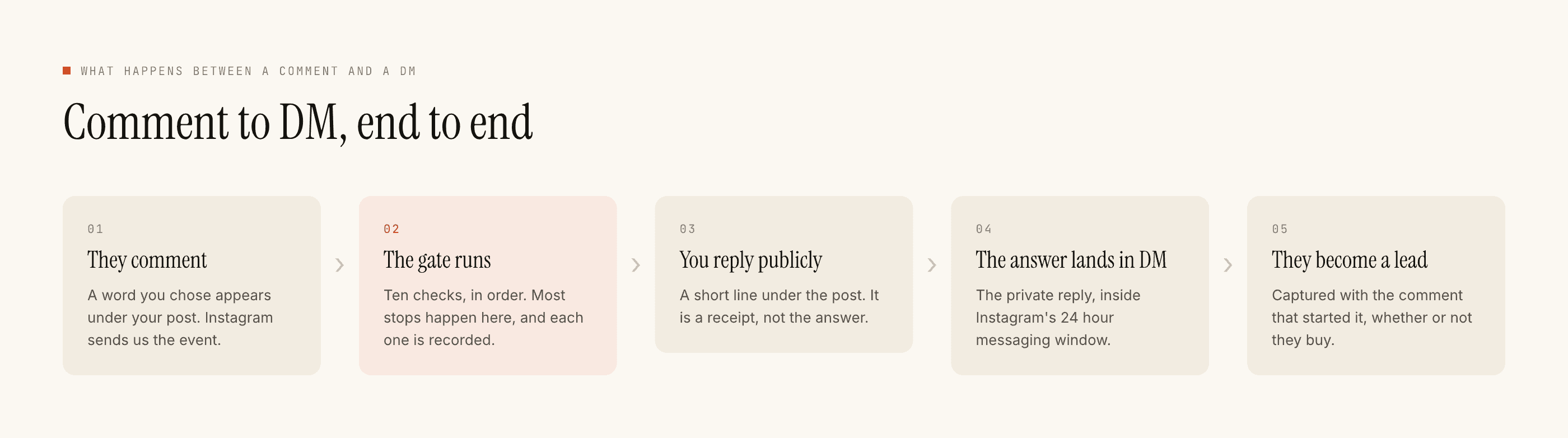
A decision about a December wedding gets made over six weeks, across a family, on a group call. A DM thread stays open for replies for twenty-four hours after their last message, and that clock restarts only when they write again.
Which means something people set up automations expecting the opposite of: the DM thread is not where this sale happens. It cannot be. There are no scheduled sends, no follow-up sequences, no reminders, and no way to message someone who has gone quiet for a fortnight. If the conversation stays on Instagram, it ends when they stop typing.
So treat the DM as one job only — getting the date, the type, the city, and a way to reach them off-platform — and treat everything after that as your own follow-up process on the phone. The leads export is a CSV of callbacks, not a pipeline the product will nurture for you.
Takeover, and the handover it protects
The moment anybody on your team replies by hand, automation stands down in that thread permanently. It matters here because event teams are chatty and multiple people touch the account during peak season. Nothing generated is going to land underneath a coordinator's careful "we can hold the 27th provisionally until Friday".
The related discipline is switching automations off. A temporary automation for a wedding-season post is fine. Leaving it running into February, still asking people about their December date, is the most common configuration error in this category.
What it will not do
No calendar, no availability, no booking, no holds, no reminders. No payment links for advances. No CRM sync — leads leave as CSV. No WhatsApp, no scheduled sends, and it cannot message anyone who has not written to you first.
Official Graph API only: seven days on a comment, twenty-four hours inside a DM thread, restarted only by their message.
Templated replies are free and unlimited; a credit is spent only when the AI writes a new one. Free tier is 100 credits, no card, packs from ₹499. An event build that refuses to confirm dates and refuses to quote runs almost entirely on templates.
If you shoot the events as well as plan them, the photographer's inbox has a different problem. Sorting which callbacks come first is worth doing when twenty people ask about the same date, and event-led campaigns covers the posting side.