Comparison · 7 min read
Which AI Image Generator for Instagram Posts in 2026?

You want AI to make your carousel slides or feed images, and every model calls itself the best one. For Instagram the questions that matter are narrower than the launch posts suggest. Can it make a 4:5 image? Can it put readable words on a slide? What does one image cost? Does it leave a mark Instagram reads as AI?
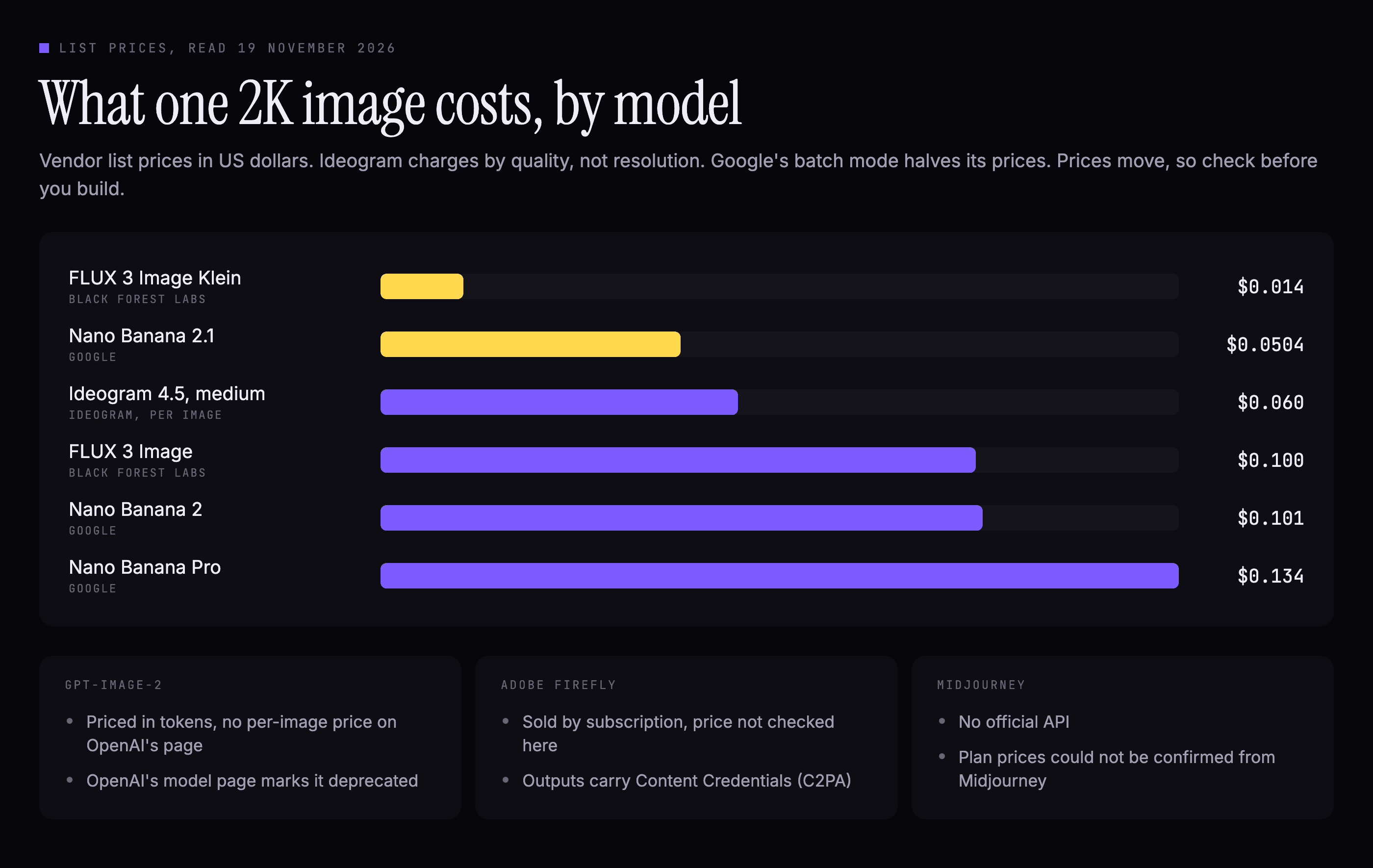
The short answer, as of 19 November 2026: for most carousels, start with Google's Nano Banana 2.1 at 2K. It costs about five cents an image, does 4:5 natively, and Google says it handles legible text. If you need lots of images with little text, FLUX 3 Klein is under two cents. If the slide is mostly words, try Ideogram 4.5. Every price below was read from the vendor's own page on that date. Prices move, so check before you commit.
What size should an AI image be for Instagram?
Meta's documentation for publishing through its API says feed images "must be within a 4:5 to 1.91:1 range", with widths from 320 to 1440 pixels and JPEGs up to 8 MB. A carousel can hold up to 20 items, images and videos mixed. 4:5 is the tallest shape allowed, so it fills the most screen. Aim for 1080x1350.
You will see blogs recommend 3:4 (1080x1440). That is taller than 4:5, which puts it outside the range in Meta's own doc. Some models offer 3:4 in their menu, Nano Banana among them. Don't pick it for the feed.
How each model gets you there:
- Nano Banana 2.1 has 4:5 built in. At 1K it returns 928x1152, at 2K 1856x2304, at 4K 3712x4608. The 2K and 4K files are wider than 1440, so resize to 1080 wide before posting. The 1K file is narrower than 1080, which is why we suggest 2K.
- gpt-image-2 takes custom sizes with edges in multiples of 16, up to 3840 pixels. 1080 is not a multiple of 16, so 1080x1350 is out. By our reading of OpenAI's rules, 1088x1360 or 1024x1280 should work, and both are exact 4:5.
- FLUX 3 and Ideogram 4.5 price by resolution or quality, and we did not confirm their aspect ratio lists from the vendor pages. Look for 4:5 in the size menu. If it is missing, generate larger and crop.
The models, side by side
| Model | Price per image | Text on slides | Marks it as AI |
|---|---|---|---|
| Nano Banana 2.1 | $0.0504 at 2K, $0.0336 at 1K | Google says legible, stylized text | SynthID, invisible |
| gpt-image-2 | Tokens only: $30 per 1M output tokens | OpenAI says it can struggle with precise placement | Not checked |
| FLUX 3 Image | $0.10 at 2K, $0.048 at 1K | Not checked | Not checked |
| FLUX 3 Image Klein | $0.014 at 2K, $0.009 at 1K | Not checked | Not checked |
| Ideogram 4.5 | $0.03, $0.06 or $0.10 by quality | Editable text layers, $0.09 an image | Not checked |
| Adobe Firefly | Subscription, price not checked | Not checked | Content Credentials (C2PA) |
| Midjourney | Could not be confirmed | Not checked | Not checked |
Google sells more than one Nano Banana, which confuses people. Nano Banana 2 costs $0.101 at 2K and Nano Banana Pro $0.134, so both cost about double or more what 2.1 does. Nano Banana 2 Lite is $0.0336 but makes 1K images only, which are smaller than a 1080-wide post. The original Nano Banana shuts down on 15 March 2027, so don't build anything new on it.
Which one for which job?
Carousel slides with words on them. Start with Nano Banana 2.1 or Ideogram 4.5. Google's page says 2.1 can make "legible, stylized text for infographics, menus, diagrams, and marketing assets", and Ideogram is known for text in images. Ideogram's Layerize option ($0.09 an image) splits the text into editable layers, which helps when a single word comes out wrong.
Our honest advice: let the model make the picture and the layout, and type anything that must be exact (a price, a date, your handle, a discount code) yourself in an editor. Even OpenAI's guide admits its model "can still struggle with precise text placement and clarity". One typo on slide four undoes the effort of the other five.
Lots of background images with little text. FLUX 3 Klein at $0.014 for 2K is the cheapest per image here. That matters when you make dozens of variations to pick from.
Product shots you need to be safe with commercially. Adobe says "everything generated with Firefly models is safe for commercial use", trained on Adobe Stock and public domain content. The Firefly app also offers partner models (Nano Banana 2, GPT Image 1.5, FLUX.2 [pro]), and Adobe's commercial safety line is about Firefly's own models, so check which one you picked.
The look matters more than anything. Many people choose Midjourney for its style. It has no official API, so it lives outside automated workflows, and we could not confirm its plan prices from Midjourney itself.
What about gpt-image-2?
OpenAI's model page for gpt-image-2 shows "Status: Deprecated" and names no successor. We cannot tell you what that means for its future. If you plan to build a workflow around it, check OpenAI's page first.
It is also the hardest model here to price. OpenAI charges $8 per million image input tokens and $30 per million image output tokens, and its page gives no per-image figure, so we left it out of the calculator. gpt-image-1.5 is still listed at $8 in and $32 out per million image tokens.
What will a month of images cost?
The calculator below prices a month that mixes models: Ideogram for the cover slides, Nano Banana 2.1 for inner slides, Klein for backgrounds, FLUX 3 for a hero image. Set a row to zero to price one model alone. The tries slider is how many images you make for each one you keep, and it starts at two.
A month of carousel images
At 2 tries per keeper, the month comes to
$3.18
- Cover slides, Ideogram 4.5 medium$0.48
- Inner slides, Nano Banana 2.1 at 2K$2.02
- Backgrounds, FLUX 3 Klein at 2K$0.28
- Hero image, FLUX 3 at 2K$0.40
List prices read from vendor pages on 19 November 2026. Prices move.
At the default two tries, that month comes to about $3.18. Images are the cheap part of AI content. If you add reels, the video is where the money goes, which we break down in what an AI-made Instagram post costs.
Will Instagram label your AI image?
It might, without you doing anything. Meta says it detects "the 'AI generated' information in the C2PA and IPTC technical standards" and invisible watermarks, and shows an AI info label when it finds them. Adobe Firefly outputs carry Content Credentials (C2PA). Google says every Nano Banana 2.1 image includes an invisible SynthID watermark.
Meta's rule that you must disclose yourself covers photorealistic video and realistic-sounding audio, so a carousel of illustrated slides is a lighter case. We found no official statement from Meta that AI-labeled posts get less reach, only commentary. The full rules are in Instagram's AI label rules.
The short version
Use 4:5 at 1080x1350. Start with Nano Banana 2.1 at 2K, move to Ideogram when the slide is mostly words, and use Klein when you need volume. Type exact words yourself. Check gpt-image-2's status before relying on it, and expect a Firefly image to be labeled.
If you also make reels, read our comparison of AI video models for Reels, and if you are still choosing your basic tools, start with AI Instagram tools for small business. We are building this into PostEngage; it is not out yet.
Questions people ask
What size should an AI image be for an Instagram post?
Ask the model for 4:5 and post at 1080x1350. Meta's publishing API documentation says feed images must sit between 4:5 and 1.91:1, with a width from 320 to 1440 pixels. Many models output larger than that at 2K, so resize before you post.
Can I use 3:4 images on Instagram?
We would avoid it. A 3:4 image is taller than 4:5, which puts it outside the 4:5 to 1.91:1 range in Meta's API documentation, even though several blogs recommend 1080x1440. Stick to 4:5 and you never have to wonder.
Which AI image generator is best for carousels with text?
Try Ideogram 4.5 or Nano Banana 2.1 first. Google says Nano Banana 2.1 can produce legible text for marketing assets, and Ideogram offers editable text layers. For anything that must be spelled exactly, like a price or a date, add the words yourself in an editor.
Will Instagram label my AI image?
It can. Meta says it reads AI information in the C2PA and IPTC standards and invisible watermarks, then shows an AI info label. Adobe Firefly images carry Content Credentials (C2PA) and Google's Nano Banana images carry an invisible SynthID watermark.