Product · 5 min read
Instagram Live and DM Automation: What Is Actually Certain

Most of what is written about Live automation is written confidently by people who have not checked. I would rather split this into what is certain, what is not, and what to build given that split — because the honest answer changes the design, and the dishonest answer gets somebody's launch night wrong.
What is certain
A direct message is a direct message, whenever it arrives. If somebody watching your Live opens your profile and messages you, that is an ordinary DM. It opens a twenty-four hour window counted from their send, an automation can fire on it, and nothing about the fact that you were broadcasting at the time changes any of it.
Comments on a normal post or Reel behave normally. Seven days from each comment, per comment. That is the surface everything else in the product is built around.
Takeover works the way you would want during a broadcast. The moment you answer a thread by hand, the automation stands down for that conversation and stays down. If you are replying to people in the inbox between questions on air, you are not fighting your own rules.
What is not certain
Whether comments typed into the Live comment stream during a broadcast arrive as the same comment events our automations fire on.
I cannot confirm that they do. We do not document Live comments as a supported trigger, and I am not going to tell you they work because it would be convenient. If you build a launch on an assumption in this position and the assumption is wrong, the failure is silent: the broadcast happens, the comments scroll past, and nothing sends.
Why the safe design is also the better one
Set aside the uncertainty for a moment. Even if Live comments did fire cleanly, building on them would be a poor idea for reasons that have nothing to do with the API.
The comment stream during a Live scrolls. A comment is visible for seconds and then it is gone, so a public reply underneath it has no audience and no permanence — the thing that makes the public reply valuable on a Reel does not exist here.
The broadcast also ends. Whatever the comment stream was, it stops being a place people arrive at, whereas a posted clip keeps collecting comments for as long as it circulates, each one opening its own seven days.
And a Live is the worst possible moment to be debugging anything. You are talking, watching the count, reading questions, and the last thing that should be load-bearing is a rule you have never seen fire.
Build the mechanism where you can watch it fail on a quiet Tuesday, not where you will discover it failed on the one night three hundred people showed up.
The shape that works
- Post the announcement in advance, with the keyword on it. A normal feed post or Reel saying the Live is happening, carrying the ask — comment a word for the reminder, the link, the joining details, whatever is real. This is an ordinary comment automation on an ordinary post and it behaves exactly as documented.
- On air, point people at the post and at your DMs. Say it out loud more than once, because viewers arrive throughout rather than at the start. "Comment JOIN under the pinned post" and "send me the word JOIN in DMs" are both instructions that land on surfaces that work.
- Post the clip afterwards. This is where most of the volume actually comes from. People who missed the Live watch the clip, and the clip keeps working for weeks. The automation on it is the same shape as on any other Reel.
- Leave the automation on the old clip. Each new comment opens its own seven days, so a clip that resurfaces in three months is still live distribution for an ask you already wrote. Turning rules off for tidiness is the most common way accounts lose this.
If you want to know for your own account
Do not take my uncertainty as a final answer and do not take anyone else's confidence either. Find out with evidence.
Go live for two minutes on a quiet afternoon with a rule armed on the account. Have a second account comment your keyword into the stream. Then read Activity. Either a row appears or it does not, and either way you now know something rather than believing something.
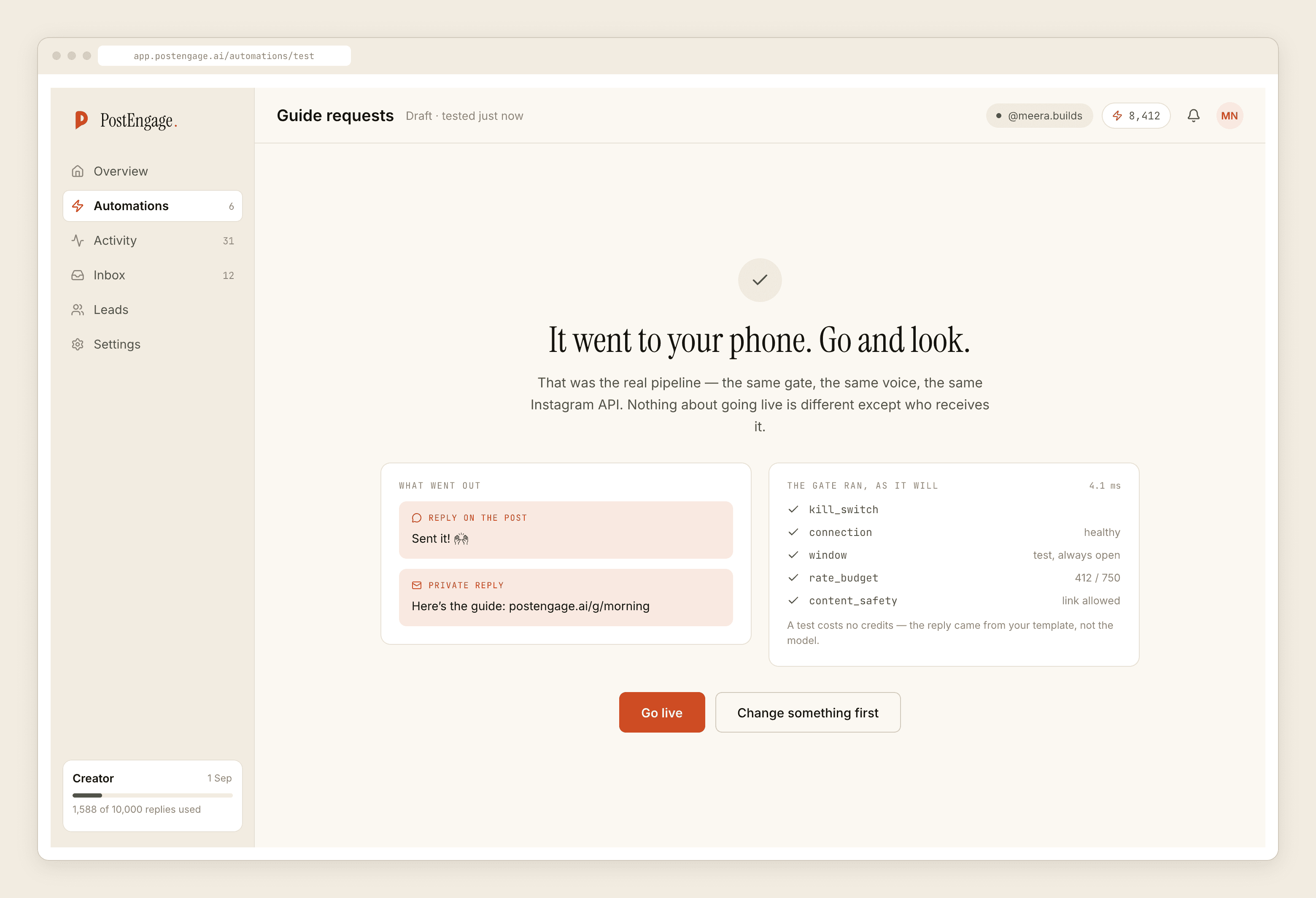
Test on myself is the right tool for the other half of this. It runs the complete pipeline — match, all ten checks, generation, send — and delivers to your own account, so you know the rule and the copy are sound before the day. It does not tell you which surfaces produce events, which is why the two-minute broadcast above is a separate experiment.
The gate does not care that you are live
Worth saying because launch nights make people nervous about limits. Every reply passes the same ten checks in the same fixed order regardless of what you are doing at the time: kill switch, connection, takeover, window, dedupe, cooldown, quiet hours, rate budget, credits, content safety.
Two of those are worth setting before a Live rather than during. Quiet hours, because Lives run late and a broadcast that ends at 11pm produces comments and messages that will be held until morning — sometimes correctly, sometimes at the cost of a window. And credits, because templated replies are free and unlimited while a credit is spent only when the AI writes a new reply, one credit per reply. If the announcement post is going to take a few hundred comments, template the first turn.
What we do not do
We do not broadcast, schedule, publish, clip, transcribe or analyse anything. There is no Live dashboard, no viewer list, no way to message people who watched without writing to you. There is no analytics product here at all.
We answer the people who sent you something, inside the window the platform allows. On a Live night the people who sent you something are the ones who commented on your posts and the ones who opened your DMs — which is exactly why the design above puts your ask on both of those and not on the scrolling stream.
If the Live has an offer attached to it, the more interesting problem is what happens in the inbox in the hours afterwards, and that is its own post. For the underlying comment mechanics, the reference is here.