Playbooks · 5 min read
Course Creators Have Four Inboxes. Here Is the Map

Being upfront about what this page is: an index. Several posts on this site cover automation for an online course business, they cover genuinely different problems, and somebody arriving from a search does not know which one they need. Rather than restate three arguments badly, this sorts them — and then covers the fourth inbox, which does not have a post of its own because it does not need one.
The four inboxes
They arrive in the same place, look the same to a keyword matcher, and want opposite treatment.
The pre-purchase inbox. People deciding. Is it live or recorded, how long is access, what language, is there a certificate, can I see the syllabus. Fixed questions with fixed answers — the most templatable inbox any business has. The two-populations problem is the one to read, because the whole difficulty is that these people are indistinguishable on arrival from the next group.
The launch inbox. Short, loud, and full of facts that expire. Dates, codes, seats, deadlines. This is a different automation from the pre-purchase one and it should be built to be thrown away. The launch-versus-evergreen split is that argument.
The support inbox. After the money moves. Access, logins, refunds, "paisa kat gaya but no access". Never automated, always routed. That is a post of its own and it is the one to build first, before anything that sells.
The alumni inbox. The one nobody plans for, covered below.
The alumni inbox
Six months after a cohort ends, a course account keeps receiving messages from people who already finished. They are not prospects and they are not support tickets, and they are the reason a course account's inbox never quiets down the way its creator expected.
What arrives: where is my certificate, does my access still work, is there a part two, can I get the updated slides, will you run this again, can I refer my colleague, can I use this on my resume, would you review my project.
Sorting those by whether a template can honestly answer them takes about ten minutes and it is worth doing once.
Safe to template, because the answer is identical for everybody and does not depend on any individual record: whether there is a next course and where to hear about it, how the referral works if you have one, where the updated material lives, what the certificate says and who issues it, whether recordings stay available.
Not safe, because the honest answer requires looking something up in a system we cannot see: whether this person's access is still live, whether their certificate was issued, whether they completed enough of it. We have no integration with your course platform — no enrolment lookup, no completion data, no certificate status. A template that says "your access is active" is guessing about a specific person, in writing.
What is true across all four
The mechanics do not change between them, and they are worth knowing before you decide anything.
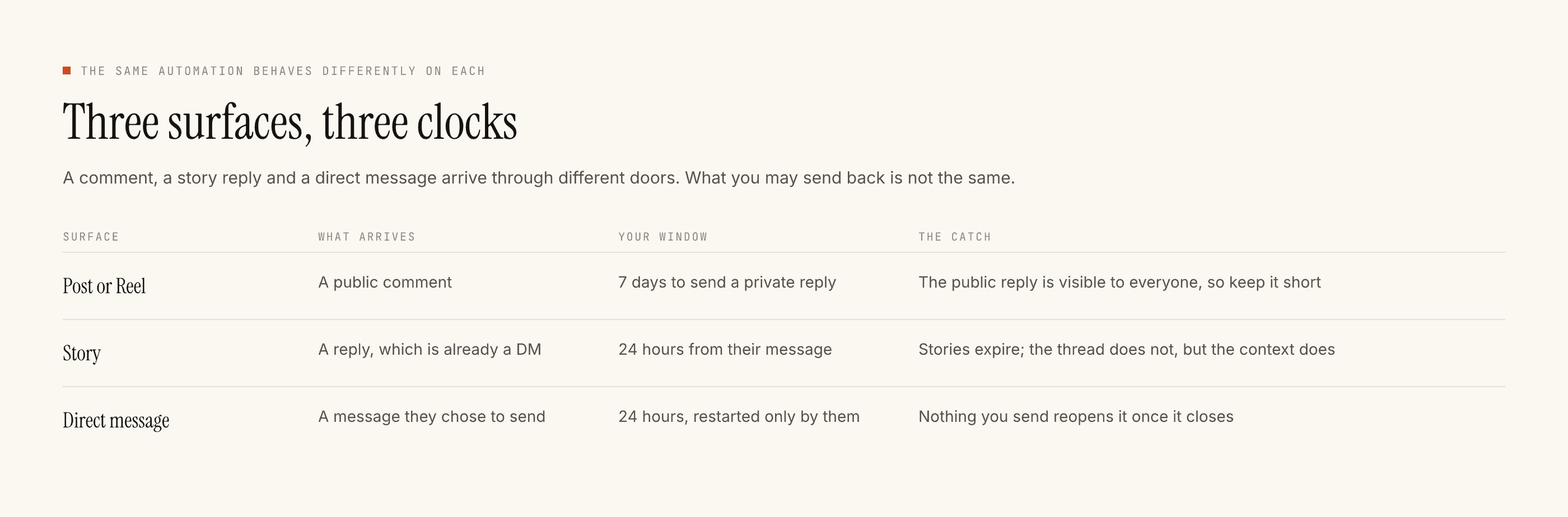
A comment can be replied to for seven days, counted from that comment rather than from the post — so an old reel picking up new comments is still reachable. A DM thread stays open for twenty-four hours from their last message, and only their next message restarts it. You cannot reopen it, and nobody can message a person who has not messaged first. Official Instagram Graph API, so those are platform limits rather than product choices.
There is no course-platform integration, no payment link, no cart, no checkout, no calendar, no CRM sync, no WhatsApp, no broadcast and no nurture sequence. Captured people land in Leads and leave as a CSV. We do not make content either: no captions, no scheduling, no publishing, no hashtags, no analytics, no follower-growth feature.
Templated replies are free and unlimited. A credit is spent only when the AI writes a new reply, one credit per reply. Free tier is 100 credits with no card, and packs start at ₹499. Most course accounts, built the way these posts describe, run almost entirely on templates.
Takeover: the moment you reply by hand in a thread, automation stands down there permanently.
The order to build in
If you are starting today and want the shortest honest path: build the support refusal list first, so nothing cheerful can land on top of somebody's payment problem. Then one pre-purchase automation, on your single best-performing post, with a trigger word you put in the caption yourself. Test it on yourself, read it on a phone, go live.
Then wait a week and read what got blocked before building anything else. That order is deliberate and the paced setup guide explains why each step waits for the one before it.
The launch automation comes last, because it is the one with an expiry date on it, and building it before you have a working evergreen setup means your first experience of automation happens during the week you have least attention to spare.
Whether to automate at all
Worth saying, since this page is meant to be the honest overview. If your course sells a handful of seats a year to people you already know, none of this pays for itself in saved time, and a well-written pinned post plus a link in the bio does the same job with nothing to maintain.
The point where it starts to matter is when the same eight questions arrive daily from people you have never met, at hours you do not work. That is a volume problem with a fixed answer, and a fixed answer is the only thing a template has ever been good at.