Playbooks · 5 min read
Bakery DMs: Nothing Is In Stock Until Someone Looks

Open a bakery's Instagram inbox at seven in the morning and you are looking at two completely different businesses that happen to share one account.
One of them is the counter. "Croissant hai abhi?" "Is the sourdough out yet?" "Kitne baje fresh nikalta hai?" These are questions about the next two hours. They expire faster than almost any message any business receives.
The other is the order book. "Need a 1kg chocolate truffle for Saturday, can you do it?" "Do you do bento cakes?" "Photo cake banate ho?" These are questions about next week, they are worth real money, and they are nothing like the first pile.
Most bakery automations fail because they were built for one of those inboxes and then quietly applied to both.
The word that must never get a confident answer
Available. Left. In stock. Bacha hai. Milega.
Whatever your regulars type, that family of words is the one place an automation can do genuine damage, because the honest answer changes hour by hour and lives nowhere a machine can reach.
There is no stock count to read. There is no catalogue sync, no inventory integration, nothing. A bakery's true inventory at 11:40am is a number of physical objects on a physical shelf, known to the person standing next to it and to nobody else. Your till does not reliably know it. The AI certainly does not.
So a reply saying "yes, we have it, come by!" is not a fact. It is a guess that sends somebody across town.
What replaces the confirmation is a bake schedule, which is fixed information and therefore safe. "Sourdough comes out around 8 and around 4, Tuesday to Sunday. Whether there is one on the shelf right now, only the counter knows — 98xxxxxxx." Nothing in that is a promise. All of it is useful. It goes out at 6am when nobody is at the till.
A bakery automation that says yes is a machine making a promise about an object it has never seen, in a shop it is not standing in.
The order book has the opposite problem
Cake enquiries look like the safe half. They are dated, they are considered, they arrive days ahead. It feels like exactly the thing to automate.
The trap is capacity. Somebody asks on Thursday for a Saturday cake, and whether you can do it depends on how many orders are already on the board for Saturday, whether your one decorator is working, and whether the flavour needs a day of setting. An automation has no view of any of that either. It is the same blindness as the shelf, pointed forward instead of backward.
So the order-book automation should confirm nothing about a specific date. What it can send, immediately, is the whole set of things that are true regardless of which Saturday it is:
- Minimum lead time, as a range. Standard cakes need this long, custom work needs longer, tiered work longer still. Ranges age well. Dates do not.
- What you actually make. Flavours, the eggless range, sizes, whether you do photo prints or fondant figures. Fixed facts about the business.
- How ordering works. Whether an order is confirmed by advance, whether design references are welcome, how collection or delivery works.
- Where the order is actually placed. One destination — the number that reaches whoever holds the board, and the hours somebody picks up.
That collapses a six-message conversation into one, and the person who owns the order book starts from a nearly complete enquiry instead of "cake chahiye."
Seven days of comments, one morning of bread
Here is the platform detail that bites bakeries harder than it bites anyone else.
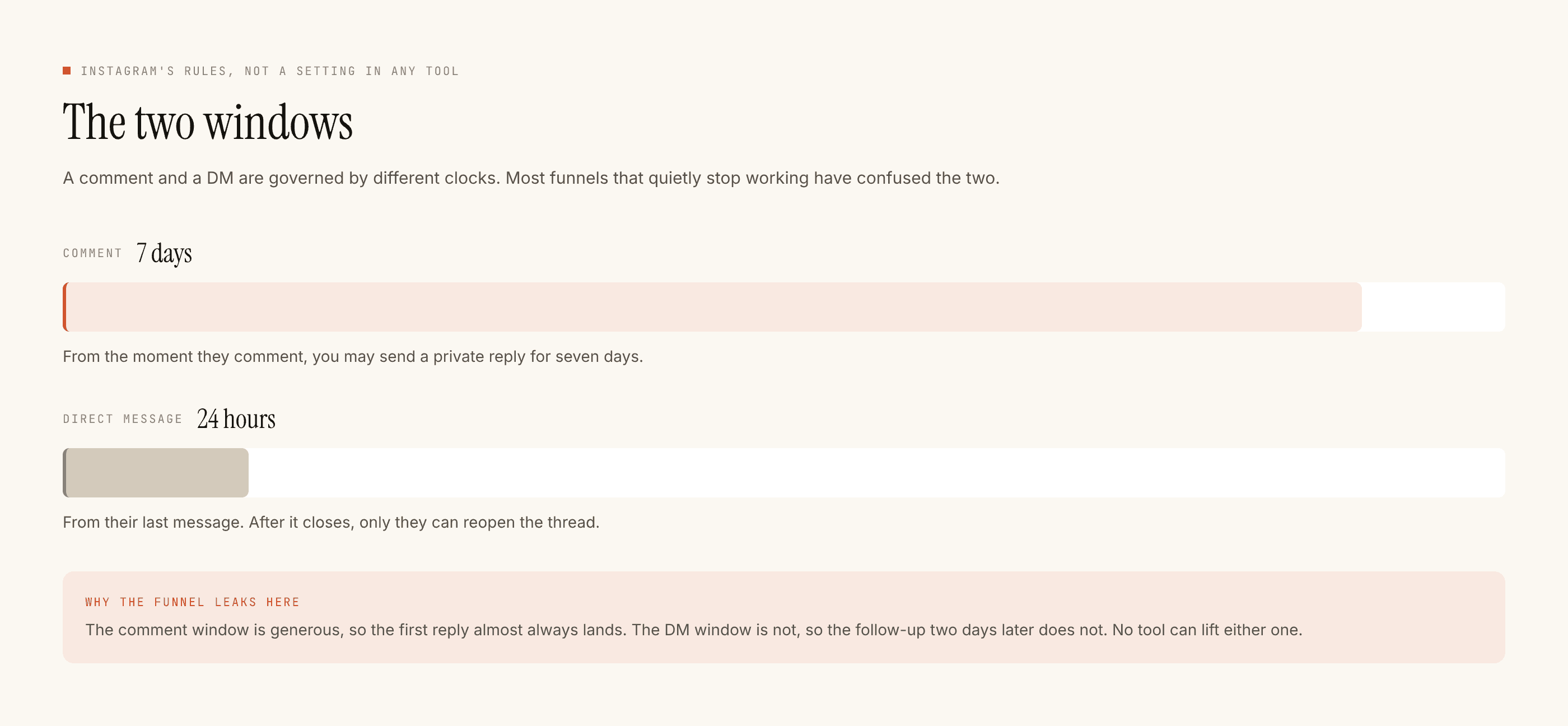
A comment can be replied to for seven days. Which means a reel of Friday's cinnamon rolls is still collecting comments on Wednesday, and your automation is still answering them, cheerfully, about a batch that was eaten before the weekend.
Nothing is broken. The rule is just that a bakery's evergreen automations have to be written about the bakery, not about the bake. "We do cinnamon rolls on weekends" survives seven days. "These are out now" does not survive the afternoon.
The DM clock cuts the other way and is the reason to run this at all: twenty-four hours, restarted only when the customer messages again. A 9pm question about tomorrow morning is worth nothing on Monday.
Eggless, and everything next to it
Indian bakery inboxes are full of this and it deserves care. "Is this eggless?" "Jain hai?" "Any nuts?"
The standing product fact is safe: that you have an eggless range, that these six items are in it. What is not safe is anything about this particular cake, this particular batch, or whether the kitchen keeps things separate — because that depends on what happened in your kitchen this morning, and a generated answer will sound certain either way. Route those to a person. The restaurant post makes this argument properly and it applies here without modification.
What this costs, and what it will not do
Templated replies are free and unlimited. A credit is spent only when the AI writes a new reply. A bakery inbox is unusually template-shaped — timings, location, bake schedule, lead times, eggless range, delivery radius — so most of the volume costs nothing at all. The free tier is 100 credits with no card and packs start at ₹499; a single-outlet bakery running six good templates may not need one.
It cannot see your shelf, your till, or your order board. It cannot take a payment or an advance. It cannot confirm a date. It cannot message anyone who has not messaged you first, and it does not do WhatsApp. Leads leave as a CSV, which for a shop this size is genuinely enough — export it before festival season and look at what people were asking for in October.
Start with the availability refusal, add the bake schedule, and read what actually stops a reply going out before your first heavy weekend rather than during it. If you also sell produce or run a counter with daily changing stock, the grocery post covers the same problem from the other side.