Compliance · 5 min read
What WhatsApp's Quality Rating Is Actually Measuring

Businesses treat the quality rating on a WhatsApp number the way they treat a credit score: an opaque grade, assigned by an authority, that you improve by behaving well in general.
That is nearly the wrong model. The rating is not an assessment of your business, your writing or your tooling. It is a summary of what the people you messaged did afterwards — and by the time it moves, the decisions that moved it were taken weeks earlier.
The signal is on the recipient's side
Every other channel gives you a soft landing for a bad message. An email goes unopened. An ad gets scrolled past. Neither costs you anything you can see.
WhatsApp is a private inbox where the block button sits within reach of the reply button, and where people are unusually willing to use it because the message arrived next to their family. Meta can observe those reactions, and what it observes is what the rating summarises.
Nobody rates your message. People react to it, and the rating is the arithmetic of their reactions.
That inverts the usual improvement instinct. You cannot write your way out of a falling rating while continuing to message the same people. The variable that matters most is not the message. It is who received it.
What actually moves it
Four things, in roughly descending order of impact. None of them is a feature you can buy.
- Whether the recipient asked to hear from you. A number collected from an order form, a business card, a lead ad or a purchased list is a number, not permission. This is the largest single cause of a falling rating and it is entirely self-inflicted.
- Whether the message matched what they agreed to. Somebody who opted in for delivery updates and received a festival offer is being marketed to without consent, and they react as though they were, because they were.
- Frequency. The same person receiving your messages repeatedly in a short span is the pattern that turns a tolerant recipient into an irritated one. Cooldown between messages to one person matters more than total send volume.
- How easy it is to stop. A stop request that is ignored, or that only pauses one campaign, converts a mildly annoyed person into somebody who reports you.
Notice that all four are decisions about who and what, made before any software is involved. That is not a comfortable finding for a vendor to publish, and it is the finding.
What a tool can honestly do about it
The line is sharp, and it is the same line we would want held against us.
A tool can
A tool cannot
Be particularly careful with vendors offering to "monitor your quality score and alert you". Surfacing what Meta already publishes about your number is a convenience and a fair thing to build. It is not protection, and an alert that arrives when the rating drops is telling you about a decision you made a while ago.
Reading the rating as a diagnosis
Because it is a lagging indicator, the useful move when it falls is archaeological rather than corrective.
Do not change your templates first. Instead, pull the actual outbound messages from the period before the drop and answer three questions about them. Who was on that list and where did those numbers come from? What did those people believe they had agreed to? How many messages did any single person receive?
The cause is almost always visible on inspection, and it is almost never the thing the team assumed. Fixing templates when the problem was the list produces a fortnight of work and no recovery.
The check worth running monthly
Read twenty of your own outbound messages from the last month as though you had never consented to any of them. Not the templates — the actual sends, to actual people, in the order they went out.
The ones that make you wince are the ones costing you rating, and they are reliably not the ones you would have guessed. That exercise costs twenty minutes and it is worth more than any monitoring feature, because it catches the problem while it is still a decision rather than a grade.
Where we actually stand
PostEngage does not ship WhatsApp, so there is no rating of yours we could watch. What is above is how the mechanism works on a channel we have studied closely and do not currently serve.
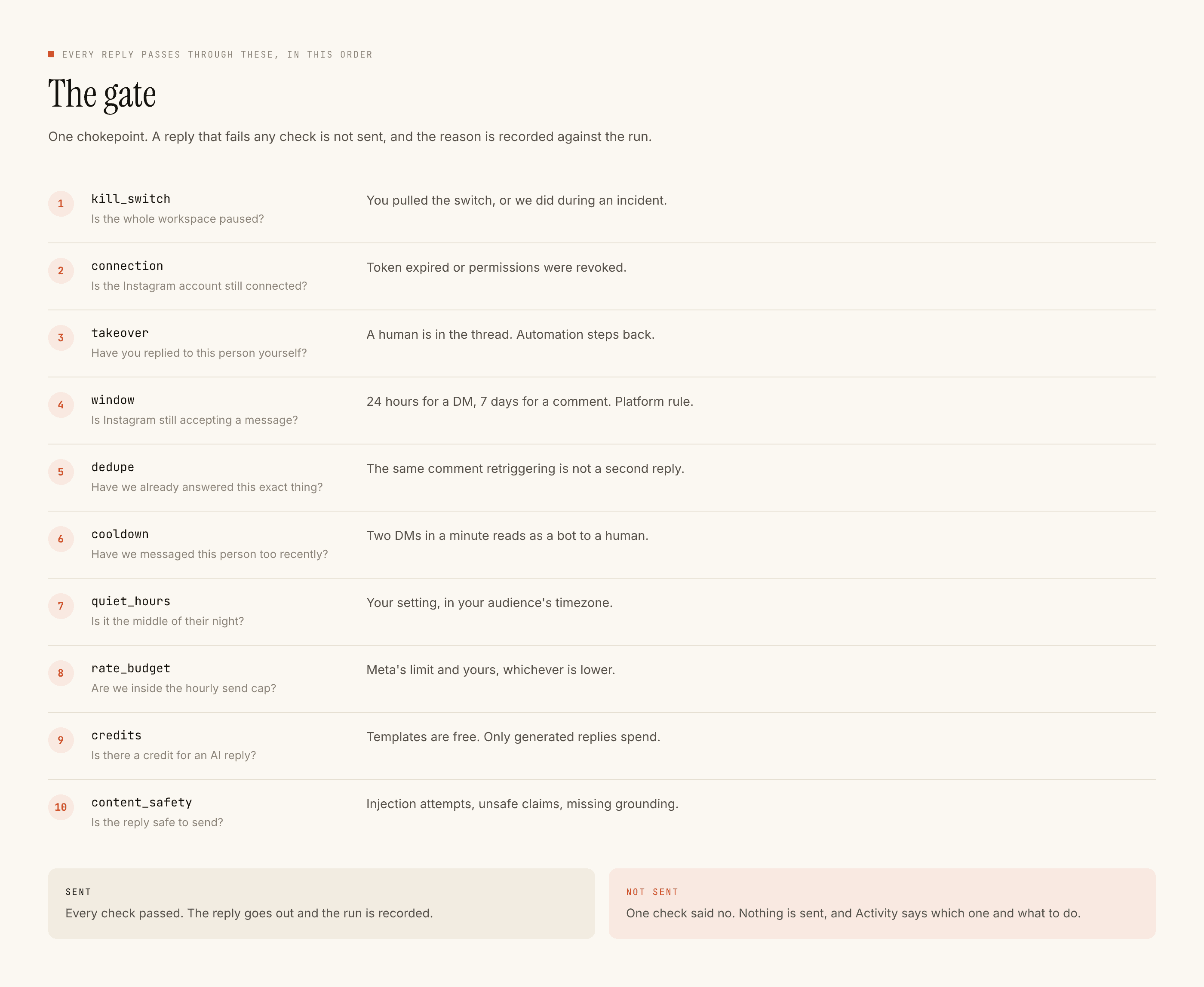
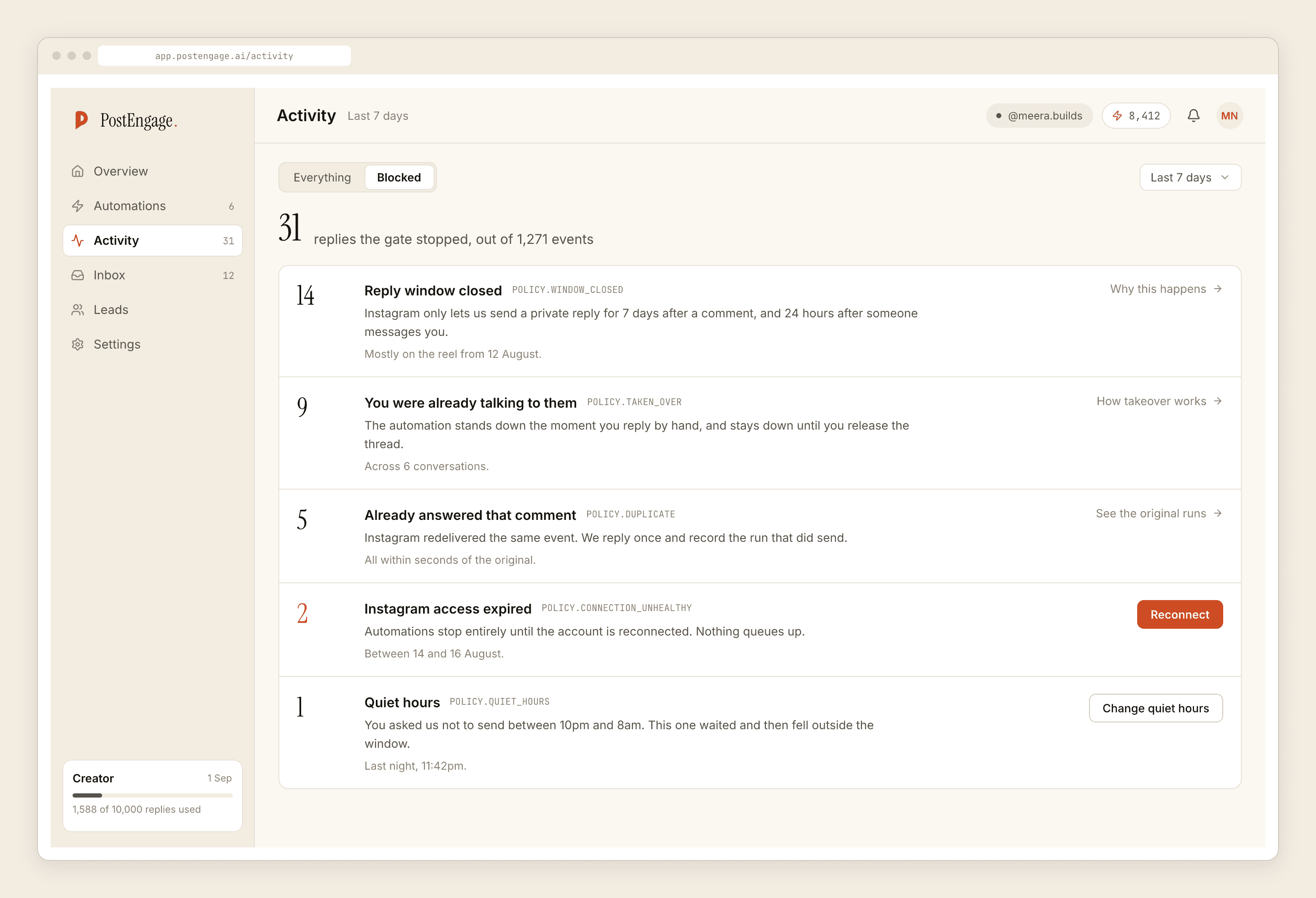
On Instagram, the equivalent discipline is the gate in the figure above: ten named checks in a fixed order before any reply, a recorded reason for every refusal, and automation that stands down the moment a human replies by hand.
If a restriction has already happened, the account post is the honest sequence. If you want the sending ceiling this rating interacts with, that is the messaging limits post. And if you want the recipient's-eye view of what earns a complaint, the spam post covers it.