
Nobody searches "is Inflact safe" out of curiosity. They search it because they are about to hand an Instagram account to software, and the account is where the business lives.
The honest answer is that the question is slightly the wrong shape. Safety in this category is not really a property of a brand. It is a property of how a tool connects to your account, and almost every tool falls cleanly into one of two groups. Once you know which group something is in, you know what you are risking, and it takes about a minute to find out.
We build a competing product in the reply half of this category, so read this knowing that. What follows is the test we would apply to ourselves.
What Inflact's own pages describe
Reading inflact.com on 26 August 2026, the product menu listed an Instagram profile viewer covering posts, stories, Reels and highlights; a downloader for the same; a profile analyzer, a search tool and a follower tracker; hashtag generation and trends; and a fonts generator. The pricing page the same day showed a free tier, a Research pack at $34.00 a month, a Pro pack at $59.00 a month, a custom pack assembled from modules, and an enterprise route for agencies wanting an API, with a seven-day trial at $3.00.
That is a research toolkit rather than a messaging tool, which we wrote up separately in Inflact vs PostEngage.
One caveat on the freshness of all that. When we tried to re-read those pages while writing this, the site returned a block to automated readers, which is a completely normal anti-scraping measure and not a criticism. It does mean the figures above are a snapshot from August rather than today, and that any article quoting Inflact's current prices — including this one — should be checked against the source in a browser before you act on it.
The distinction that actually decides it
Every Instagram tool connects in one of two ways.
Through Meta
As you
Group one is bounded. The worst case is a tool that does its job badly. Group two is unbounded, and the risk is not mainly that the company is dishonest — it is that automated activity performed while logged in as you is exactly what Instagram's systems are built to spot. Bulk follows, bulk likes and messages to people who never contacted you all require acting as you, because the official API has no endpoints for any of them.
This is why a marketing page promising mass DMs to targeted strangers is telling you which group it is in, whether or not it meant to.
How to check any tool in about a minute
- 01
- 02
- 03
- 04
- 05
The last step is the one people skip and the most conclusive. Anything connected properly appears in Instagram's own apps list and can be removed in one tap. Anything absent from that list has access you cannot withdraw.
What the official API will not let anyone do
It is worth knowing the boundaries, because they explain most of what a compliant tool can and cannot offer.
| What some tools promise | On the official API |
|---|---|
| DM people who have never messaged you | Not possible |
| Reply to a DM days later | Only within 24 hours of their last message |
| Reply to a comment weeks later | Only within 7 days |
| Follow, unfollow or like on your behalf | No permission exists for it |
| Download another account's content in bulk | Not an API feature |
Two of those are clocks rather than prohibitions, and they shape every reply tool in the category including ours. A comment can be answered for seven days. A DM can be answered for twenty-four hours after that person's last message. Any comparison showing a tool sending outside those windows is showing you something that is not running on the official API.
What connecting properly looks like
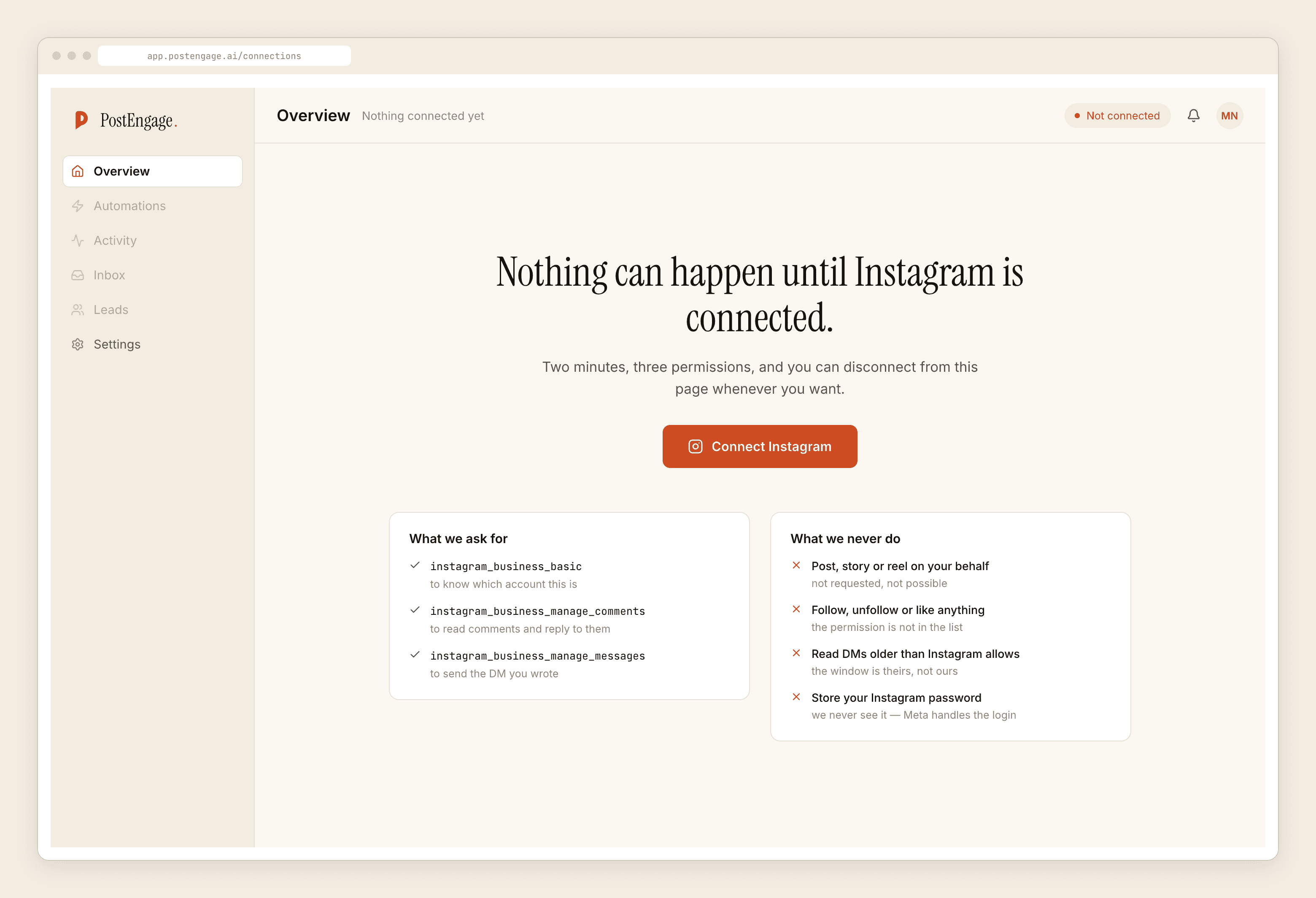
On our side the request is three permissions: read which account this is, read and reply to comments, and send the DM you wrote. We never see your password, because Meta handles the login. Posting, following, liking and reading DMs older than Instagram allows are not on the list, so they are not things we could do if we wanted to.
That is not a boast. It is the ordinary consequence of building on the official API, and it should be true of every tool in group one. If a vendor cannot show you this screen, that is the answer.
Where we actually sit
We do Instagram comment and DM replies through the official API and nothing else. No research tools, no profile analysis, no follower tracking, no downloads, no hashtag generation — so if what you wanted from Inflact was research, we are not the alternative and you should read the comparison rather than the pitch.
Templated replies are unlimited and free. Credits are spent only when the model writes something new. The free tier is 100 credits with no card, and packs start at $6.99.
If you are working through the wider version of this question, is Instagram DM automation safe covers the category rather than one product.
The short version
Stop asking whether a brand is safe and start asking how it connects. Passwords mean unbounded access you cannot revoke and behaviour Instagram is built to detect. Meta's permission screen means a scoped token you can withdraw in one tap from your own settings. Everything else — reviews, badges, testimonials, how long the company has existed — is noise next to that one check, and the check takes a minute.
Questions people ask
Is Inflact safe to use?
We can only report what their own pages say, and we have not tested the product. Reading inflact.com on 26 August 2026, the modules listed were research tools — a profile viewer, a downloader, a profile analyzer, a follower tracker, hashtag tools and a fonts generator. Whether any given module is safe for your account comes down to one thing you can check yourself: whether signing up asks for your Instagram password or sends you to Meta's own permission screen.
What actually gets an Instagram account restricted?
Automated activity that looks like a person doing things faster than a person can — bulk following, bulk liking, messaging people who never contacted you. That behaviour requires a tool to act as you, which requires your password, because the official API simply has no endpoints for it. This is why the password question is the useful one and the safety badge on a marketing page is not.
Is it against Instagram rules to give a third-party app my password?
Meta's guidance has long been not to share your credentials with third-party services, and accounts that do are sometimes prompted to change their password. Beyond the rules, it is a practical problem: a password grants everything, cannot be scoped, and cannot be revoked from Instagram's apps list because the service never appeared there.
How do I check which apps have access to my account?
In the Instagram app, open Settings, then Website permissions or Apps and websites, and look at what is listed as active. Anything connected through Meta's official flow appears there and can be removed in one tap. A tool that logged in with your password will not appear, which is the point — there is nothing to revoke, so the only fix is changing the password.
I already gave a tool my password. What now?
Change your Instagram password, which invalidates the session that tool was using, then turn on two-factor authentication so a password alone is not enough next time. Check the active sessions list for logins you do not recognise. None of this requires deleting anything you have built; it just closes the door.
Does PostEngage ask for my Instagram password?
No, and it could not use one if you sent it. Connection happens through Meta's permission screen and we receive a scoped token for three permissions: read the account, read and reply to comments, and send the DM you wrote. You can revoke it from Instagram's own settings without telling us.