Playbooks · 5 min read
Broadcast Channels: The One Instagram Surface We Do Not Touch

Broadcast channels are real, they are useful, and we do not automate them. No posting to a channel, no scheduling into one, no reading replies out of one, and no plans that change it. If you came here looking for a tool to run your channel, this is not one.
That out of the way, the reason is more interesting than the limitation, because broadcast channels solve the exact problem this product does not.
The shapes are opposites
Everything here is reactive. Somebody comments or messages you, and you may answer — for seven days after a comment, or twenty-four hours after their last direct message. You cannot open a conversation with anybody.
A broadcast channel is the reverse: one-to-many, initiated by you, going out to people who opted in, whenever you decide. Members can react and reply, but the shape of the thing is you talking outward.
What a broadcast channel is good at
What replying is good at
Most accounts that need one need both, and the mistake is expecting either to do the other's job.
Why the initiating side is not something we could add
Not a product decision. The official Instagram API a compliant tool runs on grants permission to respond. There is no endpoint that lets a third-party application message people who have not messaged you, and that is the same reason there is no cold outreach here, no broadcast, no nurture sequence and no win-back campaign.
Where the two actually meet
There is one honest connection, and it is worth setting up deliberately.
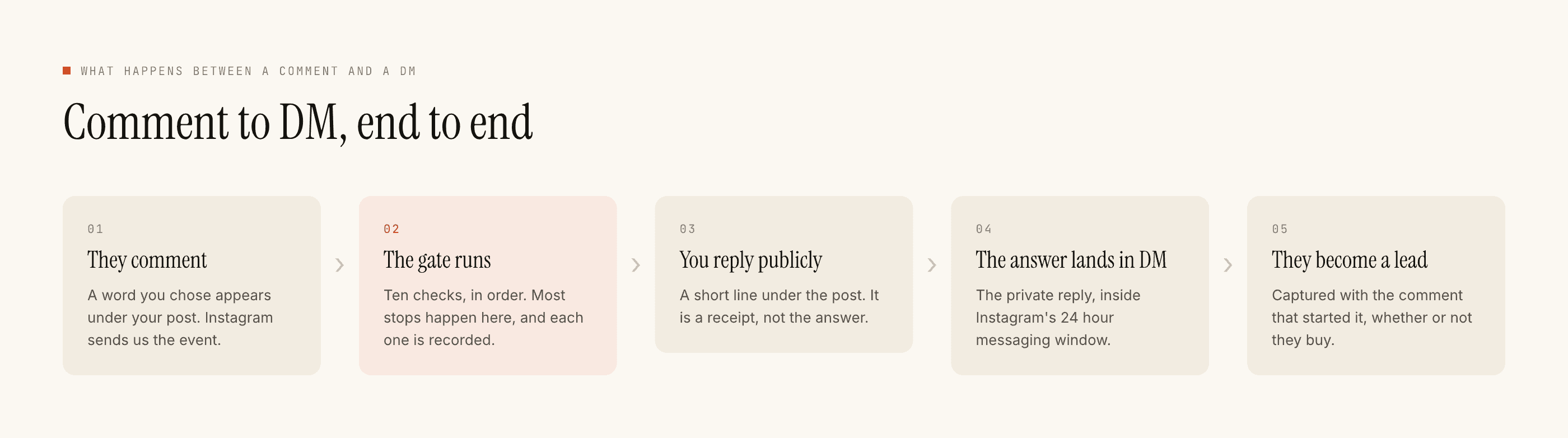
A broadcast channel needs members, and members join by choosing to. The place people decide to join is usually a post or a story — and the conversation that follows "how do I join" is exactly the kind of repeated question a reply automation handles well.
- Ask in the caption. "Comment CHANNEL and I'll send you the link."
- One narrow keyword, scoped to that post.
- A short public reply. "Sent it" — the receipt, so other readers see that commenting works.
- The link in the private reply. Where it belongs anyway, since a link in a public reply may reduce how far the post travels.
- Capture stays on. The people who asked are worth having in a list, and they will not all join.
Reading whether the ask is working
The join automation is like any other, which means the same screen tells you whether it fired and why it did not.
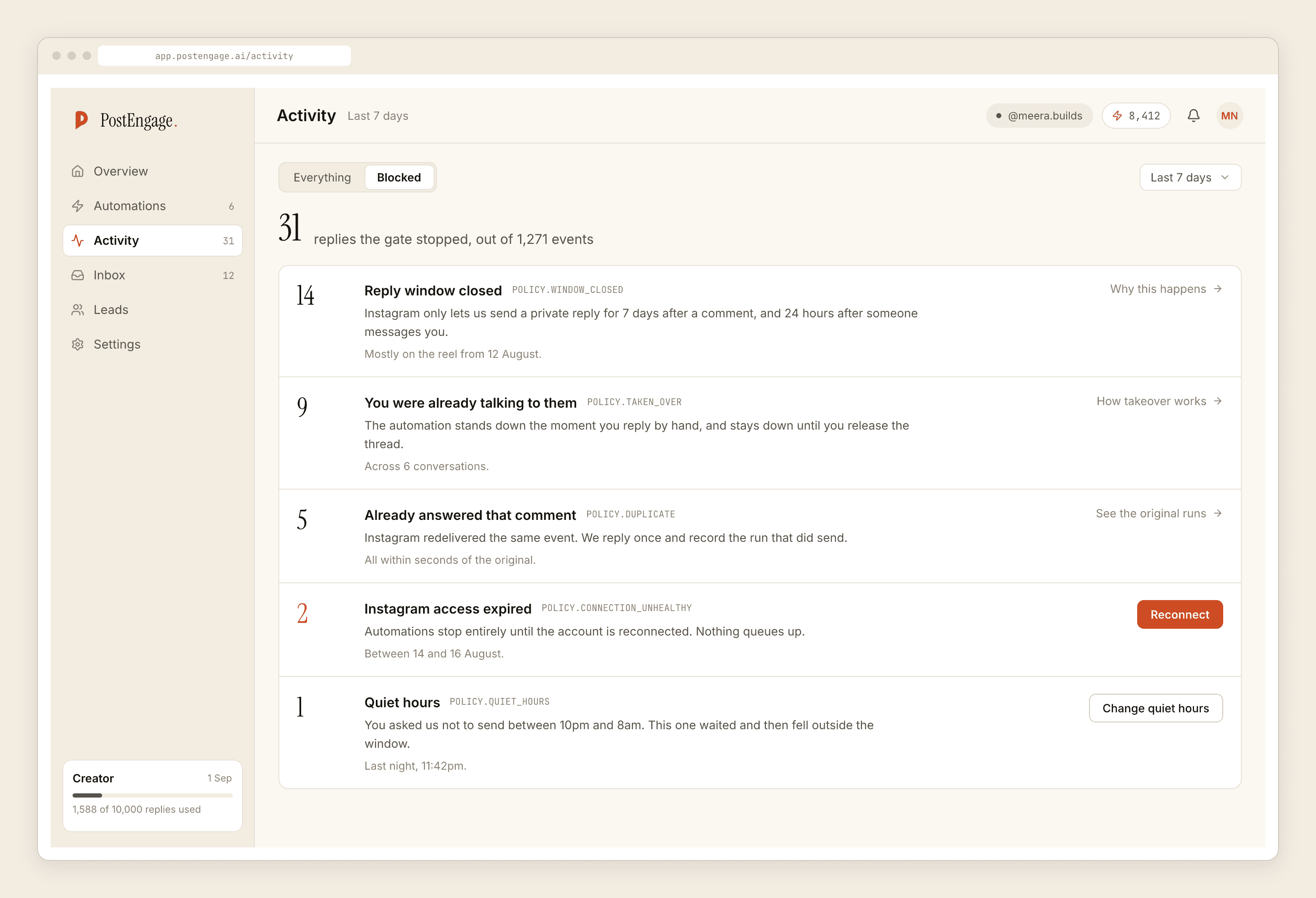
The failure specific to this ask is that channel invitations are announced once and then keep collecting comments for a week. The seven-day comment window runs per comment rather than per post, so an invitation posted on Monday still works on Friday — but somebody who comments on it a fortnight later gets nothing, and the row will say so.
The second failure is quieter. If the link in your private reply changes, or the channel fills, the template keeps sending the old one cheerfully and forever. Nothing in this product knows what is on the other end of a link you wrote.
The thing to be careful about
A broadcast channel is a permission somebody granted for a specific purpose, and it is easy to overspend.
The people in it opted into hearing from you, which is not the same as opting into hearing from you daily. Channels go quiet not because the feature is bad but because members mute them, and a muted member is functionally gone while still appearing in the count.
That is a judgement call about frequency, and no tool makes it for you.
What you cannot do afterwards
Two honest limits worth planning around.
You cannot export a channel's members, and neither can we — there is no access to that list. Whoever joins is Instagram's relationship, held on Instagram's terms, and it disappears if the feature does.
You cannot automate a reply inside a channel. If somebody replies to a broadcast, that reply lands in your inbox as a direct message subject to the same twenty-four hour window as everything else — so the reply automations you already built apply, but nothing about the channel itself is automated.
Anything you can only reach through one company's feature is a relationship you are renting.
The version of this worth building
Use the channel for the announcement. Use replies for the conversation that follows it. And keep the part you own — the leads list, exported as CSV — because that is the only piece of this that survives a product decision made in Menlo Park.
If you want the argument about what else cannot be initiated, the cold outreach post covers it. If you want the general case for owning the list rather than the platform, the email list post is here.