Playbooks · 5 min read
The One Thing a Dropshipper Must Never Automate

Open the DMs of any dropshipping account that has sold anything and the distribution is lopsided. A few people asking about sizing, a few about the material, a handful about whether it is the same as the one they saw somewhere cheaper, and then a long unbroken column of variations on: when will it arrive, has it shipped, where is it, kab tak aayega.
That column is the one you must not hand to a model. Not because a rule forbids it. Because you do not know the answer, and an automation will produce one anyway if you let it.
Why this specific question is different
You are selling something you have never held. The supplier decides when it leaves, the carrier decides how long it takes, and you find out roughly when the customer does. You have no stock visibility and no meaningful control over transit time.
A delivery date is a promise. When a person asks "when will it arrive" and gets a number, they hear a commitment, and they will hold you to it — in a chargeback, in a comment under your next post, in a review. The gap between a guessed date and a real one is not a customer service inconvenience. It is the mechanism by which dropshipping businesses get their payment processing pulled.
If you are reading that and thinking the answer is to keep the shipping page vague so nobody can pin you down, this is the wrong product and honestly the wrong post. Automation applied to a business whose model depends on the buyer not finding out the delivery time just spreads the problem faster and to more people, and it puts the misleading sentence in writing under your account name.
What to automate instead
The rule is simple to state: automate the things that are true today and will be true next month.
Safe to template
Keep it human
The left column is most of the pre-purchase inbox, and it is the half where automation genuinely earns its place, because those answers are stable and you are typing them fifteen times a day.
Use negative keywords as a routing rule
Negative keywords stop the automation replying. Most people set one, "not interested", and stop. For a dropshipping account they are the main safety mechanism you have.
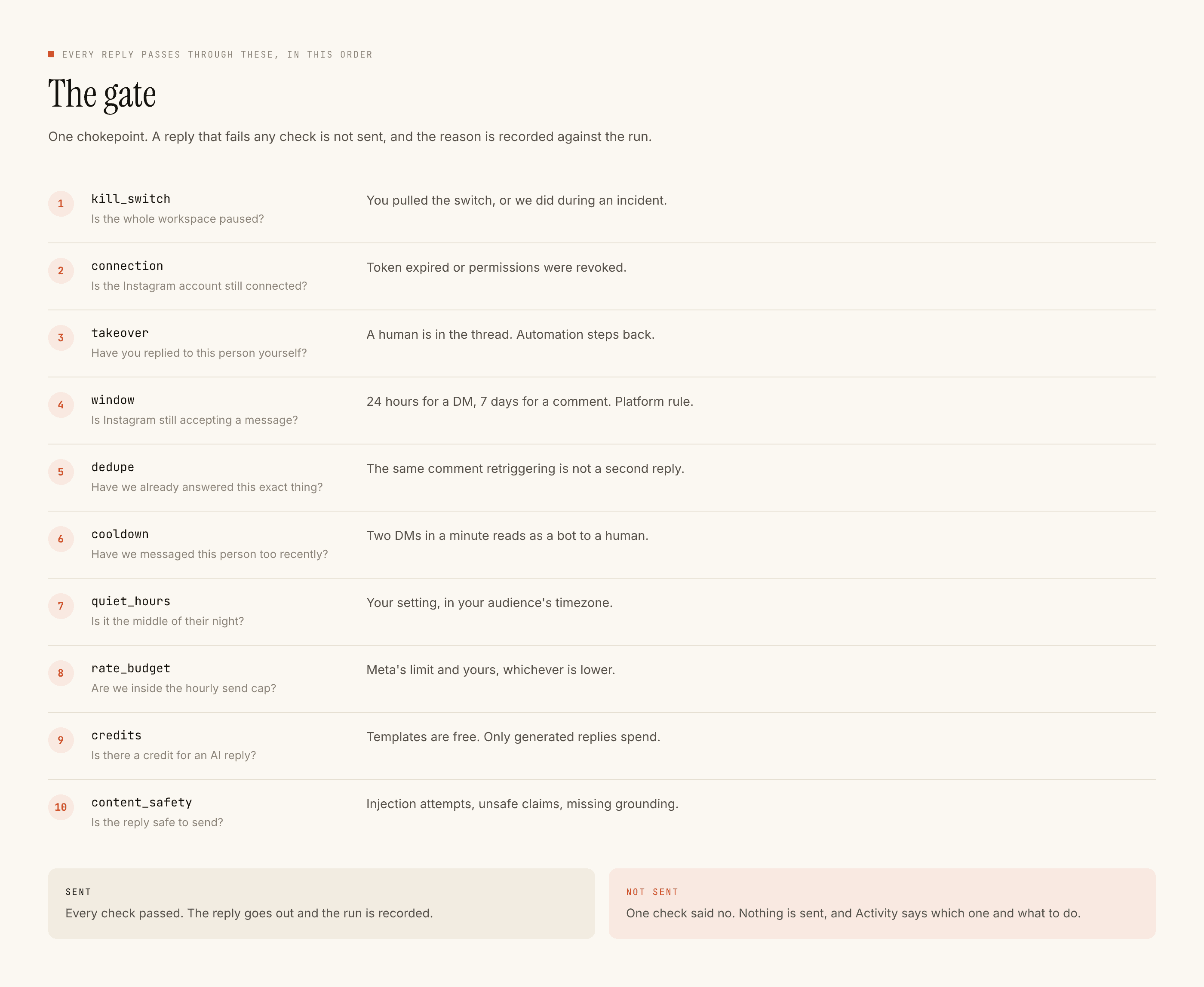
- Add the order-status vocabulary as negative keywords. Where is my order, tracking, delivery, kab aayega, not received, shipped, refund, cancel. Any of these should mean the automation stands down and the thread waits for you.
- Write them in the language your customers actually use, including Hinglish, because matching ignores case and punctuation but not vocabulary.
- Check the blocked list weekly to see what the negatives caught. That list is your unanswered-complaint queue, and it is the one screen in this product you cannot afford to ignore.
- Reply to those by hand, quickly. A slow human answer about a late parcel is survivable. A fast wrong one is not.
Availability is the second trap
"Is this in stock?" looks like a product question and behaves like a shipping question.
There is no store integration here. We do not read your catalogue, your supplier's inventory or your order system. Nothing syncs. So an automation configured to answer availability will confidently say yes to a product your supplier discontinued in March, and the first you hear of it is when the order cannot be fulfilled.
If you sell a small, stable range you keep an eye on, a template saying so is fine. If your range rotates with whatever is trending, availability belongs on the right-hand column above.
Automate the answers that do not change. Everything a supplier controls is not yours to promise.
What a good setup looks like
One automation per product post, triggered on the words people actually type — price, link, size. Public reply as a short receipt pointing at the DM. Private reply with the answer and the product link. Capture to Leads on, because the people who ask are worth having.
Then the honest part of the private reply: a sentence that tells them where the real shipping information lives, without stating a date. Something like "shipping timelines and tracking are on the order page, and you'll get an email the moment it ships" is true, useful, and cannot become a broken promise.
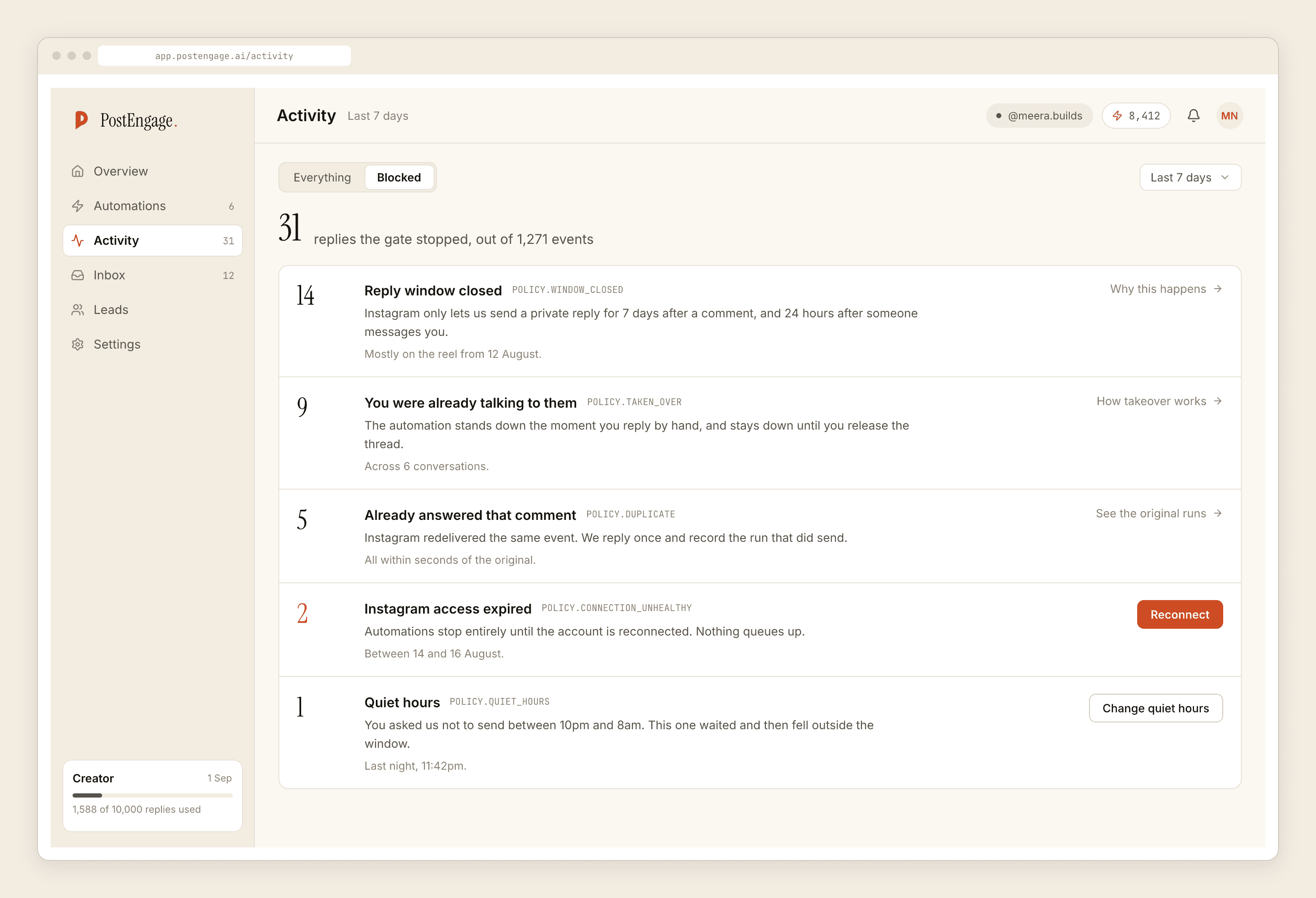
Set quiet hours in your buyers' timezone rather than yours. A 2am automated reply about an order reads worse than silence.
And test the whole thing on yourself first. Test on myself runs the real pipeline into your own account, so you can read the shipping sentence on a phone and ask whether you would be satisfied receiving it. If you would not, rewrite it before it goes to four hundred people.
The wider ecommerce version of this setup is covered in the ecommerce automation walkthrough, and what the ten checks actually stop and why is the piece to read if the refusals start looking excessive. For handmade and made-to-order sellers the availability problem is sharper still, which the Etsy-shaped version goes into.